Recent Updates Page 58 Toggle Comment Threads | Keyboard Shortcuts

  • Unknown's avatar

    Lee 5:06 pm on February 3, 2011 Permalink | Reply  

    A moment with Lee Williams 

    Hi, it’s me Lee. My background is in graphics design and before coming to Parsons I worked in the magazine publishing industry. I worked for Time Inc. in the custom pub department and then landed a Associate Art Director gig at Runner’s World magazine. You can check out my previous work at leewilliams.me. That was all fine and good, but everyone knows print is dead. So, here I am now.

    I have never really coded anything except some flash script before coming to Parsons, but I’ve really fallen for it since getting my hands dirty in bootcamp. I’ve tried to squeeze in as many code courses as possible and am focusing on ubiquitous mobile computing. I really want to create interesting applications that can extend beyond the screen. There’s really no reason why our powerful little computers in our pocket can’t communicate with all the digital stuff we surround ourselves with. I’m also interested in algorithmic logic and life simulations. I believe menu based, yes no sort of interfaces need to evolve to be more predictive of their users intentions and to assist users in finding what they really want. What my focus will be when I come out with this MFA I have no clue, but for now I’m trying to soak up as much new knowledge as possible.

     
  • Unknown's avatar

    Alvaro Soto 7:02 am on February 3, 2011 Permalink | Reply  

    Beep Beep Boop / Alvaro 

    Ok guys, thought I would never finish this Beep Beep Boo but here it is:

    my bipolar monologue goes like this:

    Hello, I am on

    I am Happy

    I am Angry

    I am Dying

    I need to alert you to do something

    By! Im turning off

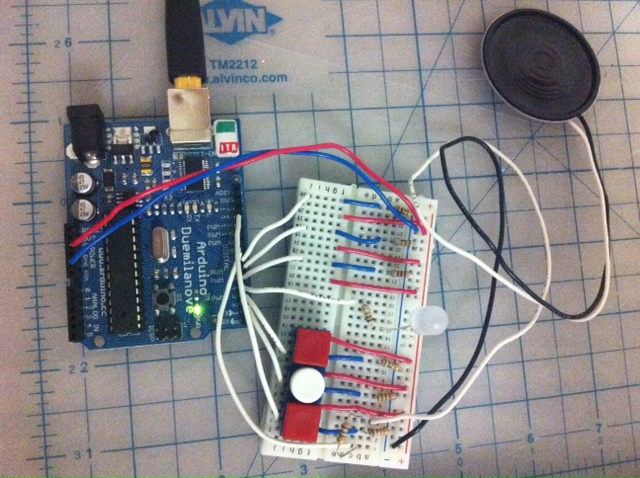
    I decided to use 6 push buttons (but I just had three with me so I would post the video later today when I get some more). Each of the push buttons represents one phrase or sentence. The code is the same code from the Arduino website but I added the interaction and of course created different melodies.
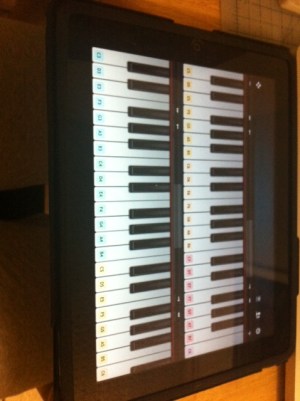
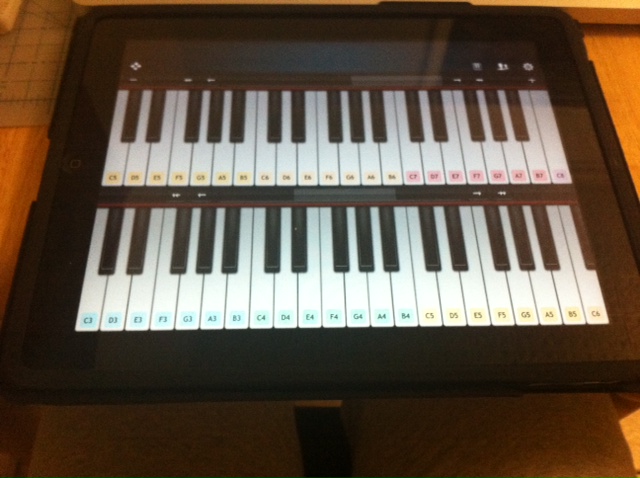
    I used an Ipad app (virtuoso) to listen to the tones, although they are not very similar to the beep sound, it actually helps.
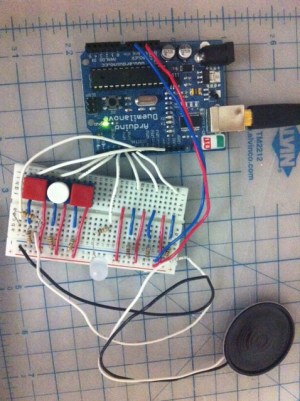
    More push buttons need to be connected but the code is ready for the 6 of them

    Here is the code (sorry for posting it directly here, if somebody knows, could you please let me/us know how to link the code? I think the blog looks messy with all that, but maybe is just me)

    /*
    HelloImon

    Plays a HelloImon

    circuit:

    • 8-ohm speaker on digital pin 8

    created 21 Jan 2010
    modified 14 Oct 2010
    by Tom Igoe

    This example code is in the public domain.

    http://arduino.cc/en/Tutorial/Tone

    modified 2 jan 2011
    by Alvaro Soto

    This code will play a short melody representing sentences in beeps
    Hello, Im on
    Im Happy
    Im angry
    Im dying
    I need to alert you to do something
    Bye, Im turning off

    */
    #include “pitches.h”

    int ledPin = 4; // LED to turn on when melody is playing

    // notes for the melody Hello Im on :
    int HelloImon[] = {NOTE_C5, NOTE_B6,NOTE_B6};
    // note durations: 4 = quarter note, 8 = eighth note, etc.:
    int noteDurations[] = {8, 8,4 };
    int button7 = 7;

    int button7State = 0;

    // notes for the melody Im Happy:
    int ImHappy[] = {NOTE_F6, NOTE_G6,NOTE_F6, NOTE_G6,NOTE_F6, NOTE_G6,NOTE_F6, NOTE_G6,NOTE_F6, NOTE_G6};
    // note durations: 4 = quarter note, 8 = eighth note, etc.:
    int noteDurations2[] = {16,16,16,16,16,16,16,16,16,16};
    int button6 = 6;
    int button6State = 0;

    // notes for the melody Im Angry:
    int ImAngry[] = {NOTE_B0, NOTE_B0,NOTE_B0, NOTE_B0,NOTE_B0, NOTE_B0,NOTE_B0, NOTE_B0,NOTE_B0, NOTE_B0};
    // note durations: 4 = quarter note, 8 = eighth note, etc.:
    int noteDurations3[] = {4,8,8,8,8,8,8,8,8,8};
    int button5 = 5;
    int button5State = 0;

    //notes for the melody Im Dying
    int ImDying[] = {NOTE_B2, NOTE_A2,NOTE_G2, NOTE_F2,NOTE_E2, NOTE_D2,NOTE_C2,NOTE_C2};
    // note durations: 4 = quarter note, 8 = eighth note, etc.:
    int noteDurations4[] = {2,2,8,8,8,8,8,4};
    int button3 = 3;
    int button3State = 0;

    //notes for the melody Im I need to alert you to do something
    int Alertyou[] = {NOTE_B6, NOTE_B6,NOTE_B6, NOTE_B6,NOTE_B6, NOTE_B6};
    // note durations: 4 = quarter note, 8 = eighth note, etc.:
    int noteDurations5[] = {4,4,4,4,4,4};
    int button2 = 2;
    int button2State = 0;

    //Bye Im turning off
    int Imoff[] = {NOTE_C8, NOTE_B7,NOTE_A7, NOTE_G7,NOTE_F7, NOTE_E7,NOTE_D7,NOTE_C7};
    // note durations: 4 = quarter note, 8 = eighth note, etc.:
    int noteDurations6[] = {2,2,8,8,8,8,8,4};
    int button1 = 12;
    int button1State = 0;

    void setup() {

    pinMode(button7,INPUT);
    pinMode(button6,INPUT);
    pinMode(button5,INPUT);
    pinMode(ledPin,OUTPUT);

    }

    void loop() {

    //Hello Im on————————————————-

    button7State = digitalRead(button7);
    if (button7State == HIGH){

    digitalWrite(ledPin,HIGH);

    // iterate over the notes of the HelloImon:
    for (int thisNote = 0; thisNote < 4; thisNote++) {

    // to calculate the note duration, take one second
    // divided by the note type.
    //e.g. quarter note = 1000 / 4, eighth note = 1000/8, etc.
    int noteDuration = 1000/noteDurations[thisNote];
    tone(8, HelloImon[thisNote],noteDuration);

    // to distinguish the notes, set a minimum time between them.
    // the note’s duration + 30% seems to work well:
    int pauseBetweenNotes = noteDuration * 1.30;
    delay(pauseBetweenNotes);
    // stop the tone playing:
    noTone(8);
    }
    }else{
    digitalWrite(ledPin,LOW);
    }

    //Im Happy———————————————————-

    button6State = digitalRead(button6);
    if (button6State == HIGH){

    digitalWrite(ledPin,HIGH);

    // iterate over the notes of the HelloImon:
    for (int thisNote = 0; thisNote < 11; thisNote++) {

    // to calculate the note duration, take one second
    // divided by the note type.
    //e.g. quarter note = 1000 / 4, eighth note = 1000/8, etc.
    int noteDuration = 1000/noteDurations2[thisNote];
    tone(8, ImHappy[thisNote],noteDuration);

    // to distinguish the notes, set a minimum time between them.
    // the note’s duration + 30% seems to work well:
    int pauseBetweenNotes = noteDuration * 1.30;
    delay(pauseBetweenNotes);
    // stop the tone playing:
    noTone(8);
    }
    }else{
    digitalWrite(ledPin,LOW);
    }

    // Im Angry———————————————

    button5State = digitalRead(button5);
    if (button5State == HIGH){

    digitalWrite(ledPin,HIGH);

    // iterate over the notes of the HelloImon:
    for (int thisNote = 0; thisNote < 11; thisNote++) {

    // to calculate the note duration, take one second
    // divided by the note type.
    //e.g. quarter note = 1000 / 4, eighth note = 1000/8, etc.
    int noteDuration = 1000/noteDurations3[thisNote];
    tone(8, ImAngry[thisNote],noteDuration);

    // to distinguish the notes, set a minimum time between them.
    // the note’s duration + 30% seems to work well:
    int pauseBetweenNotes = noteDuration * 1.30;
    delay(pauseBetweenNotes);
    // stop the tone playing:
    noTone(8);
    }
    }else{
    digitalWrite(ledPin,LOW);
    }

    // Im Dying —————————————————-

    button3State = digitalRead(button3);
    if (button3State == HIGH){

    digitalWrite(ledPin,HIGH);

    // iterate over the notes of the HelloImon:
    for (int thisNote = 0; thisNote < 9; thisNote++) {

    // to calculate the note duration, take one second
    // divided by the note type.
    //e.g. quarter note = 1000 / 4, eighth note = 1000/8, etc.
    int noteDuration = 1000/noteDurations4[thisNote];
    tone(8, ImDying[thisNote],noteDuration);

    // to distinguish the notes, set a minimum time between them.
    // the note’s duration + 30% seems to work well:
    int pauseBetweenNotes = noteDuration * 1.30;
    delay(pauseBetweenNotes);
    // stop the tone playing:
    noTone(8);
    }
    }else{
    digitalWrite(ledPin,LOW);
    }

    // I need to alert you to do something——————————

    button2State = digitalRead(button2);
    if (button2State == HIGH){

    digitalWrite(ledPin,HIGH);

    // iterate over the notes of the HelloImon:
    for (int thisNote = 0; thisNote < 7; thisNote++) {

    // to calculate the note duration, take one second
    // divided by the note type.
    //e.g. quarter note = 1000 / 4, eighth note = 1000/8, etc.
    int noteDuration = 1000/noteDurations5[thisNote];
    tone(8, Alertyou[thisNote],noteDuration);

    // to distinguish the notes, set a minimum time between them.
    // the note’s duration + 30% seems to work well:
    int pauseBetweenNotes = noteDuration * 1.30;
    delay(pauseBetweenNotes);
    // stop the tone playing:
    noTone(8);
    }
    }else{
    digitalWrite(ledPin,LOW);
    }

    // Bye! Im turning off

    button1State = digitalRead(button1);
    if (button1State == HIGH){

    digitalWrite(ledPin,HIGH);

    // iterate over the notes of the HelloImon:
    for (int thisNote = 0; thisNote < 9; thisNote++) {

    // to calculate the note duration, take one second
    // divided by the note type.
    //e.g. quarter note = 1000 / 4, eighth note = 1000/8, etc.
    int noteDuration = 1000/noteDurations5[thisNote];
    tone(8, Imoff[thisNote],noteDuration);

    // to distinguish the notes, set a minimum time between them.
    // the note’s duration + 30% seems to work well:
    int pauseBetweenNotes = noteDuration * 1.30;
    delay(pauseBetweenNotes);
    // stop the tone playing:
    noTone(8);
    }
    }else{
    digitalWrite(ledPin,LOW);
    }

    }

    Here is the video

     
  • Unknown's avatar

    minho 6:43 am on February 3, 2011 Permalink | Reply  

    Emotional tones 

    http://a.parsons.edu/~kimm541/DSC_4228.MOV


    #define  v     18000
    #define  x     10000
    #define  z     8000
    #define  c     3830    // 261 Hz
    #define  d     3400    // 294 Hz
    #define  e     3038    // 329 Hz
    #define  f     2864    // 349 Hz
    #define  g     2550    // 392 Hz
    #define  a     2272    // 440 Hz
    #define  b     2028    // 493 Hz
    #define  C     1912    // 523 Hz
    #define  D     1680
    #define  E     1500
    #define  F     1350
    #define  G     1200
    #define  A     1050
    #define  B     912
    // Define a special note, ‘R’, to represent a rest
    #define  R     0

    // SETUP ============================================
    // Set up speaker on a PWM pin (digital 9, 10 or 11)
    int speakerOut = 9;
    // Do we want debugging on serial out? 1 for yes, 0 for no
    int DEBUG = 1;

    void setup() {
    pinMode(speakerOut, OUTPUT);
    if (DEBUG) {
    Serial.begin(9600); // Set serial out if we want debugging
    }
    }

    // MELODY and TIMING  =======================================
    //  melody[] is an array of notes, accompanied by beats[],
    //  which sets each note’s relative length (higher #, longer note)
    int hellom[] = {c,  c};
    int beats[]  = {16, 64};
    int dyingm[] = {  v,  R, z, v };
    int beats2[] = { 200, 8, 8, 32 };
    int happym[] = {  c,  C,  g,  e,  C,  g,  z,  e,  z,    c,  C,  g,  f,  C,  g,  z,  f,  z,     c,  C,  g,  e,  C,  g,  z,  e,  z,     d,  e,  f,  z,  f,  g,  g,  z,  g,  a,  a,  z,  C,  R};
    int beats3[] = { 16, 16, 16,  16, 8,  8, 16, 16, 16,   16, 16, 16, 16,  8,  8, 16, 16, 16,    16, 16, 16,  16, 8,  8, 16, 16, 16,     8,  8,  8,  8,  8,  8,  8,  8,  8,  8,  8,  8, 16, 16};
    int sadm[]   = {z,  x,  z,  z,  x,  x};
    int beats4[] = {36, 36, 36, 36, 36, 200};
    int yesm[]   = {d, b, E};
    int beats5[] = {8, 16, 32};
    int nom[]    = {B,  B,  B,  B,  B,  B};
    int beats6[] = {8,  8,  8,  8,  8,  8};

    int MAX_COUNT = sizeof(hellom) / 2;
    int MAX_COUNT2 = sizeof(dyingm) / 2;
    int MAX_COUNT3 = sizeof(happym) / 2;
    int MAX_COUNT4 = sizeof(sadm) / 2;
    int MAX_COUNT5 = sizeof(yesm) / 2;
    int MAX_COUNT6 = sizeof(nom) / 2;// Melody length, for looping.

    // Set overall tempo
    long tempo = 10000;
    // Set length of pause between notes
    int pause = 1000;
    // Loop variable to increase Rest length
    int rest_count = 100; //<-BLETCHEROUS HACK; See NOTES

    // Initialize core variables
    int tone1 = 0;
    int beat = 0;
    long duration  = 0;

    // PLAY tone1  ==============================================
    // Pulse the speaker to play a tone1 for a particular duration
    void playtone1() {
    long elapsed_time = 0;
    if (tone1 > 0) { // if this isn’t a Rest beat, while the tone1 has
    //  played less long than ‘duration’, pulse speaker HIGH and LOW
    while (elapsed_time < duration) {

    digitalWrite(speakerOut,HIGH);
    delayMicroseconds(tone1 / 2);

    // DOWN
    digitalWrite(speakerOut, LOW);
    delayMicroseconds(tone1 / 2);

    // Keep track of how long we pulsed
    elapsed_time += (tone1);
    }
    }
    else { // Rest beat; loop times delay
    for (int j = 0; j < rest_count; j++) { // See NOTE on rest_count
    delayMicroseconds(duration);
    }
    }
    }

    // LET THE WILD RUMPUS BEGIN =============================
    void loop() {
    // play each sound in order, with a pause between each one.
    delay(3000);
    hello();
    delay(3000);
    dying();
    delay(3000);
    happy();
    delay(3000);
    sad();
    delay(3000);
    yes();
    delay(3000);
    no();
    delay(5000);
    }

    void hello() {
    // Set up a counter to pull from melody[] and beats[]
    for (int i=0; i<MAX_COUNT; i++) {
    tone1 = hellom[i];
    beat = beats[i];

    duration = beat * tempo; // Set up timing

    playtone1();
    // A pause between notes…
    delayMicroseconds(pause);
    //noTone(speakerOut);

    }
    }

    void dying() {
    // Set up a counter to pull from melody[] and beats[]
    for (int i=0; i<MAX_COUNT2; i++) {
    tone1 = dyingm[i];
    beat = beats2[i];

    duration = beat * tempo; // Set up timing

    playtone1();
    // A pause between notes…
    delayMicroseconds(pause);
    //noTone(speakerOut);

    }
    }

    void happy() {
    // Set up a counter to pull from melody[] and beats[]
    for (int i=0; i<MAX_COUNT3; i++) {
    tone1 = happym[i];
    beat = beats3[i];

    duration = beat * tempo; // Set up timing

    playtone1();
    // A pause between notes…
    delayMicroseconds(pause);
    //noTone(speakerOut);

    }
    }

    void sad() {
    // Set up a counter to pull from melody[] and beats[]
    for (int i=0; i<MAX_COUNT4; i++) {
    tone1 = sadm[i];
    beat = beats4[i];

    duration = beat * tempo; // Set up timing

    playtone1();
    // A pause between notes…
    delayMicroseconds(pause);
    //noTone(speakerOut);

    }
    }

    void yes() {
    // Set up a counter to pull from melody[] and beats[]
    for (int i=0; i<MAX_COUNT5; i++) {
    tone1 = yesm[i];
    beat = beats5[i];

    duration = beat * tempo; // Set up timing

    playtone1();
    // A pause between notes…
    delayMicroseconds(pause);
    //noTone(speakerOut);

    }
    }

    void no() {
    // Set up a counter to pull from melody[] and beats[]
    for (int i=0; i<MAX_COUNT6; i++) {
    tone1 = nom[i];
    beat = beats6[i];

    duration = beat * tempo; // Set up timing

    playtone1();
    // A pause between notes…
    delayMicroseconds(pause);
    //noTone(speakerOut);

    }
    }

     
  • Unknown's avatar

    Bree 6:16 am on February 3, 2011 Permalink | Reply  

    Emotive Bleeps 

    Well, I will save my more complex code for another day…my brain is sputtering.

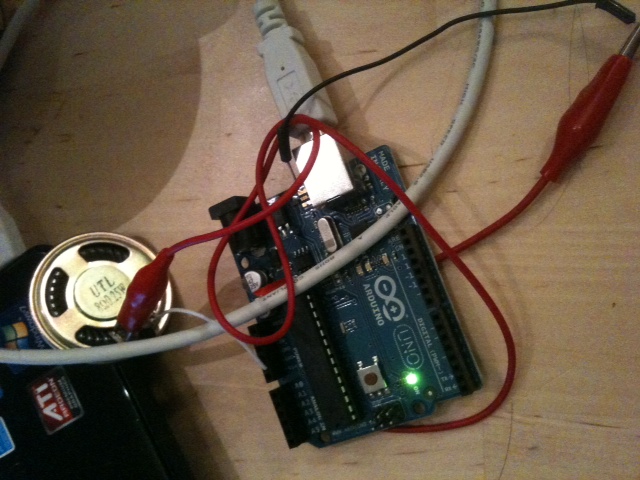
    I hooked up the arduino to the speaker and ended up making 6 separate sketches for the emotions.

    Here’s a picture of the circuit…

    the video: http://vimeo.com/19512551


    hello – something cheery and salutary

    haha – I attempted to make a laughing sound, like a twitter

    level UP – sorta inspired by Zelda’s “I got something!” sound

    yes/no – sort of went for the ding and buzzer

    I’m dying – inspired by the sound toys make when their batteries start to lose juice

    bai – a shut down sound

     
  • Unknown's avatar

    andywallace 5:54 am on February 3, 2011 Permalink | Reply  

    Emotional Tones 

    Another sound project. Between this and AV systems, I feel like I’m being tossed into the deep end of the pool. I’ve never worked with audio, but this is certainly a good way to learn. I tried to pull together a few sounds that a potential little robot could use to express itself.

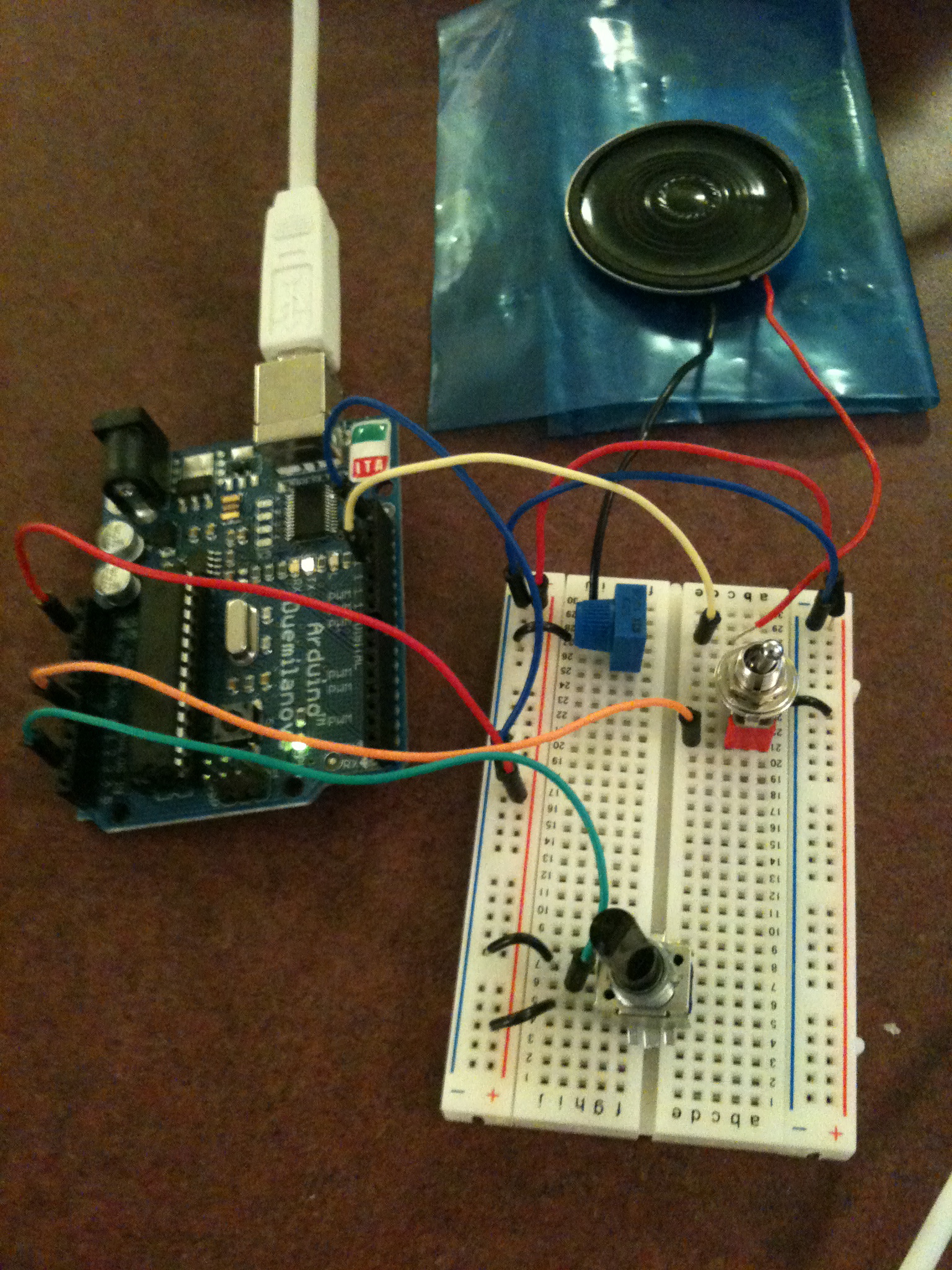
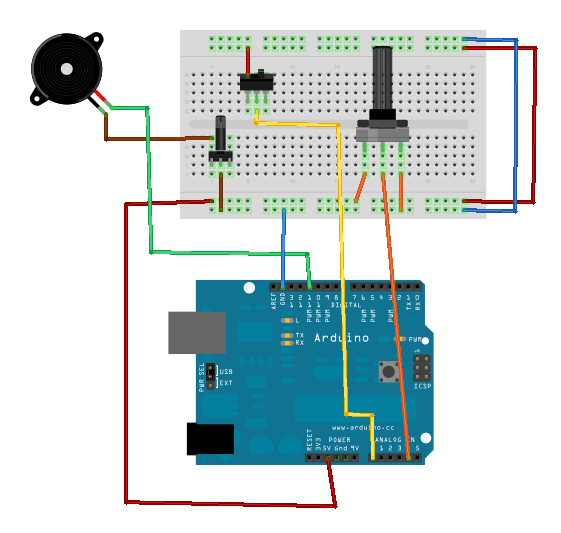
    First I threw together a simple device to let me test out the different sounds I could get out of my piezo. After some basic experimentation, I found the range of acceptable sounds (defined as them not hurting my ear) to be 50-1000 Hz. I mapped this to the range of a potentiometer (0-1024) and set it so that the piezo would play at the relevant frequency to the level of the potentiometer. While testing, I added two additional things: A potentiometer to control the volume of the piezo, and a switch that could silence the piezo without having to unplug it (I found myself uploading the code a lot, and got tired of the constant buzz resulting from keeping it plugged in.

    Here’s the code for that one

    I used the same physical device when creating the individual emotional sounds. It was easy to work on the code for the individual sounds, and then upload the tester, just to see what tones I thought would work for the one I was working on.

    For the final code, I wrote a simple loop function that calls a specific sound. Actually playing each sound is handled by a separate function. Because the way the sounds were generated tended to vary a bit from sound to sound, and each one is fairly short, it didn’t make sense to me to create a standardized way of handling it (such as in the melody example, where any array of notes and durations could have been fed to it).

    Creating the actual sounds consisted mostly of trial and error, just seeing what seemed right for each emotion. For most of the tones used, I simply found a tone manually to me that fit, although there were several that I used actual notes for, hence the inclusion of pitches.h (available in the examples that come with Arduino). Most are comprised of two or three beeps of varying lengths and a few do sweeps across a range of frequencies.

    In then end, the device has 8 expressions: “Hello”, “Yes”, “No”, “I’m happy”, “I’m sad”, “Thank you”, “I need to alert you” and “I’m dying”. They’re all my babies, but I think the happiness sound is my favorite.

    I only recently got the potentiometer I’m using for this project. It’s a big old black one and it has a great feel to it, so I thought I could use that to scroll between the options for the sounds. The range of 1024 is broken up into 8 segments, each of which is mapped to a sound. When the device is not playing anything, the current sound selection is displayed on the serial window (This requires the device to be attached to the computer in order to see what sound will be played). When the selection is made, a switch is flipped and the sound loops until it is put back down.

    I had originally intended to use a push button to activate the sound, but I ran into a bug which I assume has to be with the way I built the circuit, since I tried using code that has previously worked with it. The button reads 0 until it is pressed down, at which point it reads 1 for the rest of eternity. Instead I am using my switch as an analog input. The switch has a very satisfying feel to it anyway, though, so I decided not to worry too much about it for now.

    As the picture shows, my final setup wound up being almost identical to the test device. I moved a few things around to make them less cramped, but that was it. I really liked the tactile sensation that comes from using that specific potentiometer and switch, so I was happy to keep them.

    Given a bit more time, I would have liked to use LEDs with labels to signify which sound would be played, but as it is, the interface is easy to use, and I believe the sounds do a good job of expressing their inteded meaning.

    CODE


    IN CLASS WRITING RESPONSE:

    Prompt: Any pleasant or not-so-nice surprises while experimenting with the emotive beeps?

    What stands out is struggling for over an hour with a simple push button. For the life of me, I could not get it to work, which was infuriating given the basic nature of it. I looked over my wiring and could find nothing. Looking as it again this morning, the problem was obvious: I hadn’t ever connected the loop to ground. How I missed this yesterday? No idea.

    I definitely had some difficulty getting sounds that felt like the emotions  was trying to convey. I woud play a tone and think to myself “this will be perfect for the next part of the sequence” only to realize that it could not have been more wrong. As I mentioned, I have never really worked with sound, so it was interesting ti see just how the different tones interacted with each other.

     
  • Unknown's avatar

    Thom Hines 1:57 am on February 3, 2011 Permalink | Reply  

    Emotional Audial Gestures 

    The sounds I was going for, in order, are:

    1) Alarm: “Emergency!”
    similar to a naval ships alarm, this has a linear rise in pitch, which is sustained at the end. It gives a sense of urgency.


    2) Positive: “I’m happy”
    a simple melody played one note at a time. Like our speech patterns when we want to convey something positive, the pitch and tone go up at the end.

    3) Spooky: “Something Strange (in the neighborhood)”
    a base frequence switches back and forth between 600Hz and 800Hz, with a vibrato for effect. It uses two for loops to control the panning sound, and to switch between the base tones.

    4) Negative: “That’s not good.”
    an oscillating pattern that is very dissonant. It consists of two atonal sounds being played in rapid succession.

    5) Dying: “I’m dying… boo.”
    a decelerating pattern that lowers the frequency and period of the sound over time, giving it the feel of a device that is quickly losing power.

    6) Bye: “Signing off.”
    a normal melody, played in linear order


    And here is the code that made it all possible.


  • Unknown's avatar

    Bree 1:43 am on February 3, 2011 Permalink | Reply  

    Stuck in the mud 

    Well, here’s part of my documentation on this emotive bleep project. I am *trying* to write code that has a vocabulary of bleeps with a few “phrases”…

    I tried working out logically… that I need an array of phrases, each of which is an array of sequences. Beyond that, I am stuck, and after hours of circling the drain, I was wondering if one of you guys reading might be able to give me a few hints 🙂

    ———————————————————————————————————————————

    //emotive bleeps

    //static values
    int speakerPin = 9;
    int length = 10; // the number of notes
    int tempo = 500;
    //tone variables
    String phrases[] = {“hi”,”bye”,”yes”,”no”,”alert”,”dying”, “hot” };
    char notes[] = “qrstuvwxyz”; // a space represents a rest
    int beats[] = {1,1,1,1,1,1,1,1,1,1};

    //func to play each tone, regardless of sequence
    void playTone(int tone, int duration) {
    for (long i = 0; i < duration * 1000L; i += tone * 2) {
    digitalWrite(speakerPin, HIGH);
    delayMicroseconds(tone);
    digitalWrite(speakerPin, LOW);
    delayMicroseconds(tone);
    }
    }
    void playPhrase(String phrase){
    //get input from keyboard (processing sketch) and interpret that as a “phrase” string
    String phrase = ‘bye’;
    switch(phrase) {
    //each phrase has the same 10 notes, but I am just going to have each phrase have different values for the wavelengths
    case’hi’:
    char names[] = {‘q’, ‘r’, ‘s’, ‘t’, ‘u’, ‘v’, ‘w’, ‘x’, ‘y’, ‘z’ };
    int tones[] = {  0, 600, 1800, 1000, 400, 1000, 0,  0, 500, 3000}; //wavelengths
    case’bye’:
    char names[] = {‘q’, ‘r’, ‘s’, ‘t’, ‘u’, ‘v’, ‘w’, ‘x’, ‘y’, ‘z’ };
    int tones[] = {  400, 800, 800, 0, 0, 0, 0,  0, 2500, 3000}; //wavelengths
    default”:
    char names[] = {‘q’, ‘r’, ‘s’, ‘t’, ‘u’, ‘v’, ‘w’, ‘x’, ‘y’, ‘z’ };
    int tones[] = {  400, 600, 800, 1000, 1200, 1550, 1750,  2000, 2500, 3000}; //wavelengths
    break;
    }
    }

    /*
    void playNote (char note, int duration){
    char names[] = {‘q’, ‘r’, ‘s’, ‘t’, ‘u’, ‘v’, ‘w’, ‘x’, ‘y’, ‘z’ };
    int tones[] = {  400, 600, 800, 1000, 1200, 1550, 1750,  2000, 2500, 3000}; //wavelengths
    }*/

    void setup() {
    pinMode(speakerPin, OUTPUT);
    }

    void loop() {
    for (int i = 0; i < length; i++) {
    if (notes[i] == ‘ ‘) {
    delay(beats[i] * tempo); // rest
    } else {
    playPhrase(notes[i], beats[i] * tempo);
    }

    // pause between notes
    delay(tempo / 2);
    }
    }

    ——————————————————————————————————————————————-


    • andywallace's avatar

      andywallace 6:05 am on February 3, 2011 Permalink | Reply

      I hope this isn’t too late to be helpful, but I’m looking at your code now. There are a few things I noticed right off the bat:
      -you shouldn’t use “tone” as a variable name because it’s already reserved by arduino. That was the problem with the demo code we got last week. Name it toneValue or anything else that isn’t “tone”
      -in your void loop you make a call to playPhrase(notes[i], beats[i] * tempo), but playPhrase only wants a string. I think this was supposed to be a call to playTone, which takes two ints.

      I’m going to look it over a bit and see if I can find anything. Hooray insomnia!

    • andywallace's avatar

      andywallace 6:07 am on February 3, 2011 Permalink | Reply

      Also, the time zone on this blog is way off. It’s only 1:00 where I live.

    • Bree's avatar

      breegeek 6:10 am on February 3, 2011 Permalink | Reply

      thank you kindly!

    • andywallace's avatar

      andywallace 6:26 am on February 3, 2011 Permalink | Reply

      Looked at it bit more. I’m not really sure what names[] does or exactly how your code works, so I’m not sure how helpful I can be from a distance. It’s worth noting that the arrays you made, names and tones, are only available within the function playPhrase. they are not global variables. You would need to declare them up at the top for them to be accessible to other functions.

      Also, the example code we got the other day was pretty funky. It’s actually really easy to use a piezo as long as you now the frequency of the sound you want to make. Arduino as a pretty easy tone function: http://arduino.cc/en/Reference/Tone
      You just set the tone to what you want and then delay for as long as you want it to last. After that you can use noTone to silence it. The code I posted uses it that way if it’s helpful.

      I’m sure there are plenty of people in the class who are more knowledgable about sound than I am, but I’ll probably be in or around the 10th floor lab tomorrow from 3 to 4 or so. I have a fairly informal meeting with somebody from the games workshop, but I’d be happy to take a look at you code in person if you think it would be helpful.

  • Unknown's avatar

    minho 11:21 pm on February 2, 2011 Permalink | Reply  

    Minho 

    My name is Minho. My background is Digital Art. Few years ago, one of my friend introduced me vjing, but I’m not a vj yet. hahaha  From searching vj thing, I found interactive things. That’s one reason I came Art school, and being here. Last semester, I took Sparklelab. The final output made me so satisfied.

     
  • Unknown's avatar

    catherine 7:59 pm on February 2, 2011 Permalink | Reply  

    i’m k8! 

    My name is Catherine Strassman. I come from a background in Computer Science. I enjoy building robots, knitting and sewing. I took physical computing last semester and loved it. I hope to explore the depths of computation more and make toys you can interact with personally as well as through an online community.

    You can view my website at: http://www.k8knitz.com


  • Unknown's avatar

    scottpeterman 11:05 pm on February 1, 2011 Permalink | Reply  

    Arudindiana Jones 

    Here goes the indiana jones theme:

    And the code, for which I had to figure out a few new notes (I did so using my midi keyboard and garage band and just “hand tuning” the arduino code.

    /*Based on Melody
    * (cleft) 2005 D. Cuartielles for K3
    *
    * This example uses a piezo speaker to play melodies.  It sends
    * a square wave of the appropriate frequency to the piezo, generating
    * the corresponding tone.
    *
    * The calculation of the tones is made following the mathematical
    * operation:
    *
    *       timeHigh = period / 2 = 1 / (2 * toneFrequency)
    *
    * where the different tones are described as in the table:
    *
    * note frequency period timeHigh
    * c         261 Hz         3830 1915
    * d         294 Hz         3400 1700
    * e         329 Hz         3038 1519
    * f         349 Hz         2864 1432
    * g         392 Hz         2550 1275
    * a         440 Hz         2272 1136
    * b         493 Hz         2028	1014
    * C	        523 Hz	        1912 956
    *
    * http://www.arduino.cc/en/Tutorial/Melody
    */
      
    int speakerPin = 9;
    int length = 90;
    char notes[] = "efgCdefgABFABCDEefgCDEFggEDDEDDEDDEDCC"; 
    int beats[] = {2, 1, 2, 8, 2, 1, 8, 2,1,2,8,2,1,3,3,3,2, 1, 2, 6, 2, 1, 5, 2,1,4,2,1, 4,2,1,4,2,1,1,2,8};
    //char notes[] = "dDdD"; 
    //int beats[] = {1,1,2,2,2};
    int tempo = 126;
    
    void playNote(char note, int duration) {
      char names[] = { 'c', 'd', 'e', 'f', 'g', 'A', 'B', 'C', 'D', 'E', 'F' };
      int tones[] = { 1915, 1700, 1519, 1432, 1275, 1136, 1014, 956, 840, 760, 700 };
      
      // play the tone corresponding to the note name
      for (int i = 0; i < 11; i++) {
        if (names[i] == note) {
          playTone(tones[i], duration);
        }
      }
    }
    void setup() {
      pinMode(speakerPin, OUTPUT);
    }
    void loop() {
      for (int i = 0; i < length; i++) {
        if (notes[i] == ' ') {
          delay(beats[i] * tempo); // rest
        } else {
          playNote(notes[i], beats[i] * tempo);
        }
        
        // pause between notes
        delay(tempo / 2);
      }
    }
    
     
  • Unknown's avatar

    Thom Hines 2:32 pm on February 1, 2011 Permalink | Reply  

    Let me tell you a little bit about one of my favorite things… 

    Thom Hines

    Thom Hines, intrepid explorer

    I have been interested in the intersection between programming and art for some time, and have incorporated code into almost all of my work for the last several years. That’s the main reason why I chose this graduate program, and a big part of why I chose this Major Studio. Getting into the nitty gritty of code and hardware is almost always my favorite part of my job/schooling, and I want to do it in an awesomer way.

    Before coming to to this school, I was mostly doing freelance web design and development (dontgetthewrongidea.com) and working on more conceptual, fine arts based work with my wife, Rachel Hines. We’ve collaborated on a lot of work, and acted as assistants to each other when we have a personal project.

    Before that, I was getting my undergraduate degree in Oregon. I originally attended Oregon State as part of it’s Electrical Engineering program, hated it, and then switched to Graphic Design. It was a much better fit.

    And before that, even, I was a dumb kid and I had no idea what I was doing.

     
  • Unknown's avatar

    scottpeterman 8:45 am on February 1, 2011 Permalink | Reply  

    Scott Peterman 

    FACEBOOK IMAGE

    My name is Scott Peterman. I have worked in the NYC tech community for almost ten years, including at top companies such as Rockstar Games, Apple, and Bonobos.com.

    I came to Parsons with the intent of creating a social/party game called Party of the Year, an entirely new social game that gives players incentives for spontaneously performing in public – imagine 20 complete strangers simultaneously breaking out in dance while waiting for a train in Grand Central. You can check out my first draft at http://www.potygame.com.

    Recently, I have become increasingly engrossed with moving the design process away from traditional screen-based interfaces and into new realms of ubiquitous, wearable, and eventually bionic computers. It is in order to continue to explore this new world of design that I chose this Major Studio.

    You can see my Parsons work and read my blog at http://www.spetermanmfa.com

     
  • Unknown's avatar

    Alvaro Soto 4:03 am on February 1, 2011 Permalink | Reply  

    Alvaro Soto 

    Hey there,

    My name is Alvaro, I am an Industrial Designer and have been working in the field for about 3 and half years after college, I love objects and I see a lot of potential in Ubiquitous Computing, I believe Industrial designers need to be trained in Technology as this Ubicomp era arrives and every surface will be subject to become an interface for computing. Also Im very much interested in critical design and the work of Dunne and Raby which inspired me to work on my final project for Studio interface and I am looking forward to keep researching and contributing to this subject. I registered to this Studio because it follows my interests and will help build my body of work.

    If you’d like to see some of my work please take a look at my Parsons Blog or Portfolio.

    Cheers!

     
  • Unknown's avatar

    andywallace 2:50 am on February 1, 2011 Permalink | Reply  

    All About Andy 

    This fine looking fellow is Andy Wallace. Hello. I very much enjoyed my physical computing class last semester, and the reason I cam to Parsons in the first place was technology, so here I am in Major Studio Computation. My interest, specifically, is  gaming, but interaction in general is simply exciting to me. Im still not sure exactly what I am going to get out of the class, but I’m looking forward to expanding my knowledge of hardware and how to make things fun for people to interact with.

    My background consists almost entirely of Flash. I’ve been making games and music videos for years. As far as games go, I often prefer little oddities or toys to more traditional games. I graduated with a degree and computer science and enjoy programming (all the more reason for me to be in this class). I’ve been doing freelance flash work when I can and otherwise starve my way through grad school.

     
  • Unknown's avatar

    Behnaz Babazadeh 2:40 am on February 1, 2011 Permalink | Reply  

    Hello World, I’m Naz 

    My “cool designer” picture 🙂

    I come from a graphic design background from Washington DC. I am currently interested in fashionable technology and using the body as the interface. You can find more of my work on my pcomp blog.


  • Unknown's avatar

    Bree 12:47 am on February 1, 2011 Permalink | Reply  

    C’hello world 

    This is bree Rubin.

    My background, academically is a BA in Japanese and French, which had nothing to do with this stuff. I also have some experience with circuit-bending and a wee bit of OF coding.

    My interests in this course are making cool things that beep.

     
  • Unknown's avatar

    Oylum 12:45 am on February 1, 2011 Permalink | Reply  

    Hey everyone 


    This is Oylum! I’m from Turkey, I’ve studied Visual Communication Design out there and worked 5 years for the disgusting industry. Finally, I could get my way up here, this is something I dreamed of for years.

    My interest is in Games for Learning purposes, also toys. I have a 8-year-old nephew, almost the craziest kid in the world. My goal is to create a game/toy that would amaze him so that he would sit in front of it for more than 5 mins.


  • Unknown's avatar

    lpercifield 12:43 am on February 1, 2011 Permalink | Reply  

    Cool flat speaker 

    http://www.mouser.com/Search/ProductDetail.aspx?qs=2QQPt9Tj8X%252bNALCpjoYlUQ%3D%3D

     
c
Compose new post
j
Next post/Next comment
k
Previous post/Previous comment
r
Reply
e
Edit
o
Show/Hide comments
t
Go to top
l
Go to login
h
Show/Hide help
shift + esc
Cancel