 Evander Batson
 xinhe feng
 FluffyLeecy
 frankiezek
 gaboratparsons
 giang063
 gracegotlost
 lauriewaxman
 Siwen Li
 Xiaofeng Lin
 Yury Gitman
 mar28th
 Max(TONG WEN)
 Soohyun
 sabotai
 Susan Lin
Updates from March, 2012 Toggle Comment Threads | Keyboard Shortcuts
-
kasiawitek
-
kasiawitek
Old post. Light animation + sound
Arduino + 2 lonely chickens.
-
Yury Gitman
Major Studio – Midterm Assignment
Create a Bio-Feedback Experience.
Description: Use Heart-rate to create a Bio-feedback artifact/experience which allows a user(s) to understand and interact with their heart-rate.
Pick One:
1) Single User: User should understand if their heart-rate increases or decrease. There should be a “feedback” loop in the experience, in which the user is able to gain skills to control their heart-rate up or down. [Can work in team of 2, One Integrated Prototype per person required.]
2) Multi User: Create an experience/artifacts in which more then one users can sync their heart-rate, learn to control their heart-rate, or use their heartbeats in a play experience. [Can work in a team of 2 or 3. One Integrated Prototype per person required.]
Project Requirements:
Project should be fully enclosed and battery operated.
Monday 19th- Present 1-2 Implementation Prototype(s), 1-2 Look and Feel Prototype(s), and 1-2 Role Prototype(s).
Thursday 22- Present 1-2 Implementation Prototype(s), 1-2 Look and Feel Prototype(s), and 1-2 Role Prototype(s).
Monday 26th- Present final Integrated Prototype.
Thursday 29th- Document Project with 2 minute video.
-
Joe Volpe
-
Yury Gitman
Making Toys Assignment for Tues 21st.
Make a “Living Light Object”
Create an enclosure (of any material) that diffuses and hides your LEDs (and optionally your Arduino).
Using If and Else If, create 3 different LED Animations. The 3 animations should be Keyboard controlled. The three animations should show 3 different states:
1) Waking Up, or Alert
2) Falling Asleep, or Soothing
3) Think or Chaos
Use If statements, Knighrider, and Fading LED code to make your 3 animations. Your enclosure should not expose that LED’s are creating the light, but should instead be itself the light source. Concentrate on the use of Light, Color, and Time to recreate the illusion of life.
-
Adam
On the blog it says that the assignment is due on the 21st but in class you had said that it was due the 16th. When would you like for us to have the enclosed LED ready for?
-
-
Yury Gitman
Major Studio Assignment for Feb 16th.
Make an “Emotional Box”
Create an enclosure that diffuses and hides your LEDs (and Arduino).
Using If and Else If, create 3 different LED Animations. The 3 animations should be Keyboard controlled. The three animations should show 3 different states:
1) Waking Up, or Alert
2) Falling Asleep, or Soothing
3) Think or Random Activity
Use Sketch 6-01 from Programming Arduino along with Knighrider and Fading LED code to make your 3 animations. Recommended enclosure is a plexiglass box with paper to diffuse the light.
-
aisencc
Searching for the Right Channel

This project was created using the LOL Shield by Jimmie Rodgers and the IR library by Ken Shirriff. The LOL library and the IR library do not work together because the ISR code in both is using the same timer. I tried combining both libraries and make one of the ISR a separate function and injected into the other, however; it failed, so I had to alter the example code of the LOL Shield without the library and the help of my friend Shawn Lauriat. The idea the came to fruition, using the mac remote I was able to move a dot around the screen. Then if you found the right dot an animation would appear that I coded in with the help of Jimmie Rodgers’s excel sheet. Then the play button would flash all the LEDs at once and the menu button would reset your dot position. Its aesthetic is like a cute TV or a Bomb!
-
aisencc
// Searching for the Right Channel
// By Aisen Caro Chacin
// With the help of Shawn Lauriat, the LOL shield and IR library developers#include //This is in the Arduino library
#include // IR remote control libraryconst int irReceivePin = 14; // pin connected to IR detector output
IRrecv irrecv(irReceivePin); // create the IR library
decode_results results; // IR data goes hereint blinkdelay = 75; //This basically controls brightness. Lower is dimmer
int runspeed = 20; //smaller = fasterint pin13 =13;
int pin12 =12;
int pin11 =11;
int pin10 =10;
int pin09 =9;
int pin08 =8;
int pin07 =7;
int pin06 =6;
int pin05 =5;
int pin04 =4;
int pin03 =3;
int pin02 =2;int x=1;
int y=0;const int pins[] = {
pin13,pin12,pin11,pin10,pin09,pin08,pin07,pin06,pin05,pin04,pin03,pin02};const int ledMap[126][2] ={
{pin13, pin05},{pin13, pin06},{pin13, pin07},{pin13, pin08},{pin13, pin09},{pin13, pin10},{pin13, pin11},{pin13, pin12},{pin13, pin04},{pin04, pin13},{pin13, pin03},{pin03, pin13},{pin13, pin02},{pin02, pin13},
{pin12, pin05},{pin12, pin06},{pin12, pin07},{pin12, pin08},{pin12, pin09},{pin12, pin10},{pin12, pin11},{pin12, pin13},{pin12, pin04},{pin04, pin12},{pin12, pin03},{pin03, pin12},{pin12, pin02},{pin02, pin12},
{pin11, pin05},{pin11, pin06},{pin11, pin07},{pin11, pin08},{pin11, pin09},{pin11, pin10},{pin11, pin12},{pin11, pin13},{pin11, pin04},{pin04, pin11},{pin11, pin03},{pin03, pin11},{pin11, pin02},{pin02, pin11},
{pin10, pin05},{pin10, pin06},{pin10, pin07},{pin10, pin08},{pin10, pin09},{pin10, pin11},{pin10, pin12},{pin10, pin13},{pin10, pin04},{pin04, pin10},{pin10, pin03},{pin03, pin10},{pin10, pin02},{pin02, pin10},
{pin09, pin05},{pin09, pin06},{pin09, pin07},{pin09, pin08},{pin09, pin10},{pin09, pin11},{pin09, pin12},{pin09, pin13},{pin09, pin04},{pin04, pin09},{pin09, pin03},{pin03, pin09},{pin09, pin02},{pin02, pin09},
{pin08, pin05},{pin08, pin06},{pin08, pin07},{pin08, pin09},{pin08, pin10},{pin08, pin11},{pin08, pin12},{pin08, pin13},{pin08, pin04},{pin04, pin08},{pin08, pin03},{pin03, pin08},{pin08, pin02},{pin02, pin08},
{pin07, pin05},{pin07, pin06},{pin07, pin08},{pin07, pin09},{pin07, pin10},{pin07, pin11},{pin07, pin12},{pin07, pin13},{pin07, pin04},{pin04, pin07},{pin07, pin03},{pin03, pin07},{pin07, pin02},{pin02, pin07},
{pin06, pin05},{pin06, pin07},{pin06, pin08},{pin06, pin09},{pin06, pin10},{pin06, pin11},{pin06, pin12},{pin06, pin13},{pin06, pin04},{pin04, pin06},{pin06, pin03},{pin03, pin06},{pin06, pin02},{pin02, pin06},
{pin05, pin06},{pin05, pin07},{pin05, pin08},{pin05, pin09},{pin05, pin10},{pin05, pin11},{pin05, pin12},{pin05, pin13},{pin05, pin04},{pin04, pin05},{pin05, pin03},{pin03, pin05},{pin05, pin02},{pin02, pin05}
};uint16_t BitMap[][9] PROGMEM = {
{0,0,0,0,2048,5120,2048,0,0},
{0,0,0,10752,2048,13824,2048,10752,0},
{0,13696,8320,2560,13696,2560,8320,13696,0},
{4352,9344,2624,4352,9344,2560,9408,12672,6912},
{4352,9344,2624,4352,8320,15232,8384,12672,6912 },
{1024,1536,1280,1152,1088,16352,4224,3840,0},
{1024,1536,17921920,1024,16320,4224,3860,16383},
{1024,1536,1792,1920,1024,16320,4224,3882,16383},
{512,768,896,960,512,8160,2112,6037,16383},
{256,384,448,480,256,4080,1056,5098,16383},
{128,192,224,240,128,2040,528,4586,16383},
{64,96,112,120,64,1020,8456,13562,16383},
{32,48,56,60,32,8702,12420,14457,16383},
{32,48,56,60,8224,12798,14468,15482,16383},
{16,24,8220,30,12304,14591,15426,15934,16383},
{8,8204,12302,8207,8200,15487,15905,16286,16383},
{4,1229,14343,8199,8196,12351,15888,16271,16383},
{2,6147,15363,12291,12290,14367,16136,16327,16383},
{1,7169,15873,14849,14337,15375,15876,16355,16383},
{0,7680,16128,14592,14336,14343,15362,16129,16383},
{16128,16256,16320,14528,12352,12291,12289,14336,16383},
{7680,16256,16320,16352,15456,14369,14336,14336,16383},
{1920,8128,16352,16352,15920,15520,15456,15872,16383},
{0,1984,4064,7952,15952,16016,15968,16128,16383},
{0,448,2016,4080,7952,16208,16160,16256,16383},
{0,0,960,2016,3984,7984,16256,16376,16383},
{0,0,0,960,1824,4000,8128,16380,16383},
{0,0,0,384,960,2016,4088,16382,16383},
{0,0,0,192,480,1008,2040,16383,16383},
{0,0,0,0,192,480,1008,2040,16383},
{0,0,0,192,0,192,480,1008,2040},
{0,0,192,0,0,192,480,1008,2040},
{0,288,0,192,0,192,480,1008,2040},
{0,816,192,0,0,192,480,1008,2040},
{0,816,1032,192,0,192,480,1008,2040},
{0,816,1032,192,0,192,480,1008,2040},
{0,528,1224,1032,0,192,480,1008,2040},
{0,560,1032,1032,528,192,480,1008,2040},
{0,560,1224,1032,528,480,480,1008,2040},
{0,560,1224,1032,528,288,480,1008,2040},
{0,560,1224,1032,528,288,192,1008,2040},
{0,560,2040,1752,528,816,480,192,0},
{0,560,1224,1032,0,528,288,192,0},
{0,560,1224,1032,4092,528,288,192,0},
{0,560,2040,1752,4092,816,0,0,0},
{0,512,1920,1728,3968,768,0,0,0},
{1792,3712,4032,7872,8064,3968,1792,0,8},
{0,1536,1984,1664,3968,768,0,8,28},
{0,1536,3968,3840,7424,1536,8,28,28},
{0,1536,3968,3840,7424,1544,28,28,28},
{0,1536,3968,3840,7448,1564,28,28,62},
{0,1536,3968,3848,7452,1564,28,62,127},
{0,1536,3976,3868,7452,1564,62,127,93},
{0,1544,3996,3868,7452,1598,127,93,8},
{0,1032,3612,3612,1052,62,127,93,8},
{4096,14336,4192,192,2018,4095,2034,192,96},
{4096,14336,4288,384,4066,8183,4066,384,192},
{10240,4096,11264,6144,15873,16251,15889,6144,3072},
{4096,14336,6144,12288,15364,16094,15364,12288,6144},
{10240,4096,14336,8192,14340,16094,14340,8192,12288},
{0,4096,8192,0,12292,15070,12292,0,8192},
{4096,14336,4096,0,8196,14046,8196,0,0},
{4096,14336,4096,0,66,11759,66,0,0},
{0,0,0,0,0,11759,0,0,0},
{18000}
};// BitMap[9]
uint16_t grid[] = {
0, 0, 0, 0, 0, 0, 0, 0, 0
};void up(){
Serial.println(“moveUP();”);if(y > 0){
y= y -1;
}
}void down(){
Serial.println(“moveDOWN();”);
if(y < 8){
y= y +1;
}
}void right(){
Serial.println("moveRIGHT();");
if(x 1) {
x /= 2;
}
}void menu(){
Serial.println(“menu();”);
x=1;
y= 0;
}void play(){
Serial.println(“play();”);
blinkall(33);
}void setup() {
blinkall(2); // useful for testing
Serial.begin(9600);
pinMode(irReceivePin, INPUT);
irrecv.enableIRIn(); // Start the IR receiver
Serial.println(“Press a remote key”);
}void turnon(int led) {
int pospin = ledMap[led][0];
int negpin = ledMap[led][1];
pinMode (pospin, OUTPUT);
pinMode (negpin, OUTPUT);
digitalWrite (pospin, HIGH);
digitalWrite (negpin, LOW);
}void alloff() {
DDRD = B00000010;
DDRB = B00000000;
}void loop() {
byte line = 0;
unsigned long data;
if (irrecv.decode(&results)) {
// here if data is received
irrecv.resume();
if(results.value == 2011255018){
up();
}else if(results.value == 2011246826){
down();
}else if(results.value == 2011259114){
right();
}else if(results.value == 2011271402){
left();
}else if(results.value == 2011283690){
menu();
}else if(results.value == 2011275498){
play();
}
}
if (x == 2048 && y == 5) {
DisplayBitMap();
y = 0;
}
for(line = 0; line < 9; line++){
if(line == y){
grid[line]= x;
}else{
grid[line]= 0;
}
}
for(int i = 0; i < runspeed; i++) {
for(line = 0; line < 9; line++) {
data= grid[line];
for (byte led=0; led<14; ++led) {
if (data & (1<<led)) {
turnon((line*14)+led);
delayMicroseconds(blinkdelay);
alloff();
}
else {
delayMicroseconds(blinkdelay);
}
}
}
}
}void blinkall(int numblink) {
alloff();
for(int n = 0;n < numblink;n++) {
if (irrecv.decode(&results)) { // need to call the IR read
// here if data is received
irrecv.resume();
if(results.value == 2011283690){ // this makes the menu button reset if it is stuck on the play loop
return;
}
}
for(int i = 0; i < runspeed; i++) {
for(int j = 0; j < 126; j++) {
turnon(j);
delayMicroseconds(blinkdelay);
alloff();
}
}
delay(500);
}
}void sequenceon() {
for(int i = 0; i < 126; i++) {
turnon(i);
delay(800);
alloff();
delay(800);
}
}void DisplayBitMap()
{
boolean run=true;
byte frame = 0;
byte line = 0;
unsigned long data;
while(run == true) {
for(int i = 0; i < runspeed; i++) {
for(line = 0; line < 9; line++) {
data = pgm_read_word_near (&BitMap[frame][line]); // fetch data from program memory
if (data==18000){
run=false;
}
else for (byte led=0; led<14; ++led) {
if (data & (1<<led)) {
turnon((line*14)+led);
delayMicroseconds(blinkdelay);
alloff();
}
else {
delayMicroseconds(blinkdelay);
}
}}
} frame++;
}
}
-
-
Yury Gitman
Schedule for Rest of Semester
Oct 11: LOL homework,
Make an enclosure of your screen LOL that diffuses the light. Create software that uses dynamic scrolling text and a interactive activated animation.
Buy second ArduinoNov 18: Show twitting Displays, Homework. Pulse Sensor and Sound group present.
Make either: A project the displays the HeartRate in a physical form (can be LOL) OR Make a Sound Message Box with 2-3 switches and 2-3 LED’s.Nov 25: Thanks Giving No Class
Dec 2: Present Homework. Do the second assignment.
Dec 9: Present prototypes for review.
Dec 16: Presentation 2 project to guest crits.
-
Yury Gitman
LoL Shield, Soldering and Testing
Hi Everyone,1)If you still need some visual help putting your LOL together see this:–1.2)Once you get it all soldered up, run this test code linked below before we start the next class. It will light up all your LED’s:–2)The required reading for next class is:–3)If you want to get more advanced (next weeks homework), the official library for the shield is hosted here:The file you want to use is LoLShield V0.2.beta.zipa)To install this library create a folder in your Arduino folder called “libraries”, if it is not there already.b)Bring the LoL_Shield V0.2.beta.zip file into this new libraries folder, and unzip it there.c)restart Arduino and you should be able to see new examples in: File>Examples>LoLShield>d)Run the Basic_Test and fonttest sketches.–4)There is another great sketch and accompanying libraries called LoL-shield-dynamic-banner, that displays text you type into the serial window.–-
josefayala
I believe there might be a problem with that sketch- just because of the name…I tried correcting it but it would not let me.
What do you suggest?
-
-
strawberrymillefuille
midterm pumpkin
Initial sketches:

initial sketches
Initial ideas were a pumpkin with leds embedded on the rind to create an ‘inverted’ lit up face and a disney-esque magical castle pumpkin where if you walked past it it would light up to form a shooting star (starting from the star, and then spreading outwards like the barograph example)
After thinking a long time, I decide to come up with a pumpkin pie idea:

pumpkin pie and slice
It works like this: inside the pie slice would be pin13 led and the pir motion sensor to ‘lure’ unsuspecting people to the pie-slice….. once the motion is triggered, the larger pie-face would light up farther away. I decided to make it out of felt and aluminium foil, to keep to the handmade look

pir motion sensor
The good part about having a seperate slice and also stuffing was that it helped hide the sensor and decrease sensitivity. Here is the shield I made for the sensor, underneath the orange felt is a thin layer of aluminium foil.
Initial tests:
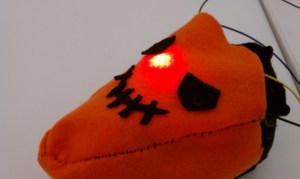
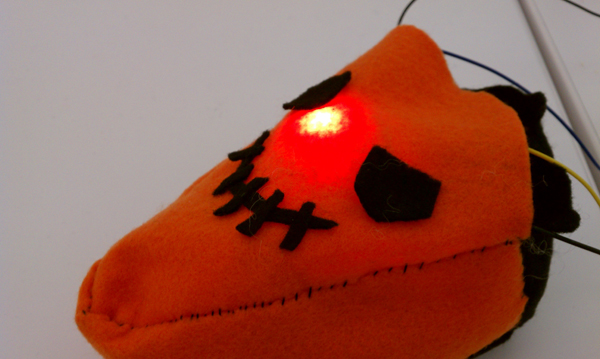
pie slice lure test
The giant red leds from mad scientist kit lit up really brilliantly and well

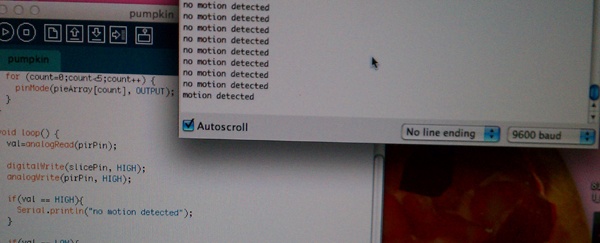
serial monitor checking
I used the pull-up switch method for the pir motion sensor which was always on ‘high’

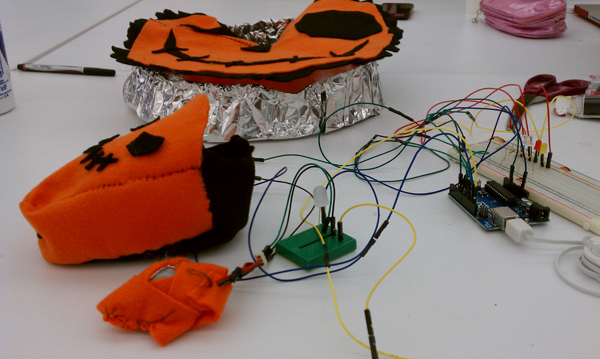
full test setup
Full test setup with both the pie slice and pie face – I had a lot of problems with the pie face because the leds weren’t bright enough to see through the fabric!!!! I should’ve gotten the larger leds like that red one instead of the smaller leds which didn’t really show up as well. In the final video I lifted the covering a little so you could see the leds underneath.
Final video:
Final code:
http://www.mediafire.com/?btjqyta3wyqorpb (zipped)
-
Yury Gitman
scholarships, competitions
And for Cecilia, a grant for people who work with ceramics
-
Yury Gitman
Presentation and papers
May 9th – Presentations — Prototypes + video
11:15 – 3PM
11:00 – 11:15 — SetupMay 12th – Individual meetings
May 18th – Apply to 3 events and email Yury the applications
Sheet, videoVideo specs
30 – 45 secs
Title
Name
Description
Show use
For what made + date (optional)Presentation specs
Title
Name
Description
Show use
For what made + date (optional)
Technical problems (only if it helps in the exchange process)
Future
Questions?Residency, Commissions, Grants, Events, Conferences, Shows, Competitions
Ars Electronica
Interactivos
Figment
Transmedila
Dork bots
SIGGRAPH
IDC
Telephonica
Location 1
Young Guns
ingeniouslyfest
Walker Museum Art
turbulence – twitterlite
techtonic
callstopps.com
dumbofest
sumptee gallery
franklin furnace
ubitech
etech
rhizome
maker faire
fabrica – residency
picnic09
SXSW
eyebeam
Biennials Electronic Arts
Creative capital
Headlanes
Poptech
CES
ID MagazineFind
the dates for show and application
application instructions
BLOG THESE -
Yury Gitman
homework assigned 4/17
1. 3-4 prototypes
- 1 implementation
- 1 look and feel
– 1 role2. 3 more blogs –>
-
Yury Gitman
homework assigned 4/14
1. submit to 3 or more blogs if you haven't yet
2. readings
3. design document/blueprint/specs/description -
Yury Gitman
homework
• Send project(s) to 3 blogs.
• Develop 3 plush toy concepts (rough): 1 drawing, 1 description each.
• Post photos/videos to the blog (link to Flickr/Vimeo)
• Group presentations
-
Yury Gitman
Reading / Podcast:
1) Audio: Role of Anthropologist
2) Malcolm Gladwell on Human Nature
http://itc.conversationsnetwork.org/shows/detail230.html -
Yury Gitman
Assignment due for March 6th
1)
Illustrate 2-3 users. Give them a name and a description. Explain why, what, and how they use your artifact and design. Explain what role it plays in their life. Post this to the blog.2)
Show your prototypes (Look&Feel, and etc…) and user scenarios to others (preferably your ideal users) and get user feedback. Do 4-5 hours of this user-testing and user-feedback. Record and blog the results.3)
Make any changes or additions to any of your prototypes or sketches, so as to better communicate the concept embedded in the prototype to your users.Reading Podcast:
Audio: Role of Anthropologist
Tom Kelly: http://ecorner.stanford.edu/authorMaterialInfo.html?mid=2054 -
Yury Gitman
Minimum of 7 Prototypes
Make a minimum of 7 prototypes. 2 minimum of "Look and Feel, Role, and Implementation."


 Adam is discussing.


 Making Toys
Reply