Updates from Yury Gitman Toggle Comment Threads | Keyboard Shortcuts

  • Unknown's avatar

    Yury Gitman 5:32 pm on November 29, 2012 Permalink | Reply  

    One Chip Many Programs 

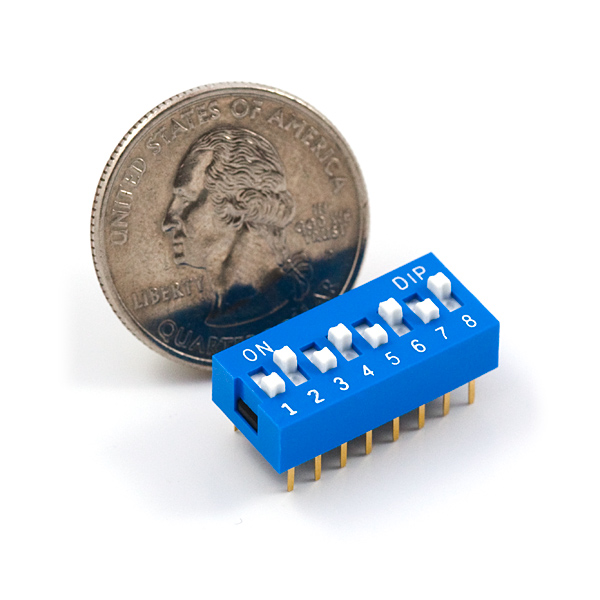
    Using as DIP switch like below is common/traditional way to active/deactivate different programs or features on your program.   Flipping one of these switches ON or OFF can give Power or Ground to a PIN of a microchip.  If you use the Boolean Logic on the Arduino, you can then “active/deactivate different programs or features” in your greater program.  DIP switches like these are usually not “user facing”, they are typically for an engineer or technican to use, like in a TV cable box to turn on/off premium channels, for example.  But sometimes these switches are user facing in a number of off-the-shelf thermostats for example.

    When you put “jumper wires” in your last project, they were to emulate this types of circuit switches. You find them useful as your projects get more complex and may have different types of users that your one device needs to work for.

    https://www.sparkfun.com/products/8034

     
  • Unknown's avatar

    Yury Gitman 4:04 am on November 9, 2012 Permalink | Reply  

    analogRead & analogWrite Assignment for next class 

    Do:

    1)  http://arduino.cc/en/Tutorial/AnalogReadSerial  [POT]

    2) Photocells – Adafruit Learning System

    3)  2.16 from Arduino CookBook (on Switch Statements)

    Read:

    1) analogRead  http://www.arduino.cc/en/Reference/AnalogRead

    2) http://www.arduino.cc/en/Reference/AnalogWrite

    Assignment:

    Build a Sound Performance Toy.  The Interface should be one POT, one LED, one Speaker, and one Photocell.  There should be four case statements, and two jumper wire.  If jumper wire are in or out, there are 4 possible states.

    *1st State controls LED dim level with the POT, and Speaker with the the PhotoCell

    *2nd State controls LED dim level with Photocell, and Speaker Tone with POT

    *3rd State controls LED blink-rate with the POT,  Speaker Tone with POT, and Delay Rate (for both) with PhotoCell

    *4rd State controls LED blink-rate with the PhotoCell, and Speaker tone with PhotoCell.

    Use with Case Statements to switch between 4 states.

    Upload Code and Video of Circuit before Class.

    Use Code and Pics for Hints: https://docs.google.com/folder/d/0B5C5Fh-HOLYFenF2UmthZWJ1QVk/edit

     
  • Unknown's avatar

    Yury Gitman 9:58 pm on October 28, 2012 Permalink | Reply  

    Parts Left To Buy for Rest of Semester 

    The Things Left to Buy For Rest of Semester
    1)  Thin Speaker x 1 pcs [If you ordered 2 before, you don’t need a 3rd, just 2 speakers for all semester]
    https://www.sparkfun.com/products/10722?
    $0.95

    2)  Wireless Transmitter,  RF Link Transmitter – 434MHz  x 1 pcs
    https://www.sparkfun.com/products/10534?
    $3.95

    3)   Wireless RF Link Receiver – 4800bps (434MHz)  x 1 pcs
    https://www.sparkfun.com/products/10532
    $4.95

    4)  Pulse Sensor Amped x 1 (use provided promotion code in email)

    https://pulsesensor.myshopify.com/collections/frontpage/products/pulse-sensor-amped

    5)
    2 Arduinos for Final
    http://www.amazon.com/gp/offer-listing/B006H06TVG/ref=sr_1_1_olp?ie=UTF8&qid=1351457275&sr=8-1&keywords=arduino&condition=new   ~22$

    Yury  already ordered and will Bring to Class

    6)  Mini Photocell x 1 pcs    $1.50

    7) Vibration Motor x 1 pcs    First one is free. If you break it second is $2.

    8) Diode Rectifier – 1A 50V  x 1 pcs 

    9)  Capacitor Ceramic 0.1uF x 1 pcs

    10) NPN Transistor x 1 pcs

    Optional:
    If you like the wirewrap tool, the best priced one I’ve ever seen is here. Makes sure to get “30 AWG”:
    http://www.amazon.com/Jonard-WSU-2224-Strip-Unwrapping-Diameter/dp/B007A1ZWYQ/ref=sr_1_3?ie=UTF8&qid=1351275636&sr=8-3&keywords=wire+wrap+tool

     
  • Unknown's avatar

    Yury Gitman 8:08 pm on October 28, 2012 Permalink | Reply  

    Simon Say Style Game, Midterm, Deliverables 

    Hi All,

    As discussed in class.  We are finishing off the Simon Says project this week.
    For the next class you will present your “Simon Says Style Project”, along with a video of it.

    The video should be 60-120 seconds long.  It should show 3 users using/playing with the project.  It should show interaction with your project start to finish. We should see how the interaction starts, how interaction is sustained, and how it ends.   The video should have two tiles, one with the projects name, one with your name.  Feel free to add more if you like, but those are the most basic requirements.  Try to have fun with the video and capture the essences of you work.

    Note:  The video should be on the blog before class starts. If you are new to video, it’s acceptable to shoot this with a simple camera.  Use as much natural light as possible with low-end camera to get good results on video.  Many of you know Final Cut already, so if you do, that may be the fastest tool for you. But it’s totally fine to edit with YouTube’s editing tools.  YouTube does allow for title effects.  Post your final video on Vimeo or YouTube and Embed into your post.

    Send any thoughts or questions you may have before then.

     
  • Unknown's avatar

    Yury Gitman 2:27 pm on October 26, 2012 Permalink | Reply  

    Simon Says Build Slideshow 

    https://plus.google.com/photos/105307847282252311120/albums/5803620979412077633

     
  • Unknown's avatar

    Yury Gitman 12:25 pm on October 14, 2012 Permalink | Reply  

    Simon Says, Starter Code and Assignment 

    Here is some Code to get you started with Simon Says.  There are 3 steps in the code. It helps setup the Simon “brain” part of the game.

    https://docs.google.com/open?id=0B5C5Fh-HOLYFVndRRHdkOW1CdHc

    For the assignment, program Arduino to listen for user imput and compare it to what Simon says.  The out come should trigger a lose sound, or tell Simon to say something next.   Work in groups of 2.

     
  • Unknown's avatar

    Yury Gitman 7:39 pm on October 5, 2012 Permalink | Reply  

    Reading and some Code for next class 

    Arduino Cookbook: 

    Tone and Random Numbers Topics, Read and Do code in:

    Tone: Sections 9.0,  9.2
    Random Numbers: Section 3.11

     
  • Unknown's avatar

    Yury Gitman 7:32 pm on October 5, 2012 Permalink | Reply  

    MidTerm Assignment, A “Simon Says Style Game” 

    In this 3-week assignment, make a “Simon Says” Style Memory Game.

    Game Design Specs:
    This is a memory game.  A light/sound pattern is presented. The user copies that pattern. After a successful copy, the pattern gets longer. As the game progresses, the speed of the pattern presented increases. There is a conclusion of the game, Win or Lose.

    Physical Specs:
    ON/OFF POWER SWITCH  [toggle switch]
    4 LED’s
    4 Momentary Switches
    Battery Pack
    Speaker
    A physical enclosure to hold all.

    Vision and Enclosure Homework:
    3 Sketches, or Image Mock-up “Blue Sky Idea”, or Vision of the Physical form.
    3 Photo Found or Off Shelf Enclosures That you can “Tool”

    Publish Images on Blog BEFORE class, and present these 6 images in class.

    Sound Design Homework:
    1)  Make 3 Start-up Sound and light effect
    2)  Make 3 “You are Correct!” sound effect.
    3)  Make 3 “You are Wrong, you Dummy” sound effects.
    4)  Make 3 “You Lose, Shame on you and your family” sound effects.
    5)  Make 3 “You Win the Game Cheer or Effect”.

    Put these 15 (total) distinct tones into one Sketch, present them in class.

     
  • Unknown's avatar

    Yury Gitman 8:54 pm on October 4, 2012 Permalink | Reply  

    Simon Says Videos 

    http://www.youtube.com/watch?v=b1OZgOQxJTk&feature=related

     
  • Unknown's avatar

    Yury Gitman 7:39 pm on October 4, 2012 Permalink | Reply  

    Breadboads to consider for projects 

    Round PCB Kit (5-Pack)

    http://www.radioshack.com/product/index.jsp?productId=3173937

     
  • Unknown's avatar

    Yury Gitman 7:22 pm on September 28, 2012 Permalink | Reply  

    Assignment for Sept 28th Class 

    1)

    Make a Project with 4 Buttons,  4 LEDs, and one Speaker.  Color Code the Buttons and the LEDs.  IF buttons 1-3 are pressed, the corresponding LED lights and the speaker makes a tone.  When the 4th Button is pressed it makes the KnightRider light effect.

    2)

    Blog 3 projects are Maker Faire that you like. Include one photo, project Name, Creator’s Name, and 2-3 sentences why you like it.

     
  • Unknown's avatar

    Yury Gitman 7:03 pm on September 28, 2012 Permalink | Reply  

    Reading for Sept 28th Class 

    Code Book, Charles Petzold:
    Chapters 4 and 5

    Arduino CookBook:

    switch basic 5.2,
    toggle switch  5.3,
    switch on time  5.4,
    Connecting Multipule LED’s  7.1
    LED Knight Rider  7.6
     
  • Unknown's avatar

    Yury Gitman 2:37 pm on August 31, 2012 Permalink | Reply  

    Physical Computing 1 – PGTE 5585 B – 

    Syllabus:  https://docs.google.com/document/d/1J5pVlrpLSbpainufIx-maAAoLYtXGKj66OBHizxywyk/edit

    Parts List and Text:  https://docs.google.com/document/d/1tbSnPfc4-wTwMeg4h1ZgP0dWqqGq0n-g1JLLbGNy6Uk/edit

    Homework for 1st Class: 

    1)  Email me a little about yourself.  What is your professional and academic background?  Why did you take this class OR what you do hope to get out of this class. What is your favorite childhood toy, please provide picture.

    2)  Order parts needed for this class.

     
  • Unknown's avatar

    Yury Gitman 6:35 pm on May 10, 2012 Permalink | Reply  

    Major Studio: Project Written Doucmentation 

    Prepare a PDF documenting your work.

    Written Documentation Guidelines:
    This document will be composed of the following sections.

    +  A Thesis Sentence and Thesis Paragraph:  One sentence that summarized the big picture of the project.  This is located in on paragraph that expands on that one sentence.
    +Summary: a narrative description of the project:  What is it, who is it designed for, what is it designed to do, what kind of technology, design, or culture does it explore, etc.

    +Domains:  What are the domains with which your project engages? What relationships exist between these domains? Use diagrams.

    +Precedents:  What are examples of work that share something in common with your project? These precedents can be contemporary or historical, can be drawn from the realms of design, technology, sociology, psychology, etc. In preparing this section of your document, please include the following information for each precedent discussed:
    • title of work and author/designer/artist
    • brief description of project
    • relevance/relation of the project to your own work

    +Iterative Design Process and User-testing:  A narrative description of your process, prototypes, user-testing, key methods and discoveries, sample sketches, storyboards, diagrams, etc.

    +Evaluation: the Evaluation section of your document has three parts:
    • a narrative summary that outlines your thoughts on the strengths and
    weaknesses of your project.
    • a list of criteria that you are using to evaluate the quality of your project. These criteria will be shared with the critics during your final presentation, and will serve as the basis for feedback during your review.

    • a summary of feedback you received during your final project presentation.

    Future Directions: Summarizes what step would be taken if this project would be continued in the future. This should be written absolutely last, and after final presentations.  Use photo-shopped images if needed to communicate future visions.

    +Bibliography, References, Resources: a list of important works used to guide your project. Bibliographic information should include the title of the work, author(s), publication date, publisher, and pages cited.

     
    • best seo reseller's avatar

      best seo reseller 10:35 am on June 27, 2013 Permalink | Reply

      “Zune as well as iPod: Most folks compare the actual Zune to touch, but right after seeing how slim and surprisingly tiny and light it really is, I consider it to become a rather unique hybrid which combines attributes of the two Touch and the Nano. It’s extremely colorful along with lovely OLED display is a bit smaller as opposed to touch display, but you itself feels quite a bit smaller as well as lighter. It weighs in at about 2/3 the maximum amount of, and can be noticeably smaller in width and level, while being just a hair thicker.”

  • Unknown's avatar

    Yury Gitman 7:21 pm on May 1, 2012 Permalink | Reply  

    Final Documentation Video Requirements [Making Toys] 

    Create a 45-120 second Video that includes:

    1)
    Title and Your Name

    2)
    One Sentence Description

    3)
    One Paragraph Summary

    4)
    Demo item stand-along

    5)

    Demo item with users

    6)
    Slide of Iterations/ Prior Art inspirations [Biggest Findings, Differences from Prior Art]

    8)
    Future Directions,
    Image(s) and List

    9)

    Your Name. Project Name

     
  • Unknown's avatar

    Yury Gitman 1:28 am on May 1, 2012 Permalink | Reply  

    Major Studio Final Presentation Slides 

    1)
    Title and Your Name

    2)
    Thesis, Sentence –  One Image

    3a)
    Thesis Paragraph, Image, Statement

    3b)
    Demo (or Demo Video) 20-60 seconds

    4)
    Domains

    5)
    Precedents / Prior Art

    6)
    Iterations of prototypes [Biggest Findings, Differences from Prior Art]

    7)
    Hands-On Interaction 60-120 seconds.

    8)
    Future Directions,
    Image(s) and List

    9)
    Questions for Guest Critics, you’d like feedback on..

     
  • Unknown's avatar

    Yury Gitman 6:31 pm on April 10, 2012 Permalink | Reply  

    Making Toys Final Project Schedule 

    4/10- Present Prior Art, Prototypes, User-Feedback
    4/17- Iterate 3-6 Prototypes, Document & Present
    4/24-  Iterate 3-6 Prototypes for User-Feedback, Document
    5/1-  Present User-Feedback to prototypes, Iteration 2
    5/8 –  Present Integrated Prototypes and User Feedback Documentation
    5/15 – NO CLASS documentation video due.
     
  • Unknown's avatar

    Yury Gitman 8:44 pm on April 9, 2012 Permalink | Reply  

    Major Studio, Mini-thesis 

    4/6-
    Begin Mini-Thesis
    4/9-
    Present Role Prototyping, Domain Mapping, Map Concepts on Domains
    4/12-
    Iterate 7-9 Prototypes for one or two Concepts,  Prepare a Thesis Statement for Each
    4/16-
    Iterate 7-9 Prototypes for one Concept, Rewrite your Thesis Statement
    4/19-
    Prepare Prototypes for User Feedback, capture User-Feedback
    4/23-
    Research, Iterative Prototyping, User-Testing, Documentation
    4/26-
    Prepare 3-6 Prototypes for User-Feedback 2
    4/30-
    Present User Research and Documentation, make more Iterative Prototype,
    5/3-
    Iterative Prototyping,
    5/7-
    Prepare 3-6 Prototypes for User-Feedback 3
    5/10-
    Present User-Feedback 3 to prototypes, Iterative Prototyping, Documentation
    5/14-
    Finalize your thesis statement, Present Project
    5/16
    Turn in Paper
    ————

    Design writing represents one form of expression with the MFADT program. As a result, students in the Major Studio.  In addition to learning how to write a design brief, students will also be asked to produce a longer piece of writing associated with the many aspects of their course work.
    *Document Objectives
    1. Present a clear and concise overview of the project concept;
    2. Situate the project within historical and creative contexts;
    3. Provide a set of criteria used to evaluate the project;
    4. Provide self-assessment of the project’s strengths and weaknesses
    5. Give an overview of the design process;
    6. Present a list of related resources.
    **Guidelines
    This document will be composed of the following sections:
    A Thesis Sentence and Thesis Paragraph: One sentence that summurized the big picture of the project.  This is located in on paragraph that expands on that one sentence.
    Domains: what are the domains with which your project engages? What relationships exist between thesedomains?
    Summary: a narrative description of the project. What is it, who is it designed for, what is it designed to do, what kind of technology does it explore, etc.
    Precedents: What are examples of work that share something in common with your project? These precedents can be contemporary or historical, can be drawn from the realms of design, technology, sociology, psychology, etc. In preparing this section of your document, please include the following information for each precedent discussed:
    • title of work and author/designer/artist
    • brief description of project
    • relevance/relation of the project to your own work
    Iterative Design Process and User-testing: a narrative description of your process, prototypes, user-testing, key methods and discoveries, sample sketches, storyboards, diagrams, etc.
    Evaluation: the Evaluation section of your document has two parts:
    • a narrative summary that outlines your thoughts on the strengths and
    weaknesses of your project.
    • a list of criteria that you are using to evaluate the quality of your project. These criteria will be shared with the critics during your final presentation, and will serve as the basis for feedback during your review.
    Future Directions: Summarizes what step would be taken if this project would be continued in the future. This should be written absolutely last, and after final presentations.
    Bibliography, References, Resources: a list of important works used to guide your project. Bibliographic information should include the title of the work, author(s), publication date, publisher, and pages cited.

     
c
Compose new post
j
Next post/Next comment
k
Previous post/Previous comment
r
Reply
e
Edit
o
Show/Hide comments
t
Go to top
l
Go to login
h
Show/Hide help
shift + esc
Cancel