 Evander Batson
 xinhe feng
 FluffyLeecy
 frankiezek
 gaboratparsons
 giang063
 gracegotlost
 lauriewaxman
 Siwen Li
 Xiaofeng Lin
 Yury Gitman
 mar28th
 Max(TONG WEN)
 Soohyun
 sabotai
 Susan Lin
Emotional Tones
Another sound project. Between this and AV systems, I feel like I’m being tossed into the deep end of the pool. I’ve never worked with audio, but this is certainly a good way to learn. I tried to pull together a few sounds that a potential little robot could use to express itself.

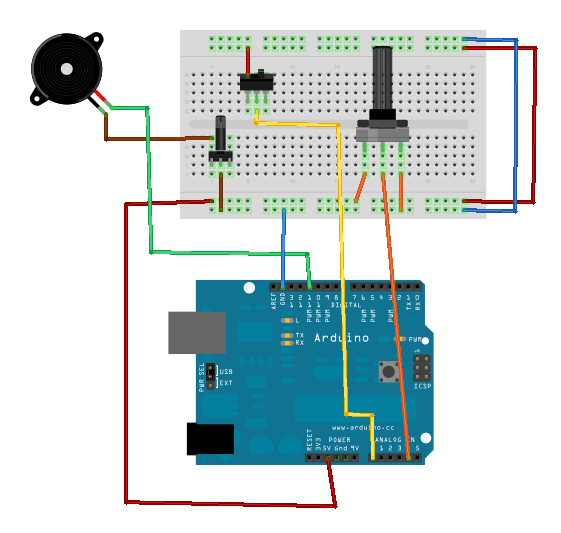
First I threw together a simple device to let me test out the different sounds I could get out of my piezo. After some basic experimentation, I found the range of acceptable sounds (defined as them not hurting my ear) to be 50-1000 Hz. I mapped this to the range of a potentiometer (0-1024) and set it so that the piezo would play at the relevant frequency to the level of the potentiometer. While testing, I added two additional things: A potentiometer to control the volume of the piezo, and a switch that could silence the piezo without having to unplug it (I found myself uploading the code a lot, and got tired of the constant buzz resulting from keeping it plugged in.
I used the same physical device when creating the individual emotional sounds. It was easy to work on the code for the individual sounds, and then upload the tester, just to see what tones I thought would work for the one I was working on.
For the final code, I wrote a simple loop function that calls a specific sound. Actually playing each sound is handled by a separate function. Because the way the sounds were generated tended to vary a bit from sound to sound, and each one is fairly short, it didn’t make sense to me to create a standardized way of handling it (such as in the melody example, where any array of notes and durations could have been fed to it).
Creating the actual sounds consisted mostly of trial and error, just seeing what seemed right for each emotion. For most of the tones used, I simply found a tone manually to me that fit, although there were several that I used actual notes for, hence the inclusion of pitches.h (available in the examples that come with Arduino). Most are comprised of two or three beeps of varying lengths and a few do sweeps across a range of frequencies.
In then end, the device has 8 expressions: “Hello”, “Yes”, “No”, “I’m happy”, “I’m sad”, “Thank you”, “I need to alert you” and “I’m dying”. They’re all my babies, but I think the happiness sound is my favorite.
I only recently got the potentiometer I’m using for this project. It’s a big old black one and it has a great feel to it, so I thought I could use that to scroll between the options for the sounds. The range of 1024 is broken up into 8 segments, each of which is mapped to a sound. When the device is not playing anything, the current sound selection is displayed on the serial window (This requires the device to be attached to the computer in order to see what sound will be played). When the selection is made, a switch is flipped and the sound loops until it is put back down.
I had originally intended to use a push button to activate the sound, but I ran into a bug which I assume has to be with the way I built the circuit, since I tried using code that has previously worked with it. The button reads 0 until it is pressed down, at which point it reads 1 for the rest of eternity. Instead I am using my switch as an analog input. The switch has a very satisfying feel to it anyway, though, so I decided not to worry too much about it for now.
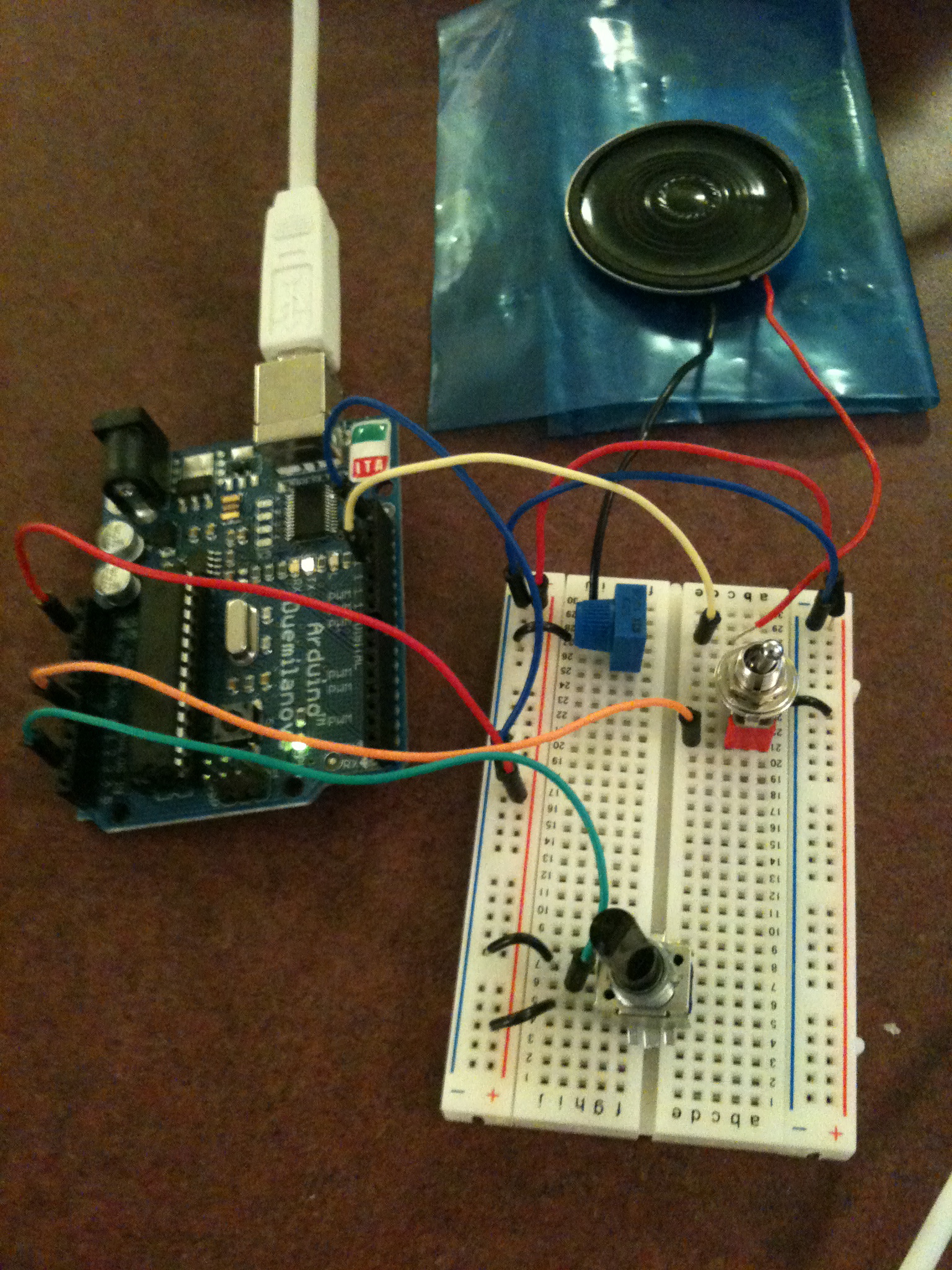
As the picture shows, my final setup wound up being almost identical to the test device. I moved a few things around to make them less cramped, but that was it. I really liked the tactile sensation that comes from using that specific potentiometer and switch, so I was happy to keep them.
Given a bit more time, I would have liked to use LEDs with labels to signify which sound would be played, but as it is, the interface is easy to use, and I believe the sounds do a good job of expressing their inteded meaning.
IN CLASS WRITING RESPONSE:
Prompt: Any pleasant or not-so-nice surprises while experimenting with the emotive beeps?
What stands out is struggling for over an hour with a simple push button. For the life of me, I could not get it to work, which was infuriating given the basic nature of it. I looked over my wiring and could find nothing. Looking as it again this morning, the problem was obvious: I hadn’t ever connected the loop to ground. How I missed this yesterday? No idea.
I definitely had some difficulty getting sounds that felt like the emotions was trying to convey. I woud play a tone and think to myself “this will be perfect for the next part of the sequence” only to realize that it could not have been more wrong. As I mentioned, I have never really worked with sound, so it was interesting ti see just how the different tones interacted with each other.
 Making Toys
Reply