Recent Updates Page 45 Toggle Comment Threads | Keyboard Shortcuts

  • Unknown's avatar

    Bree 9:21 pm on April 11, 2011 Permalink | Reply  

    Popular meters 

    This week, I received my Didget and forced my boyfriend to be the guinea pig. He played the DS game for all of three minutes, and asked if he could just use the meter and make me play the game (he left the bulky white meter at home, however, and took his snazzy sleek Ultra Mini with him instead). The DS game is pretty elaborate, but is a point-and-click adventure, so I imagine it has an end point. From what I can tell, I believe that Bayer envisioned this product being ported for a dozen or so different games to appeal to a range of kids, but the new DS systems no longer have the legacy slot for the meter. I guess that’s my opening.

    I am working on the initial logic in Processing for my little GluPets, but also continuing research into glucometers and how they output data. Perhaps someone can help me hack one of these guys?

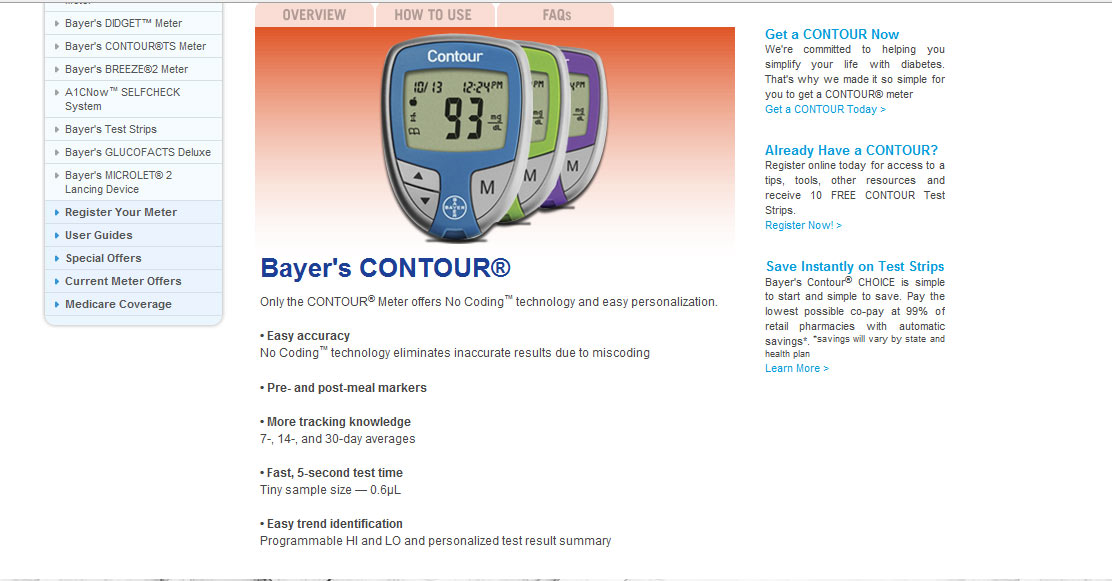
    The Bayer Contour meter doesn’t seem to have a great deal of functionality beyond simple metering. I don’t see anything about the meter having USB connect-ability, for example.

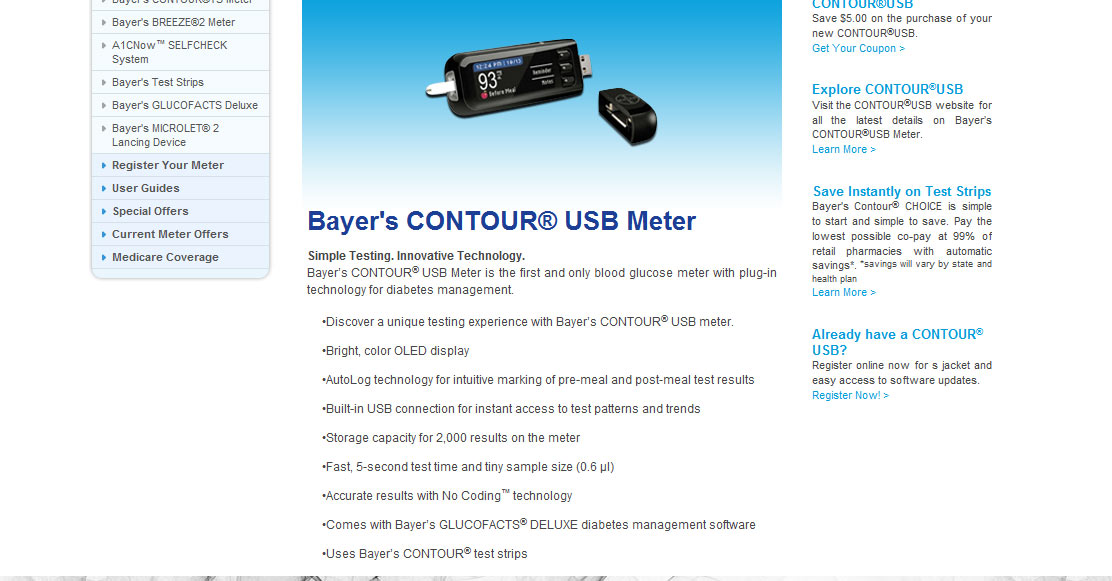
    However, the Contour USB version has not only a more robust display, but has a built-in USB plug so that one could then download their information onto the computer. The software has charting and other data vis capabilities, but obviously, not made for kids.

    (More …)

     
    • andywallace's avatar

      andywallace 10:06 pm on April 11, 2011 Permalink | Reply

      I wouldn’t necessarily worry too much about getting the readings. You could make a very viable prototype just using simulated readings. Somebody else (Scott I think) suggested just using RFID tags to represent the different readings a user could have (high, low, medium) etc.

      Having it use real readings would make it difficult to demonstrate anyway since you’d pretty much have to kill your boyfriend to show the creature when it’s really sad or unhappy.

    • Oylum's avatar

      Oylum 10:09 pm on April 11, 2011 Permalink | Reply

      Your research is getting detailed and you are finding new stuff each time, which is really great. But I think you should start prototyping your project from now on. Sometimes the assumptions fail so bad when you prototype it and it will definitely happen to you. You cannot make sure which direction to go, how to continue this project unless you have something working even if it’s not working perfectly. I suggest you do some implementation prototypes and blend it with look and feel for the next step.

  • Unknown's avatar

    hilalkoyuncu 8:47 pm on April 11, 2011 Permalink | Reply  

    Moving on with physical prototype 

    Here are a “few” images of my prototype.  My code is working 80%. I am hoping to do a few adjustments to the code and playtest it during class. His name is “hipster toy” but you have probably never heard of it.

    This slideshow requires JavaScript.

    (More …)

     
    • Bree's avatar

      breegeek 9:34 pm on April 11, 2011 Permalink | Reply

      definitely looks hipster tastic. You could have him wearing bulky headphones and use those to house speakers…

    • scottpeterman's avatar

      scottpeterman 10:03 pm on April 11, 2011 Permalink | Reply

      Hey this looks great! Love the little blue jeans, very cool.

    • Behnaz Babazadeh's avatar

      Behnaz Babazadeh 10:12 pm on April 11, 2011 Permalink | Reply

      Love the stache, its definitely hip with the hipsters. His expression is a bit strange but maybe thats what your going for … maybe less black around the eyes and instead put a eyeglasses frame on him, the thick black ones 🙂

  • Unknown's avatar

    Alvaro Soto 8:34 pm on April 11, 2011 Permalink | Reply  

    A lot is going on//Modulos Update 

    After Prototyping both circuits and look and feel for Modulos (finally it has a name), I started re-thinking what the project was about, finding the soul of my main idea and what differentiates my project from cubelets, Braun electron or Olars. I always been very interested in my role as a product designer in a program where interaction in screen based applications is the main area of research. For my thesis id like to work on techniques and development of materials and manufacture processes for product development. Thinking on technology as a way to enhance aesthetics, performance etc.

    Modulus to me is the starting poing of this research where fabrication is as important as the technology. Id like to document the process starting from wood scraps and the use of laser cutter technology. so to explain in an elevator pitch what Modolus is:

    Modulos is a modular optical color mixer  that uses electronics (inputs and actuators) embedded in wooden blocks.

    Modulos is designed to show the product design process of an object with computing electronics from start to end as a way to experiment and research on material properties, physical interactions and production methods.

    All the circuits and code are working

    (More …)

     
    • Bree's avatar

      breegeek 9:37 pm on April 11, 2011 Permalink | Reply

      Wow, it’s an ambitious project and it’s already so far along!

    • Oylum's avatar

      Oylum 10:04 pm on April 11, 2011 Permalink | Reply

      The documentation is really good. We can definitely see your design process here. You have the circuit and code working which is nice, but things will change when you take the parts out and put them on their own containers. I think you should prototype the implementation on paper cubes, just to see what happens when you take apart that circuit. You can replace the paper cubes with the actual wood ones whenever they are ready and whenever you’re sure your circuits are working perfectly.

      I really like this project and admire the way it develops.

    • scottpeterman's avatar

      scottpeterman 10:07 pm on April 11, 2011 Permalink | Reply

      I really like the name alvaro and looks like you’re making some great prototypes. Already, just from your photos, you can really see that the blocks are going to have a sense of heft, of actual, “block”-y weight. I wouldn’t worry too much about differentiating yourself from the prior art you cite, your project is unique in its very handmade/piece-of-craft nature, though those are great inspiration (and I want to play with all of them)

    • andywallace's avatar

      andywallace 10:13 pm on April 11, 2011 Permalink | Reply

      Not to reiterate what everybody else said, but this project is really interesting and looks like it’s shaping up to be something really cool and sleek.

      One thing, though, is that your elevator pitch is kind of confusing, at least for me. It has a lot going on, and I wasn’t clear if the project was the final object or the process and its documentation. Just something to think about when explaining what the project is.

    • Thom Hines's avatar

      Thom Hines 10:15 pm on April 11, 2011 Permalink | Reply

      This has always been one of my favorite projects in the class, especially since we have been focusing so much on toys this semester. Bridging the analog and digital gap is tricky, especially in a novel way, and the real winners in the area manage to make you forget that you are dealing with either.

      It’s hard to get a very specific sense of your implementation from just the sketches alone, although you have done plenty of work on them and perhaps they are perfect to help you guide your thoughts. It is great to see you trying out various forms in your drawings, and you should push it, but I hope you don’t lose track of your target audience. Simplicity in design can be a major strength when the underlying principles may be harder to grasp.

      That said, I totally think you are right about the materials being a key part of your project. These things are completely tactile, and so even if a user had no idea what these blocks could do, they should be a pleasure to touch and hold on their own.

      As for role and differentiating yourself from the precendents you showed, I would think about how you could make it more intuitive to work with, where there is essentially no ‘wrong’ way to do it. Find ways of introducing relationships between ALL the blocks, so that any two blocks can make something happen. If this is for kids, it should be fun right out the gate.

      Also, I ran across this a while back, and I just thought about it in relation to your project. http://www.technologyreview.com/video/?vid=365

      Good luck, man!

  • Unknown's avatar

    thisisvictorkim 5:20 am on April 11, 2011 Permalink | Reply  

    this might be interesting…

    “IOIO (pronounced: yo-yo) is a product which lets you connect electronic circuits to an Android device and control them from an Android application.”

     
  • Unknown's avatar

    andywallace 2:19 am on April 11, 2011 Permalink | Reply  

    Gyroscopes! Infrared LEDS! Sounds! Balls! YOUR WILDEST DREAMS! 

    I dealt with a few things this weekend, so I’ll just start at the top.

    Wireless Gyroscope

    It looked like this, but with more tape.

    (More …)

     
    • Yury's avatar

      Yury 2:45 am on April 11, 2011 Permalink | Reply

      Andy,
      You are doing great work. Lots of distance covered on research, prototyping, experimentation.

    • Alvaro Soto's avatar

      Alvaro Soto 10:00 pm on April 11, 2011 Permalink | Reply

      Andy, Ill post again when I have information about the foam coat that I told you in class, you can make some perforations at the end of the process, keep both half spheres separate and join them at the end with styrofoam glue.

    • lpercifield's avatar

      lpercifield 10:06 pm on April 11, 2011 Permalink | Reply

      When I created a hollow ball last semester by casting a form in silicon. It worked pretty well but took a little time to cure. For the power switch you might look into a hall effect sensor that will turn the thing on and off with a magnet.

    • Alvaro Soto's avatar

      Alvaro Soto 10:51 pm on April 11, 2011 Permalink | Reply

      This is the artist Chris talked about

    • andywallace's avatar

      andywallace 10:55 pm on April 11, 2011 Permalink | Reply

      Some quick responses from presenting:

      -people seem to like the the sound changed ball.
      -Victor suggests using a cube for it, which think is a very good idea.

      -Balls that affect the sound the other balls make in general seem popular.

      -If I’m going to have the sounds switch, I’ll need to make other sound synths, which could be tough. I like the chime sounds I’m using now, and I’m not a sound person, so I worked pretty hard at them, but a few variants shouldn’t be too bad. An 8-bit collection could be fun, same goes for a set of brass sounds.

    • Alvaro's avatar

      Alvaro 12:05 am on April 12, 2011 Permalink | Reply

      Andy these are the two resins you could use to coat the styrofoam:
      http://www.aquaresin.com/
      orhttp://www.westsystem.com/ss/

  • Unknown's avatar

    andywallace 2:48 am on April 10, 2011 Permalink | Reply  

    Problems with serial and OpenFrameworks 

    Hey guys,

    I’m trying to get my xbee to talk with openfFrameworks using the serial port, but it keeps freezing up my computer.

    I’m using the serial example that comes with openFrameworks and just changing the baud rate to 157,600 since that’s what seems to be working for my gyroscope. I get good data for a few seconds and then everything locks up an I have to restart.

    Anybody else experienced something like this or know what I might be doing wrong?

     
  • Unknown's avatar

    hilalkoyuncu 10:25 pm on April 7, 2011 Permalink | Reply  

    Prior art/ reframing the concept 

    Prior Art:

    http://www.youtube.com/watch?v=e5psNItY-f4

    Concept:

    I decided to reframe my concept.

    My game is going to be aimed toward adults and the diseases that the toy will display will be ones that I will create based on contemporary afflictions of technology. An example of diseases would be “facebook fever”. I am still researching though, hopefully will come up with interesting conditions.

    I will most probably barrow the game mechanics of “the operation”.

    I built most circuits and coded the interactions (sound and visual feedback) and  there are some glitches that I would like to work on.

    Hopefully I will have a working first prototype in the next session.


  • Unknown's avatar

    Thom Hines 9:53 pm on April 7, 2011 Permalink | Reply  

    Easy Peasy CMS 

    I’ve developed my CMS a bit further than last time, as it now works with images and can store user settings (such as password, etc.) in a data file on the server. Since my CMS is intended to operate without a database, it’s essential that all of the information can be stored and updated on the server, but only in file format.

    See it here.
    user: thomhines
    pass: pass

    Todo

    • Some sort of media manageer so that images, PDFs, etc. can be linked to easily from within the browser window.
    • A multi-user permission systems that will allow for different users to have access to only content, styling, page structure, etc.
    • A way to store drafts and/or versions
    • Smart, inline editing that will allow the content editor to feel like he/she is actually editing the page.
    • Smart phone optimization
    • Standardize theming system to allow for quick changes in style
    • Collaborative editing?
    • Automatic install process
    • Site manager

    In addition to all this, I need to get it onto a few sites and test it thoroughly. In order to make sure I can get enough testing, I’ve decided to break the development down into several sub-versions, which I will make available as I go along. I’ve also set up the file structure so that the core files are stored separately from the settings and content, so that upgrading should be as simple as replacing the core file folder and the new features should be integrated right away.

    Needs

    The more research I have done, the more I can see the advantages of a system like this in certain, somewhat specific instances. First of all, MySQL and all the relational databases that drive all the common CMSs are generally slow(ish), and when operating under heavy traffic loads or on a server with sparse resources, can slow to a crawl or even crash. I ran across this an article earlier today (http://carpeaqua.com/2011/04/05/recipe-for-baked-wordpress/) that talks about how to ensure your hosted version of WordPress can survive a large influx of traffic. The advice isn’t difficult, but it is above many people’s heads, and even if it wasn’t, people clearly aren’t following it. The takeaway of the article: If you can’t or don’t want to do this, don’t bother setting up your own WordPress install.

    Furthermore, there is a movement of people who are completely against the use of MySQL in almost any capacity. Called the NoSQL movement, they think that for sites, large or small, there are better solutions, including flat file CMSs like the ones listed below:

    Prior Art

    Razor CMS

    Pluck CMS

    Pivot Blog

    Lotus CMS

    Skeleton CMS

    Cushy CMS

    Also, I found a couple of patents that are somewhat related, but not much in the way of dynamically changing flat files on a web server.

    http://www.google.com/patents/about?id=sk42AAAAEBAJ&dq=content+management+system (1981)

    http://www.google.com/patents/about?id=dySXAAAAEBAJ&dq=content+management+system

    http://www.google.com/patents?id=1-CDAAAAEBAJ&printsec=abstract&zoom=4#v=onepage&q&f=false (2001)

     
  • Unknown's avatar

    catherine 9:53 pm on April 7, 2011 Permalink | Reply  

    Prior Art 

    Some more prior art for kni++.


    (More …)

     
  • Unknown's avatar

    scottpeterman 8:38 pm on April 7, 2011 Permalink | Reply  

    Prior Art and a new name??? 

    ART:
    kraakdos
    Kraakdoos – Michel Waisvisz and Geert Hamelberg – 1960s
    folgerphone
    Folgerphone – Nolan Hatcher and Craig Nutt – 1979
    Gittler Guitar
    Gittler Guitar – Allane Gittler – 1970s and 80s
    played by Andy Summers of the Police on “Syncronicity II”
    gravikord
    Gravikord – Robert Grawl – 1986
    SynthAxe
    SynthAxe – Bill Aiken – 1986
    z6-spxa
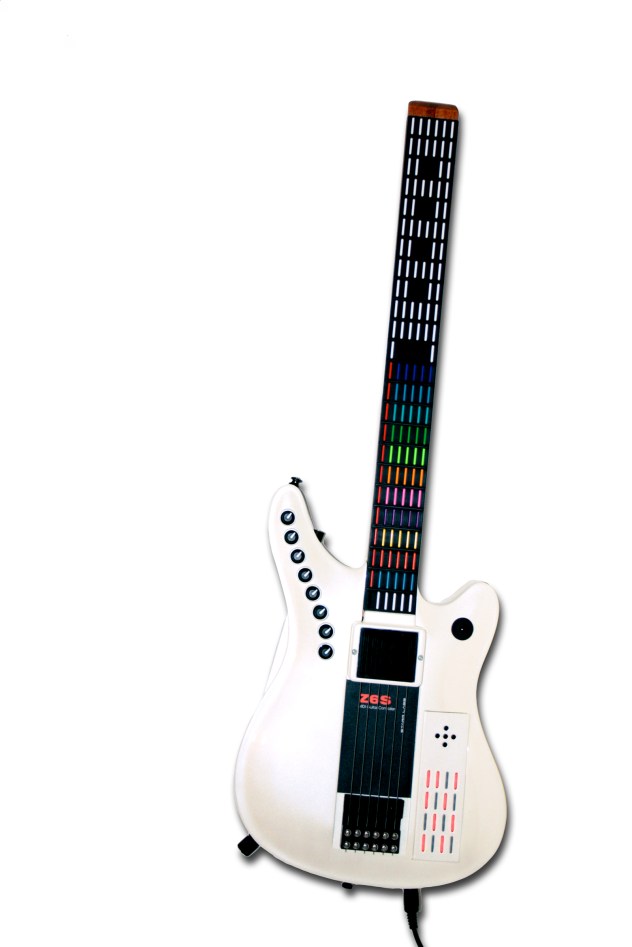
    Ztar – Starr Labs – 1980s-Present
    kaisatsu
    Kaisatsuko – Yuichi Onoue – 2003
    moodswinger
    Moodswinger – Yuri Landman – 2006
    played by Alex Hemphill of the Liars on “Leather Prowler”
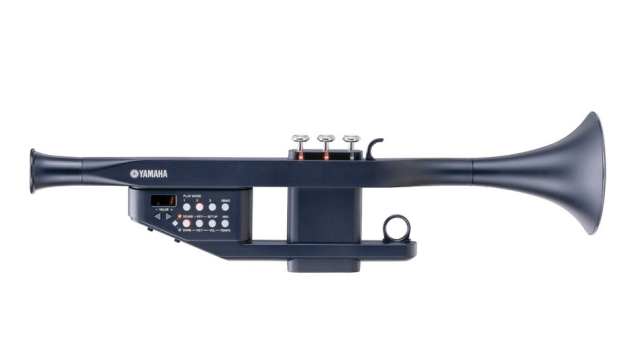
    Yamaha Trumpet Yamaha EZ-TP MIDI Trumpet – Currently available ($350)
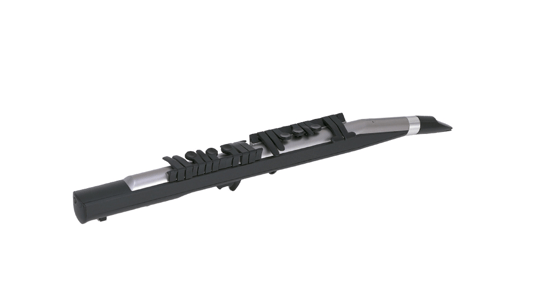
    Yamaha WX-5 woodwind Yamaha WX-5 MIDI Woodwind – Currently available ($350)

    PATENTS:
    1942Electrical Clarinet
    1959 Device for measuring speech

    1965 – VOLUME CONTROL APPARATUS FOR A SINGLE-TONE .ELECTRONIC MUSICAL INSTRUMENT
    1966 Fluid Pressure Actuated Sensor controlled instrument
    1969 Electrical Woodwind Synthesizer
    1969 Breath Control sensor for single-tone musical instrument

    1971 Electric Reed Mouthpiece
    1973 Electronic wind instrument
    1975 Electrically Operated Music
    1976 Trumpet using variable wind pressure post valves then feeding into synthesizer
    1976 A method for capturing sound actually housed inside the mouth
    1977 Breath pressure actuated electronic instrument
    1978 Pressure transducer for musical instruments
    1979 Voice controlled instrument
    1979 Control system for an electronic music synthesizer

    1981 Wind sensing mouthpiece for electronic instruments
    1982 Musical apparatus
    1984 Hand-held musical instrument and systems including a man-machine interface
    1985 Musical instrument
    1987 Musical Instrument (flute)
    1988 Synthesized Whistle
    1988 Entertainment and creative expression device for easily playing along to background music
    1989 Detection of Musical Gestures

    1990 Musical wear – finger switched by Hideo Suzuki for Yamaha
    1990Air flow response controlled musical instrument
    1990 Electronic musical instrument with pitch alteration function
    1991 Electronic Saxophone
    1991Musical keyboard for buttonless woodwind synthesizer
    1991 Electronic musical instrument with a tone parameter control function
    1991 Electronic musical instrument with improved generation of wind instruments
    1992 Electronic musical instrument with selection of standard sound pitch of a natural instrument
    1992 Pitch data output apparatus for electronic musical instrument having movable members
    1993 Breath controller for musical instruments
    1995 Electronic musical instrument with tone generation control
    1995 Electronic musical instrument having key after-sensors and stroke sensors to determine differences between key depressions
    1996 Musical instrument having voice function
    1997 Hands-free input device for operating a computer having mouthpiece with plurality of cells
    1997 Wind instruments with electronic tubing length control
    1998 Hybrid electronic and acoustic musical instrument
    1999 Electronic wind instrument capable of diversified performance expression
    1999 Woodwind-styled electronic musical instrument

    2002 Musical instruments that generate notes according to sounds and manually selected scales
    2002 Musical wind instrument and method for controlling such an instrument
    2003 Voice-controlled electronic instrument
    2003 Wind controller for music synthesizer
    2005 Musical tone generating apparatus and method for generating musical tone on the basis of detection of pitch of input vibration signal
    2006 Hybrid wind instrument selectively producing acoustic tones
    2008Tone generator control apparatus and program for electronic wind instrument
    2009 Electric wind instrument and key detection structure thereof
    2010 Hybrid wind musical instrument and electric system incorporated therein
    2010 Instrument
    2010 Flute controller driven dynamic synthesis system
    2010 Wind musical instrument with pitch changing mechanism and supporting system

    TITLE CHANGE?
    I think the term “Ghost Music” is too vague and helped to contribute to Yuri’s feeling that I needed to restate my central thesis again. What about “The Transparent Brass Band”? Then you get the nice consonance of “Transparent Trumpet,” “Transparent Trombone” and “Transparent Tuba.”

     
  • Unknown's avatar

    minho 8:20 pm on April 7, 2011 Permalink | Reply  

    Bad robot – face detecting 

    (More …)

     
  • Unknown's avatar

    catherine 8:11 pm on April 7, 2011 Permalink | Reply  

    Knitting Techniques 

    4 Videos of Basic Knitting Techniques
    (More …)

     
  • Unknown's avatar

    thisisvictorkim 8:03 pm on April 7, 2011 Permalink | Reply  

    Musical Cigarettes 

    http://vimeo.com/22066071

    This was inspired by the youtube hit “Amateur” by Lasser Gjertsen.  It is my first “prototype” (rough video edit) of the notion of mundane, everday habits as musical instruments.

    (More …)

     
  • Unknown's avatar

    Behnaz Babazadeh 5:42 pm on April 7, 2011 Permalink | Reply  

    Plausibility Tests 

    Today I ran a series of tests to see where the technology might be limited in and/or if it is completely plausible.

    http://vimeo.com/22087821

    Here I experimented with the possibility of incorporating illustration board into the novelty cards to give shape and structure. The alloy was able to move the pieces, however the shape was a little distorted. I believe I can achieve the right type of interaction with the use of several alloys on each corner.


    http://vimeo.com/22087547

    Part of a series of experimentation of how shape memory alloys react with in the oven and at what temperature. This alloy was placed inside of a conventional oven at 150 degrees. The alloy went from a stretched state at 3 inches to its compressed memory state at 1 inch, all in just one minute in this oven.


    Conclusion | I can definitely use shape memory alloys as the technology to change flat shapes into 3 dimensional shapes with in the convenience of a standard home oven.

     
  • Unknown's avatar

    Behnaz Babazadeh 5:05 pm on April 7, 2011 Permalink | Reply  

    Interactive Novelty Cards 

    Currently there are absolutely no other paper/novelty products that utilize SMAs (Shape Memory Alloys) technology.

    1) The current trend in smart novelty cards seem to be in soft circuit space of paper craft and conductive inks. Novalia is a company that has been started by Cambridge professor Dr Kate Stone. They create flat circuits on paper to get interactive simple circuit greeting cards. Most of which are simple, push button/ light led. Click Here for the Article.

    2) Here is a video of a neat greeting card hallmark is doing with augmented reality. Hallmark wants to go Hi-Tech!

    3) The standard tech cards that everyone has seen such as pop up cards and musical cards.

     
  • Unknown's avatar

    Oylum 4:36 pm on April 7, 2011 Permalink | Reply  

    Prior Art 

    I found some prior work related to over distance emotional impact or haptic outputs.
    My keywords are: Haptic feedback, telepresence toys, virtual/physical existence.
    Most of them have more science oriented approach, you can tell it even from their interfaces. Here are some examples:

    Augmented reality puts the squeeze into virtual hugs:

    Virtual hugs
    It uses Second Life to communicate. It matches your words in Second Life with emotions and convey that emotion to your partner. In the video, there are 2 characters in Second Life, hugging each other, talking, getting excited atc. The look and feel is horrible! So technical, so engineer style. Would you wanna walk around wearing this? And the guy, he’s like Clark Kent – The Engineer!

    (More …)

     
    • Willie's avatar

      Willie 10:12 pm on September 12, 2011 Permalink | Reply

      What an awesome way to explain this-now I know everiytnhg!

  • Unknown's avatar

    Behnaz Babazadeh 4:09 pm on April 7, 2011 Permalink | Reply  

    Materials Exploration | Symposium 

    Parsons Fashionable Technology Event Series continued on the 31st with a series of lectures and demonstrations from the people in the industry who are doing interesting things in their field relating to fashionable / wearable technology.

    This is a video of my favorite talk at the symposium. I think was was really great to see the variety of different materials out there available that I had never heard about before. You can thank me later for shooting this video 🙂

    http://vimeo.com/22063204

    Below are some of the interesting things Bare Conductive is up to with their patent non-toxic conductive ink.


    Conductive Ink Track Pad

    Conductive Ink Switchs / Potentiometor for outputs of light / sound.

    Conductive Ink Flex Sensor

    According to Matt Johnson from Bare Conductive, this ink will not be available for purchase for quite some time. Huge bummer for some soft circuit friends of mine who would have loved to use this ink for their mini-thesis.

     
  • Unknown's avatar

    andywallace 5:55 am on April 7, 2011 Permalink | Reply  

    Gyroscope Vs Accelerometer 

    Tilt Sensors are still on their way, but my Sparkfun order came in today, along with some foam balls I orderred form Amazon! I didn’t get home until late, so I have not had too much of a chance to play with my new toys, but I did experiment a bit with the gyroscope and accelerometer as a way of getting the velocity of the ball (or at least something close enough to the velocity to fool any user).

    I set up simple openFrameworks app to monitor each sensor and see how it reacted to different movements. I really wanted to get each of them in a ball using xBee, but something is going wrong with one of my xBees. I’m going to look into it tomorrow. Instead, I put the gyroscope in the ball and used long wires to attach it to the Arduino. Unfortunately, this limited the movement a lot more than I was expecting it to, and the ball really is not free rolling at all.

    (More …)

     
c
Compose new post
j
Next post/Next comment
k
Previous post/Previous comment
r
Reply
e
Edit
o
Show/Hide comments
t
Go to top
l
Go to login
h
Show/Hide help
shift + esc
Cancel