 Evander Batson
 xinhe feng
 FluffyLeecy
 frankiezek
 gaboratparsons
 giang063
 gracegotlost
 lauriewaxman
 Siwen Li
 Xiaofeng Lin
 Yury Gitman
 mar28th
 Max(TONG WEN)
 Soohyun
 sabotai
 Susan Lin
Takin’ it all the way: Sleep Mode and Direct Activation
Today’s lesson covers two unrelated, but very practical subjects.
First off, we’re starting with enabling sleep mode on our end device XBee’s. This essentially will power down our remote devices on a regular cycle to save power and make our network slightly more efficient. We’re going to be using the same thermometer circuit that we worked with last week. Here is a diagram of the circuit you need to (re)build:
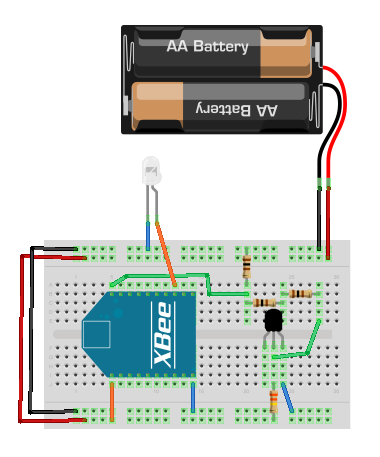
In order to enable sleep mode on the device, we’ll have to bring your Router into CoolTerm, and set up a few AT parameters there.
From here, we’re going to be using the same Processing code to read all the various thermometers. Easy! Done!
The direct activation project is basically the thermometer project in reverse. Instead of reading from each of the routers, the coordinator (hooked up to a Processing sketch) will be able to turn on and off various devices remotely. Here’s the circuit you’ll want to build:

The LED on the board represents the device we’ll want to turn on and off.
The Processing sketch we’re using can be found on the O’Reilly site here (contains several assets).
 Making Toys
Reply