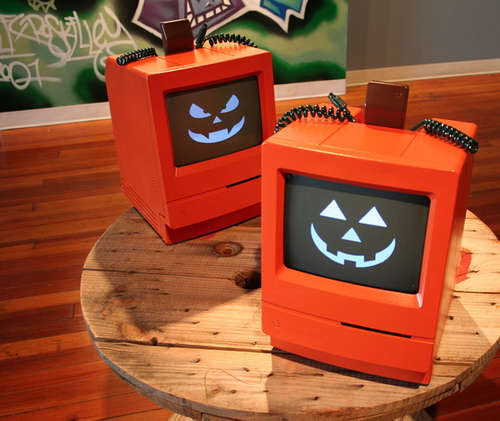
Recent Updates Page 37 Toggle Comment Threads | Keyboard Shortcuts

  • Unknown's avatar

    danSelden 3:49 pm on November 4, 2011 Permalink | Reply  

    protoPumpkin… 

    Well… the protoPumpkin was off to a great start despite being fairly different than it’s original concept.  Instead of moving panels, I used one servo motor inside to spin a disk which held the various LEDs.  An IR sensor on front would “agitate” the pumpkin, sending the pumpkin from a state of rest (breathing red LEDs) to a state of agitation, a swatch array of LEDs spiraling around its center. After a few loops it would return to its resting state. In addition, the stem acts as a potentiometer, spinning the disk and creating an even more dynamic effect on the front.  See pictures and videos.

    Unfortunately construction was far from perfect and I ran into some major obstacles. Some of which were not completely apparent until final assembly.  The code worked perfectly… but due to the size of the disk, a bizarre servo, and a poorly constructed internal structure (due mainly to the challenges of working inside a pumpkin), the disk and soldered wires kept snagging on each other, eventually tangling, destroying crucial pieces of the pumpkin. Without a functioning IR sensor or the breathing lights… protoPumpkin has unfortunately been reduced to an array of colorful LEDs and a finicky servo motor. For now I’m content to consider it a prototype.

    [update] after poking around during class, I discovered a questionable soldering connection for the sensor. Excited, since for some reason the red lights only work if the sensor works, I figured if the connection was made everything would be back up and running… and sure enough after clipping the ground cable to the sensor and resetting its contact with the ground wafer, everything came back online.  Still had obvious issues with the spinning disk and sure enough after a few demonstrations, two more wires were torn from their solder (once again killing the sensor and an additional LED). It was a great first run though and a great learning experience in terms of building within a decaying fruit.


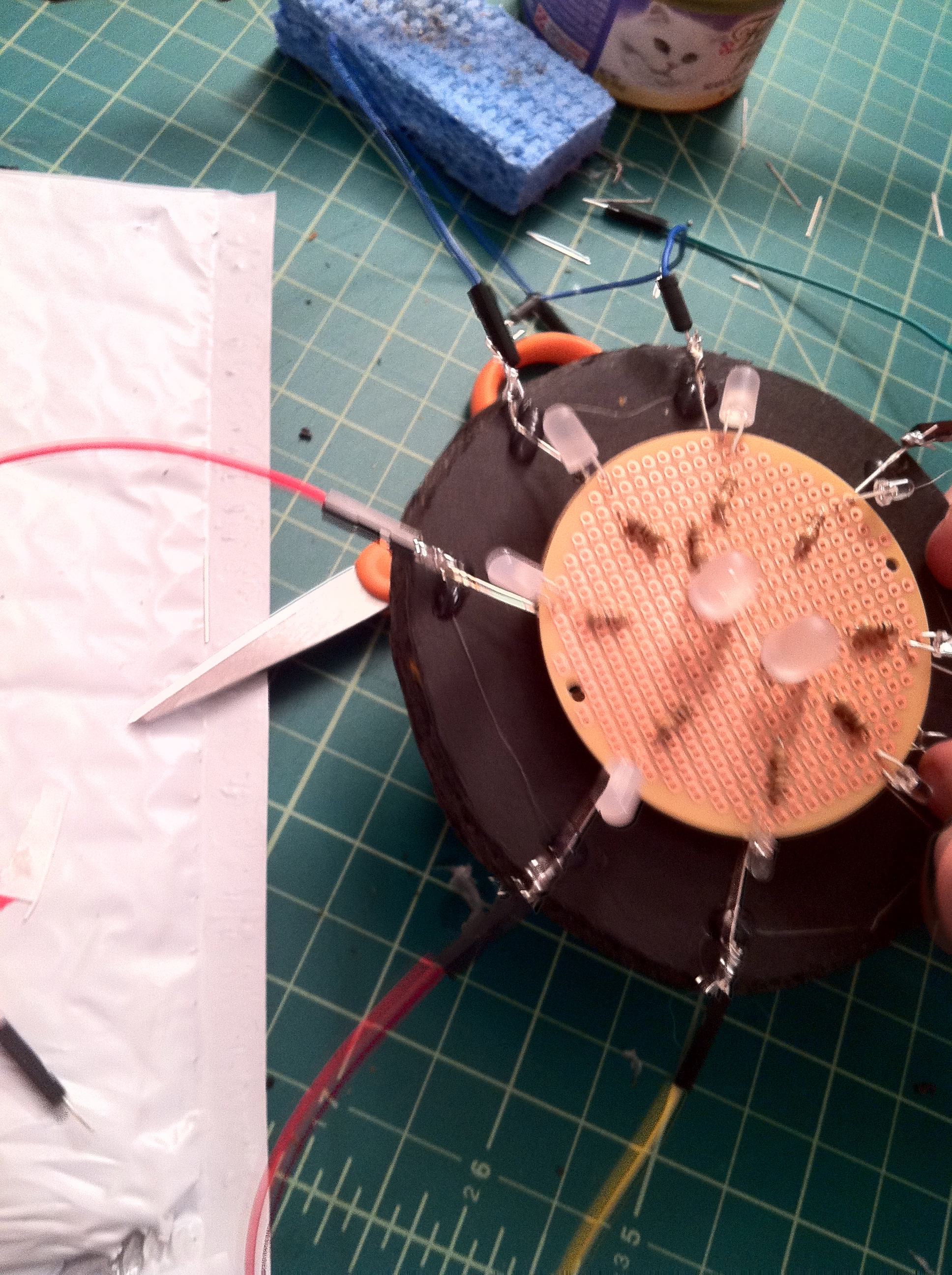

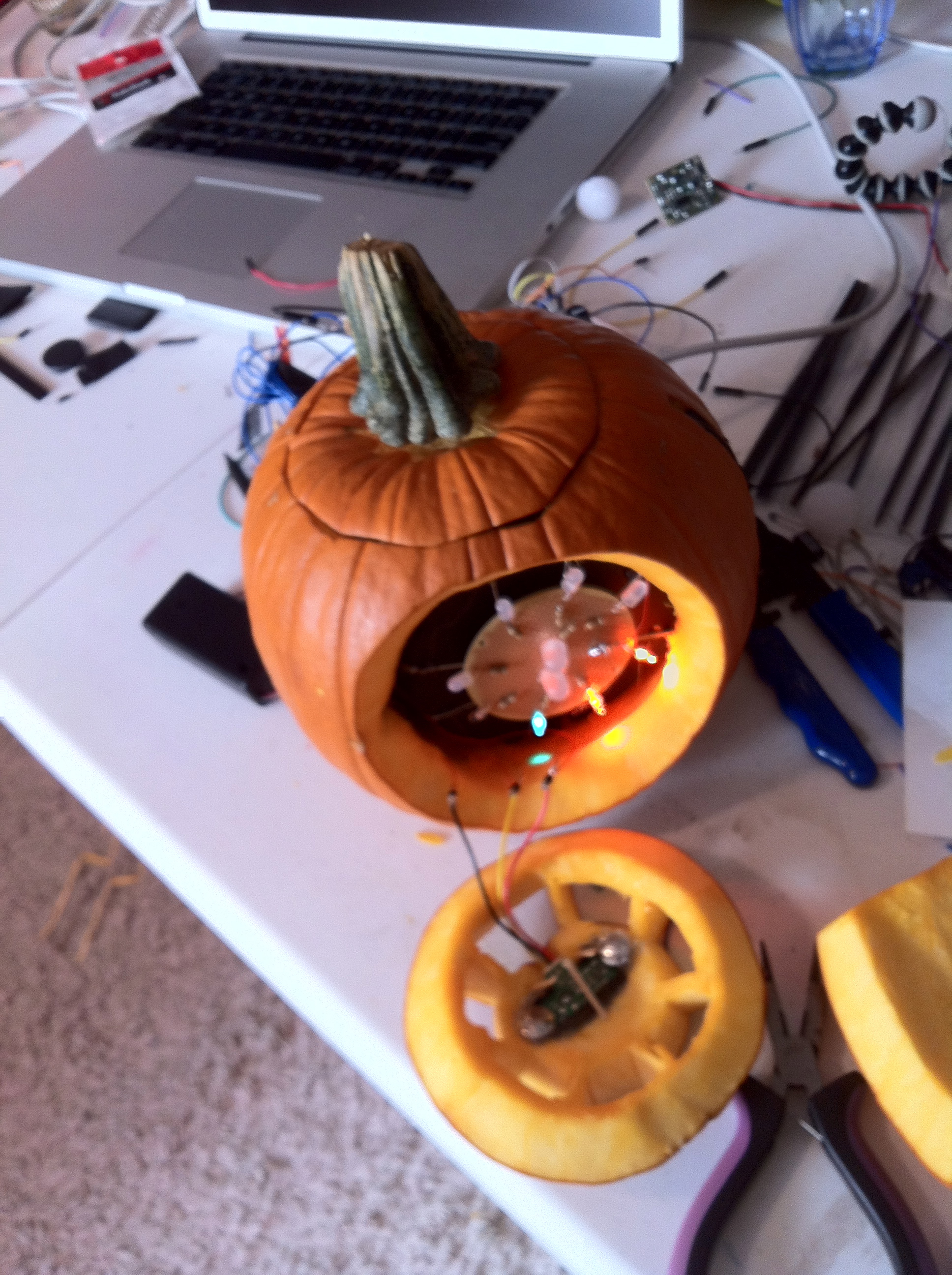
    and my code:

    /*Proto-Pumpkin
      pComp*/
    
    #include <Servo.h>
    
    Servo myservo; 
    
    int potPin = A1;   //analog pin used to connect the potentiometer
    int val;  //variable to read the value from the analog pin
    
    int timer = 500;
    int sensorPin = A0;
    int sensorValue = 0;
    int ledPin = 11;
    
    int brightness = 0;    // how bright the LED is
    int fadeAmount = 3;    // how many points to fade the LED by
    
    boolean arraySwitch = false;
    
    int pinArray[] = { //array of pins for colorful lights
      10,9,8,7,6,5,4,2
    };
    int counter=0;
    int count=0;
    
    void setup () {
      Serial.begin (9600);
      pinMode(ledPin, OUTPUT);
      pinMode(sensorPin, INPUT);
      myservo.attach(3);  //attaches the servo on pin 3
    
      for(int count=0; count<8; count++){
        pinMode(pinArray[count], OUTPUT);
      }
      delay (2000); // it takes the sensor 2 seconds to scan the area around it before it can detect presence.
    }
    
    void loop (){
    
      Serial.println (sensorValue);
    
      val = analogRead(potPin);  //reads value of potentiometer
      val = map(val, 0, 1023, 0, 179);  //scale it to use with servo
      myservo.write(val);
    
      sensorValue = analogRead(sensorPin);
      if(sensorValue > 160){
        arraySwitch = true;
      }
      if(arraySwitch == true){
        lightFade();
        counter++;
        if(counter >= 5){   //control how long agitation lasts
          arraySwitch = false;   //turn led array off
          counter = 0;   //reset counter
          brightness = 0;   //reset brightness
         fadeAmount = 5;    //reset fadeamount 
        }
      }
      else {
        lightGlow();
      }
    
    }
    
    //CIRCULAR LED ARRAY
    void lightFade(){
      int counter = 0;
      for(int i=0; i<10; i++){
        digitalWrite(pinArray[i],HIGH);
        digitalWrite(pinArray[i-2],LOW);
        delay(80);
      }
    }
    
    //BREATHING RED LIGHTS
    void lightGlow(){
     analogWrite(ledPin, brightness);
      brightness = brightness + fadeAmount;
      if (brightness == 0 || brightness == 255) {
        fadeAmount = -fadeAmount ;
      }
      // wait for 30 milliseconds to see the dimming effect
      delay(30);
    }
     
  • Unknown's avatar

    mónica arias. 12:02 pm on November 4, 2011 Permalink | Reply  

    the mac-o-lantern is alive! 

    The mac-o-lantern thinks it has a little Pentium heart <3. So to light up your pumpkin you need to treat it just like a computer. When you’re not using it, it’s in sleep mode, fading in and out (breathing). To wake it up  you need to push its right patch, and a white light will turn on (simulating when it’s on). Then it has a little mouse. When you move it over the switch, it will connect to the internet (dial-up connection tones). Then, you need to click the button on its left patch, and it will download the Halloween software. A beeping sound indicates when the download is done. When it finishes downloading… you can now turn off the lights and the pumpkin will light on, and it will be ready to light up the night!

    This slideshow requires JavaScript.

    The connections:

    And here’s my baby code:

    
    // DECLARE BREATHE
     int ledBreathe = 6;
     int buttonPin = 3; // the number of the pushbutton pin
     int buttonState = 0; // variable for reading the pushbutton status
     int brightness = 0; // how bright the LED is
     int fadeAmount = 5; // how many points to fade the LED by
    
    // DECLARE REED + SPEAKER SWITCH
     int reedPin = 2; // the number of the reed switch pin
     int reedState = 0; // variable for reading the reed status
     int speaker = 8;
    
    // DECLARE BUTTON CLICK
     int buttonStateD = 0; // variable for reading the pushbutton status
     int buttonPinD = 13; // the number of the pushbutton pin
     int ledGreen1 = 4; // the number of the LED pin
     int ledGreen2 = 5; // the number of the LED pin
     int ledGreen3 = 12; // the number of the LED pin
     int ledGreen4 = 7; // the number of the LED pin
    
    // DECLARE LIGHT SENSOR
     int analogPin = 0;
     int ledFire1 = 10;
     int ledFire2 = 9;
     int ledFire3 = 11;
     int val = 0;
    
    // -------------------------------------------------------------
     // -------------------------------------------------------------
    
    void setup(){
     Serial.begin(9600);
     // BREATHE
     pinMode(ledBreathe, OUTPUT);
     pinMode(buttonPin, INPUT);
    
    // REED SWITCH
     pinMode(speaker, OUTPUT);
     pinMode(reedPin, INPUT);
    
    // BUTTON CLICK
     pinMode(ledGreen1, OUTPUT);
     pinMode(ledGreen2, OUTPUT);
     pinMode(ledGreen3, OUTPUT);
     pinMode(ledGreen4, OUTPUT);
     // initialize the pushbutton pin as an input:
     pinMode(buttonPinD, INPUT);
    
    // LIGHT SENSOR
     pinMode(ledFire1, OUTPUT);
     pinMode(ledFire2, OUTPUT);
     pinMode(ledFire3, OUTPUT);
    
    }
    
    // -------------------------------------------------------------
     // -------------------------------------------------------------
    
    void loop(){
    
    // LIGHT SENSOR
     val = analogRead(analogPin); // Read the value (amount of light) from photocell
     Serial.println(val);
     click();
     breathe();
     sound();
    
    if(val
    
    digitalWrite(ledGreen1, LOW);
     digitalWrite(ledGreen2, LOW);
     digitalWrite(ledGreen3, LOW);
     digitalWrite(ledGreen4, LOW);
     analogWrite(ledFire1, random(120)+135);
     analogWrite(ledFire2, random(120)+135);
     analogWrite(ledFire3, random(120)+135);
     delay(random(100));
     Serial.println("high");
     }
    
    else{
    
    analogWrite(ledFire1, LOW);
     analogWrite(ledFire2, LOW);
     analogWrite(ledFire3, LOW);
     Serial.println("low");
     }
    
    }
    
    /* -------------------------------------------------------------
     ALL THE MAC-O-LANTERN FUNCTIONS
     ------------------------------------------------------------- */
    
    // BREATHE FUNCTION
     void breathe(){
     buttonState = digitalRead(buttonPin);
    
    if (buttonState == LOW){
     analogWrite(ledBreathe, brightness);
     brightness = brightness + fadeAmount;
     if (brightness == 0 || brightness == 255) {
     fadeAmount = -fadeAmount ;
     }
     delay(30);
     }
    
    if (buttonState == HIGH) {
     digitalWrite(ledBreathe, HIGH);
     delay(5000);
    
    }
     }
    
    // -------------------------------------------------------------
    
    // CLICK FUNCTION
     void click(){
    
    buttonStateD = digitalRead(buttonPinD);
    
    if (buttonStateD == HIGH) {
    
    digitalWrite(ledGreen1, HIGH);
     delay(1000);
     digitalWrite(ledGreen2, HIGH);
     delay(2000);
     digitalWrite(ledGreen3, HIGH);
     delay(3000);
     digitalWrite(ledGreen4, HIGH);
     delay(1000);
     digitalWrite(ledGreen1, LOW);
     digitalWrite(ledGreen2, LOW);
     digitalWrite(ledGreen3, LOW);
     digitalWrite(ledGreen4, LOW);
     delay(500);
     digitalWrite(ledGreen1, HIGH);
     digitalWrite(ledGreen2, HIGH);
     digitalWrite(ledGreen3, HIGH);
     digitalWrite(ledGreen4, HIGH);
     delay(500);
     digitalWrite(ledGreen1, LOW);
     digitalWrite(ledGreen2, LOW);
     digitalWrite(ledGreen3, LOW);
     digitalWrite(ledGreen4, LOW);
     delay(500);
     digitalWrite(ledGreen1, HIGH);
     digitalWrite(ledGreen2, HIGH);
     digitalWrite(ledGreen3, HIGH);
     digitalWrite(ledGreen4, HIGH);
     delay(500);
     digitalWrite(ledGreen1, LOW);
     digitalWrite(ledGreen2, LOW);
     digitalWrite(ledGreen3, LOW);
     digitalWrite(ledGreen4, LOW);
     delay(500);
     digitalWrite(ledGreen1, HIGH);
     digitalWrite(ledGreen2, HIGH);
     digitalWrite(ledGreen3, HIGH);
     digitalWrite(ledGreen4, HIGH);
    
    tone(speaker, 2000);
     delay(100);
     noTone(speaker);
     delay(100);
     tone(speaker, 3000);
     delay(100);
     noTone(speaker);
     delay(100);
    
    }
     else{
    
    noTone(speaker);
     }
     }
    
    // -------------------------------------------------------------
    
    // REED PLUS SPEAKER FUNCTION
    
    void sound(){
     reedState = digitalRead(reedPin);
     if (reedState == HIGH) {
     tone(speaker, 200);
     delay(2000);
     tone(speaker, 500);
     delay(2000);
     tone(speaker, 800);
     delay(2000);
     tone(speaker, 1100);
     delay(4000);
     tone(speaker, 1600);
     delay(500);
    
    }
     else{
    
    noTone(speaker);
     }
     }
    
    // -------------------------------------------------------------


  • Unknown's avatar

    strawberrymillefuille 6:37 am on November 4, 2011 Permalink | Reply  

    midterm pumpkin 

    Initial sketches:

    initial sketches

    Initial ideas were a pumpkin with leds embedded on the rind to create an ‘inverted’ lit up face and a disney-esque magical castle pumpkin where if you walked past it it would light up to form a shooting star (starting from the star, and then spreading outwards like the barograph example)

    After thinking a long time, I decide to come up with a pumpkin pie idea:

    pumpkin pie and slice

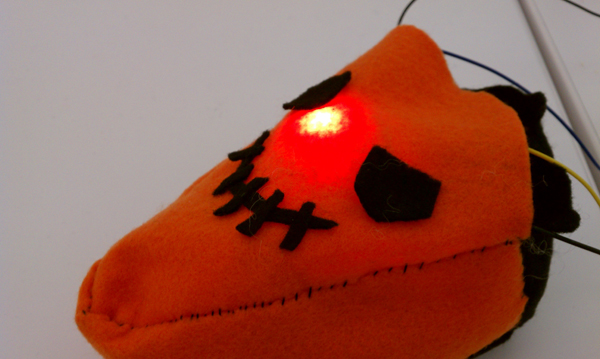
    It works like this: inside the pie slice would be pin13 led and the pir motion sensor to ‘lure’ unsuspecting people to the pie-slice….. once the motion is triggered, the larger pie-face would light up farther away. I decided to make it out of felt and aluminium foil, to keep to the handmade look

    pir motion sensor

    The good part about having a seperate slice and also stuffing was that it helped hide the sensor and decrease sensitivity. Here is the shield I made for the sensor, underneath the orange felt is a thin layer of aluminium foil.

    Initial tests:

    pie slice lure test

    The giant red leds from mad scientist kit lit up really brilliantly and well

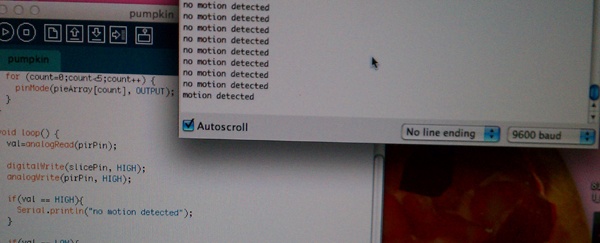
    serial monitor checking

    I used the pull-up switch method for the pir motion sensor which was always on ‘high’

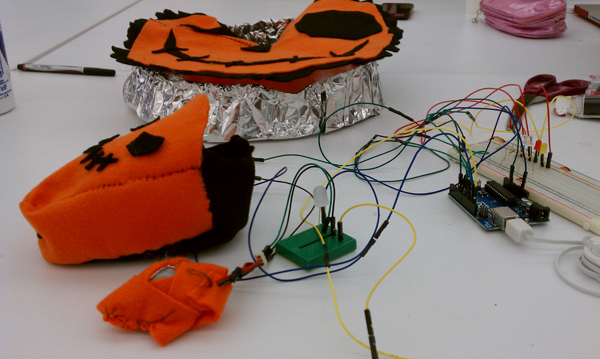
    full test setup

    Full test setup with both the pie slice and pie face – I had a lot of problems with the pie face because the leds weren’t bright enough to see through the fabric!!!! I should’ve gotten the larger leds like that red one instead of the smaller leds which didn’t really show up as well. In the final video I lifted the covering a little so you could see the leds underneath.

    Final video:

    http://vimeo.com/31586631

    Final code:

    http://www.mediafire.com/?btjqyta3wyqorpb (zipped)


  • Unknown's avatar

    Yury Gitman 12:12 am on October 31, 2011 Permalink | Reply  

    For Next Class 

    Hi All,

    I’m just reviewing to make sure everyone is on the same page.

    In the next class you are coming in with you WORKING project.  You DO need blog post documenting your project.

    The working project is do next class.  The blog post can be turned in the following class.  BUT, it’s always easier to document while your project still works well and is fresh to the mind.

    The Blog Post should have:
    1) Project Name
    2) A photo of the electronics
    3) A photo of the final project
    4) A short video demonstrating it. [More in video below]
    5) The code you used.

    Regarding the video, it should:
    Be 60-90 seconds long.
    Contain the project title [either with a graphic or via voice over)
    Demonstrate the concept and function.

    This does not have to be a perfect “Pixar-quality” video. It just needs to contain the above.  It can be done very well with a careful long-take, with a voice over.
    The video should be posted on Vimeo or google and then embedded in to

    Bring to next class:

    1) The LOL Shield. We will be soldering them.

    2) A power strip if you have one. I’ll try to bring one too.

     
  • Unknown's avatar

    yongjaelee2011 5:25 pm on October 28, 2011 Permalink | Reply  

    PIR Motion Sensor 

    https://docs.google.com/present/view?id=0AcwFEsZiA2XlZGdmNjl4cWtfMWY2NGh4cGd4

     
  • Unknown's avatar

    aisencc 5:10 pm on October 28, 2011 Permalink | Reply  

    Toccata CalaBach 

    Toccata Calabaza is an interactive pumpkin design that has different functions based on three inputs. A motion sensor, when triggered plays the Toccata and Fugue in D minor. When the night falls a photoresistor triggers the light inside the pumpkin. A temperature sensor is set to change the lights to flickering orange when it gets colder outside.

    Some of the challenges I found in making this pumpkin is that the PIR sensor is too sensitive, so the the Toccata plays constantly. I will have to take off the lens, and perhaps the sound will be more accurate to movement. Another challenge is better representing the chill of the ghost with more than just an orange flicker. Some positive aspects of the project have been learning to compose with PWM, and having to do more research on motion sensing. I’m excited to learn more about music tones with PWM pins.

     
  • Unknown's avatar

    yongjaelee2011 4:30 pm on October 28, 2011 Permalink | Reply  

    Paper Halloween Pumpkin 

    1) Project Title:

    Paper  Halloween Pumpkin

    2) Concept:

    Based on a users distance and interaction, my pumpkin will display different colors to create different mood. Also, there will be sound to make people surprise or scared.

    First of all, yellow color will be shown. When a motion sensor detect a user, color will change to red. There will be photo sensor that will activate the multi-mouse led lights.

    Once a user shake my pumpkin, it will play a music.

    3)My Experience:

    Working with codes is not easy for me. I will have to combine different function of codes to make my pumpkin alive.

     
  • Unknown's avatar

    Catalina 4:30 pm on October 28, 2011 Permalink | Reply  

    Pumpkin-Sky Lamp 

    My idea is to create a pumpkin lamp.
    The lamp consist on 3 small pumpkins that interact with each other and they also respond to it’s environment using the motion sensor and the photocell.

    The one in the middle will have little holes, like the sky, with blue LED’s inside, and will light as knight rider when the photocell is activated. It’ll also have a motion sensor which will respond lighting the RGB lights that are inside the other two pumpkins, changing colors.

    The most challenging part will be to  solder everything because I’ve never done it before.
    And the most interesting and fun part so far, has been to make the photocell work and react to the changes of light intensity inside the room.

     
  • Unknown's avatar

    firmread 4:24 pm on October 28, 2011 Permalink | Reply  

    Boo!!! I’m not a pumpkin! 

    midterm project of : Firm Tharit Tothong
    project name : Boo!!! I’m not a pumpkin!

    This pumpkin take a character like a ghost in Mario game. (this guy )

    Basically, the idea is the pumpkin going to do something when you’re not there.
    Initial ideas now are to use proximity sensor to detect people and it hide itself if there is someone there, while it casually lit up when nobody nearby.
    Also, it make some sound this sound is refer to Ghost house theme in Mario game and the beat is an analogy of the heartbeat of Boo. So when no body is closed to it, the beat goes slow because it’s relax. And goes more upbeat if there is someone nearby.

    documentation video

     #include "pitches.h"
     int speaker = 5;
     int bulb = 6;
     int lightPin1 = 3;
     int lightPin2 = 4;
     int brightness = 0;
     int fadeAmount = 5;</code>
    
    // notes in the melody:
     int melody[] = {
     NOTE_B3, NOTE_CS4, NOTE_A3, NOTE_C4, NOTE_B3 ,NOTE_CS4, NOTE_A3, NOTE_C4};
    
    // note durations: 4 = quarter note, 8 = eighth note, etc.:
     int noteDurations[] = {
     4, 4, 4, 4,4,4,4,4 };
    
    void setup() {
     pinMode(speaker, OUTPUT);
     pinMode(bulb, OUTPUT);
     }
    
    void loop() {
     note();
     fade();
     }
    
    void note(){
     for (int thisNote = 0; thisNote < 8; thisNote++) {
    
    // modulate music speed through proximity sensor
     int tempo = map (analogRead(0),10,400,300,4000);
     int noteDuration = tempo/noteDurations[thisNote];
     tone(speaker, melody[thisNote],noteDuration);
     int pauseBetweenNotes = noteDuration * 1.30;
     delay(pauseBetweenNotes);
     // stop the tone playing:
     noTone(speaker);
     }
     }
    
    void fade(){
     int brightness = map (analogRead(1),10,250,10,255);
     analogWrite(bulb, brightness);
     }


  • Unknown's avatar

    danSelden 4:23 pm on October 28, 2011 Permalink | Reply  

    pumpkinROBOT 

    The concept was actually derived from the likes of the Google Chrome icon… a metal sphere with an “eye” in the center. The pumpkinRobot won’t do anything super amazing and at first glance will seem to only have an eye with a pulsating internal light.  However, upon its detection of someone’s physical presence, it’s light will immediately turn flashing red as panels emerge from it’s sides with flashing LEDs.  After some time the panels will recede back into the form of the pumpkin and the internal light will return to its normal state.

    2-3 Sentences about the most challenging and most interesting aspects of the project:
    This has been difficult to build… and while I have built out the circuits for my RGB LEDs (the pulsating interior) and the panel LEDs… the other mechanics have been difficult. I’ve been testing with a button switch but plan on changing the trigger to a sensor once everything works.

    The panel mechanism has been extremely challenging. At first I decided I would need servo motors to push and pull the panels into place… after talking with peers I decided a linear actuator (piston like screw pump) or a solenoid pump would be better since they operate in a single direction and would be easier to integrate into the pumpkin innards. Unfortuantely linear actuators start around $100 and the solenoid pump I picked up is too small to really do what I need it to. Thus, I am back to servo motors… and continuous ones at that, so I need to figure out how to map the range I need and find a way to engineer the push/pull mechanism. (YIKES).

    The only other trouble I ran into was with the RGB light cycle.  While the cycle works fine… breaking out of it mid-cycle to switch into a flashing red display has been difficult and I’m still troubleshooting. Even by including break statements within the cycle code, I was only able to interfere at certain points but would not be able to kill the actual loop.  I hope to resolve this soon or I’ll just include a different mechanism.

     
  • Unknown's avatar

    mrcansler 4:22 pm on October 28, 2011 Permalink | Reply  

    Pumpkinstein, eater of pumpkins (Noa and Aaron) 

    Pumpkinstein is a life loving pumpkin that loves to eat and receive a lot of attention.  Pumpkinstein makes happy sounds when you rub his ears, which are connected to pots and speakers.  If you walk away, this is detected by a maxsonar sensor and his eyes turn red and angry, but if you are close, they are peaceful and blue.  If you feed him candy, it interrupts a led/photo resistor circuit and his eyes blink in happiness.

    The challenges so far have been figuring out the timing on potentiometers and speakers that make up the pumpkins ears.  It’s been complicated making them both only react when touched, and not just running all the time.  The other tricky part has been taking the simpler code from all separate sensors and combining them all together to play nice.

     
  • Unknown's avatar

    hirumi 4:22 pm on October 28, 2011 Permalink | Reply  

    Harry Potter Pumpkin 

    1. Ze Harry Potter Pumpkin

    2. This magical pumpkin lights up and shoots spells based on how close a person is to the pumpkin. The eyes and wand of the pumpkin are LEDs and a sound recorder plays back 3 different spells.

    3. I was having a lot of issues with the PIR sensor, so I switched to the miniphoto cell. This actually ended up being a good thing, because I can assign different values based on distance instead of just one with the PIR. The RGB LEDs make it more playful and integrates emotionality to the pumpkin; the closer you get to it, the more aggressive the spells get.

    I haven’t had success with the sound recorder just yet. I’m missing the JST female connector, but with the new soddering skills we’re picking up today, I should be able to work around it. There’s also something funky going on with the wand part. It lights up, but its super dim.

     
  • Unknown's avatar

    mónica arias. 4:22 pm on October 28, 2011 Permalink | Reply  

    the mac-o-lantern. 

    The mac-o-lantern thinks it has a little core duo heart <3. Hence, it acts just like a computer. It doesn’t have a button to turn it on, so you just need to give it a little shake, and a white light will turn on (simulating an apple computer when it turns on). Then it has a little mouse. When you move it around, it will find the spot and connect to the internet. Then, you need to click the button on the mouse, and it will download the Halloween software. When it finishes downloading… THEN the pumpkin will light on, and it will be ready to light up the night. After it’s on, when people walk in front of it, it flickers its eyes, trying to lure them with its affordance… just like a real apple computer would do.

    This was my inspiration:

    rough sketch of the mac-o-lantern.

    I really wanted to add sound to the project, but all the instructions for the Twig Sound Recorder were so confusing. I thought sound would really add up to the concept (with the sounds of turning on, connecting to the internet, finishing downloading the software), so it was difficult bringing it down to just lights. The code in general was also a bit tricky, since there’s a lot of if’s and a lot of led’s. HOWEVER, the tricky/difficult parts are also the most interesting ones! But the best part overall was coming up with a concept that both makes sense, and makes me happy.

     
  • Unknown's avatar

    Jun Sik (Jason) Kim 4:21 pm on October 28, 2011 Permalink | Reply  

    Stupid Pumpkin 

    1) Project title: Stupid Pumpkin

    2) 2-3 Sentences explaining concept.

    My project is entitled Stupid Pumpkin because it is a pumpkin that people want to hit. It uses numerous LEDs using a shift register and uses blink, fade, multicolored, etc. to show its stupidness. It also has a motor that also turns according to the direction the pumpkin is hit to represent the pumpkin “seeing stars” after he gets hit. I’ve also used LEDs to show the pumpkin crying after he is it. Potentiometers are used so that people can change the pumpkin’s eye color.

    3) 2-3 Sentences on most challenging and most interesting parts of your experimentations.

    It was the first time I was using a shift register and a servo motor. I knew I wanted to use a lot of LEDs but my Arduino could only support so many output pins therefore I used the shift register to connect 8 LEDs to represent the mouth. Understanding the concept of the shift register was quite challenging. Another challenging part was working with the servo motor’s angles. I wanted to control the amount and the angle the servo motor turns and I had to work with a code that detected which numbers represented the turning of the servo motor. What is fun about my project is the servo motor turning according to which side the pumpkin is hit and that the pumpkin cries and makes a sad smiley face when it is it.

     
  • Unknown's avatar

    Fred Andrade 4:20 pm on October 28, 2011 Permalink | Reply  

    Haloweeeeeeeeee 

    Hi there 🙂

    My pumpkin will henceforth be known as

    Kitteh

    The concept is to explore the reactions of animals to recreate life in my pumpkin. I hope to make it blink naturally and breath steadily during its relaxed state, and make its eyes and breath very irregular when it’s startled.

    The most challenging aspect so far was to unify all four sketches into a single one. The most interesting has been to learn about randomizing numbers and how that works. I used randomizing for the blinking and the breath.

    ~Freddie

     
  • Unknown's avatar

    Fred Andrade 6:05 pm on October 26, 2011 Permalink | Reply  

    Fun toy worth looking at 


    http://www.gosphero.com

     
  • Unknown's avatar

    firmread 7:30 am on October 23, 2011 Permalink | Reply  

    This and that on carving pumpkin 

    I’ve never done this before so I did a little bit research,,,

    How to Carve a Pumpkin for Halloween
    (series of how to video)

    How to Make Jack-O-Lanterns Last Longer
    (short tip article)

    Just wanna share, so you know 🙂

     
  • Unknown's avatar

    danSelden 8:35 am on October 20, 2011 Permalink | Reply  

    R2D2 Pumpkin!!!! Amazing 

    Had to post this… came across it on youtube while researching sound recording things…

     
    • rachel's avatar

      rachel 4:50 am on October 21, 2011 Permalink | Reply

      okay that makes america’s obsession with halloween 100x cooler!!!!!!

c
Compose new post
j
Next post/Next comment
k
Previous post/Previous comment
r
Reply
e
Edit
o
Show/Hide comments
t
Go to top
l
Go to login
h
Show/Hide help
shift + esc
Cancel