Updates from February, 2011 Toggle Comment Threads | Keyboard Shortcuts

  • Unknown's avatar

    catherine 11:20 pm on February 7, 2011 Permalink | Reply  

    Writing Assignment about Lucy – 02/07/2011 

    1) Explain (in a nutshell) your code structure, logic and/or important parts.

    The code structure starts with identifying all variables. Then pairs or maps pitches to the amount of light coming through. The most important part of the code is the Serial.print function because it provides information from the photocell so you know if it’s working!


    2) What did you do that you feel is new, non-obvious and/or useful?

    Lucy makes a high pitch annoying noise that no one has ever made before. It is wretched. Lucy & Sam together are new/non-obvious because one is afraid of the dark and the other is afraid of the light, therefore they work together to protect each other. .

     
  • Unknown's avatar

    minho 11:19 pm on February 7, 2011 Permalink | Reply  

    Minho Illusion of Life Project 

    Charger scorpion

    1) My code is based on the first code of this link (http://www.arduino.cc/en/Tutorial/PlayMelody), I added melody arrays, then used switch and case object and If function.

    with If function it gets time line each dark an light situation has  3 steps. I also use map function, it controls time delay, so get more interaction with light.

    2) I think this structure what I made for my bug would be pretty useful for later, whenever I make things has a timeline and reaction by sensor.

     
  • Unknown's avatar

    Alvaro Soto 11:19 pm on February 7, 2011 Permalink | Reply  

    Questions week 3 

    link to Lightbird project

    1. Explain (in a nutshell) your code structure, logic, important, parts

    2. what did you do that you feel is new, non-obvious, and useful

    Answers

    1.The code structure is written in multidimensional arrays that store each one of the melodies that are triggered by the light sensor. The logic is a set of conditionals that calculate the time in which the sensor is reading light. We used this time to change from one stage (mood) to another, same logic applies to the time the sensor is not reading any values or reads values bellow a margin defined in the code.

    Is important to note that thanks to multidimensional arrays we developed a much cleaner, simple code.  One thing to develop further is a threshold at the last step of the logic in which the mood (death of the bird) cant be resolved. In other words once the bird is in the mood before death is inevitable to stop the array so at the end Lightbird will always die. (Take a look at the video) .

    2. We felt very good with our simple approach to the project, defining one of our previous sounds as the starting point. We also chose to used another device (Ipad) to compose the sounds and then put them in the code.

    Is useful the way we decided to prototype since it has a good quality but still has a “in process feeling” that give us the freedom to iterate multiple times after this one.


  • Unknown's avatar

    Lee 11:18 pm on February 7, 2011 Permalink | Reply  

    Explanation Questions 02.07.2011 

    Space squid of doom!

    Explain (in a nutshell) your code, structure, logic, important parts.
    The logic behind our code structure is built around the states of our creature. Whether it’s happy, neutral or upset. We identified the levels of brightness in which each state should be active. When the creature is in full darkness it is most content, if it stays in the state for determined length of time it will go into bliss mode. If the creature is in shadow, so mostly in darkness it’s neutral, if it starts getting lighter it gets upset. While upset it’s vocalizations will increase in pitch and tempo based ont he length of time it is in light and how bright it is. If it stays int he light too long it will die. Once dead the creature needs to be placed in full darkness for a length of time for it to revive.

    What did you do you feel is new, non-obvious, and useful.
    What we accomplished that’s new/useful is creating tones and vocalizations that can be increased in tempo and pitch to indicate in a kind sliding scale how happy or sad the creature is before reaching it’s extreme states of bliss and death.

     
  • Unknown's avatar

    lpercifield 11:18 pm on February 7, 2011 Permalink | Reply  

    In Class Writing Feb 7 

    You can see the homework post here.

    1. Explain (in a nutshell) the code; structure, logic, important parts.

    Basically the code starts with the arduino playing a set note. This note modulates up and down over a set period of time. The arduino records the brightness of the ambient light using a photo resistor. This value is then added or subtracted from the original note. The addition or subtraction is set to allow the “creature” to either want light or dark. In our code the “creature” is happiest at a lower note and is upset at a higher note. At a set point in the low scale of the code a vibrating motor is triggered to create a “purr” effect.

    An important part of the code is calculating the amplitude of the sounds and to control the rate at which the sounds modulate up and down. This is done to create a soothing effect. This helps to represent the mood of the creatures.

    2. What did you do that you feel is new, non-obvious, and useful

    The nature of the interaction and the way in which the feedback is represented is new and useful. The feedback from the photo resistor is buffered so that sounds don’t change immediately. The notes are completely generative in nature except of the initial starting point and the minimum and maximum settings. The application of a vibrating motor and its placement in the enclosure add a second dimension of sound to the experience.

     
  • Unknown's avatar

    Bree 11:17 pm on February 7, 2011 Permalink | Reply
    Tags: creature, , predator, prey   

    Creature prototype 1 freewriting 

    https://makingtoys.net/2011/02/07/i-shall-call-him-meat/


    1 -Explain your code

    As a team, we decided to make one creature a predator and the other its prey. The code we attempted to write had varying levels of behavior based on the abruptness of changes to the creature’s situations in a way that made it have apparent character.

    Since I worked primarily with the “prey” model (I call him “Meat”), I wanted my guy to exhibit the behaviors of a dayturnal prey animal. So, he’s pretty happy when there’s light and begins to panic when darkness falls. If there is abrupt darkness, he screams and the shock kills him. I also wanted to add a “Lazarus function” to revive him with a bright burst of light.

    After monitoring “normal”, “bright”, and “dark” values from my photoresistor, I started to structure the logic around “if this … then this”, writing functions for each. Then, I tried testing different pitches and lengths of tones to determine what sounds made the most sense. For example, I have the scream raise in pitch as a steady tone until it is almost unbearable to hear. It is followed by a crunchy “death” sound and silence. When he’s happy, however, he plays a Major 3-note progression, kind of like happy whistling. As his panic rises, the speed of his sounds increases to simulate frantic fear.

    The code relies heavily on conditional statements in order for the creature to respond to his situation and the degrees of change in it.

    2-What did you do that was innovative, non-obvious, and useful?

    I think making a sense of panic from the sounds was a bit non-obvious. One might think he should only get less happy-sounding, but I think if we are going to sell the idea that he is afraid of the dark because he might get eaten, he should have a sense of panic, almost like rapid breathing or heart-beats. Whether or not it is innovative, I am not sure, but I definitely think it is useful in telling the story of “Meat” and his antagonist.

    I also think the idea of having two creatures, one predator and one prey, completes a fuller narrative than “Meat” could do by himself. The fact that there is another creature “Eater” stalking him in the dark adds dimension to his character.

     
  • Unknown's avatar

    thisisvictorkim 11:17 pm on February 7, 2011 Permalink | Reply  

    In Class Writing 02/07/11 

    My Project

    “Explain (in a nutshell) your code structure, logic, important parts.”

    My code starts out by reading the room’s light and then creates a limit, based on the code, as far as how dark and how bright of light it will read. By using these parameters, it then plays different sounds based on how dark or light the photocell resistor reads.  It is a bit broken now, but if the resistor reads the highest capacity of brightness for 10 seconds consecutively then the speaker plays the intro to Bob Marley’s (RIP) song “Buffalo Soldier”.  This is done to simulate the utmost euphoric state of THC highness.  At its darkest state, the program plays a disenchanted, depressed sound to simulate sobriety.  Between these two sounds there are 5 more levels of THC intoxication represented by different sounds.

    “What did you do that you feel is new, non-obvious, and useful”

    This project is not useful whatsoever, let’s just get that out there.  However as far as new and non-obvious, my project was a left field approach to an assignment that called for the construction of a “creature” that responds to light and dark.  In the context of my project, the creature is both the stoner’s joint and his state of being.  Instead of a creature or plant that receives light to grow or be happy, my project uses light as a metaphor for a stoner’s lighter that he or she would use to light up a joint.  I thought this was a creative approach to this assignment.

     
  • Unknown's avatar

    Alvaro Soto 11:05 pm on February 7, 2011 Permalink | Reply  

    LightBird 

    This lightbird I made with Chris Piuggi needs to be fed with light and he would tell you if he is actually being fed. but you can not give him too much food because he can get full then depressed and finally die. although if you don’t give him food he will be angry and then sad. Eventually he will die. So lightbird you need to keep him in the right combinations.

    Download the code here:

     
  • Unknown's avatar

    Chris Piuggi 11:01 pm on February 7, 2011 Permalink | Reply  

    Light Bird 

    For this assignment we created a little bird who loves and feeds off of the light.

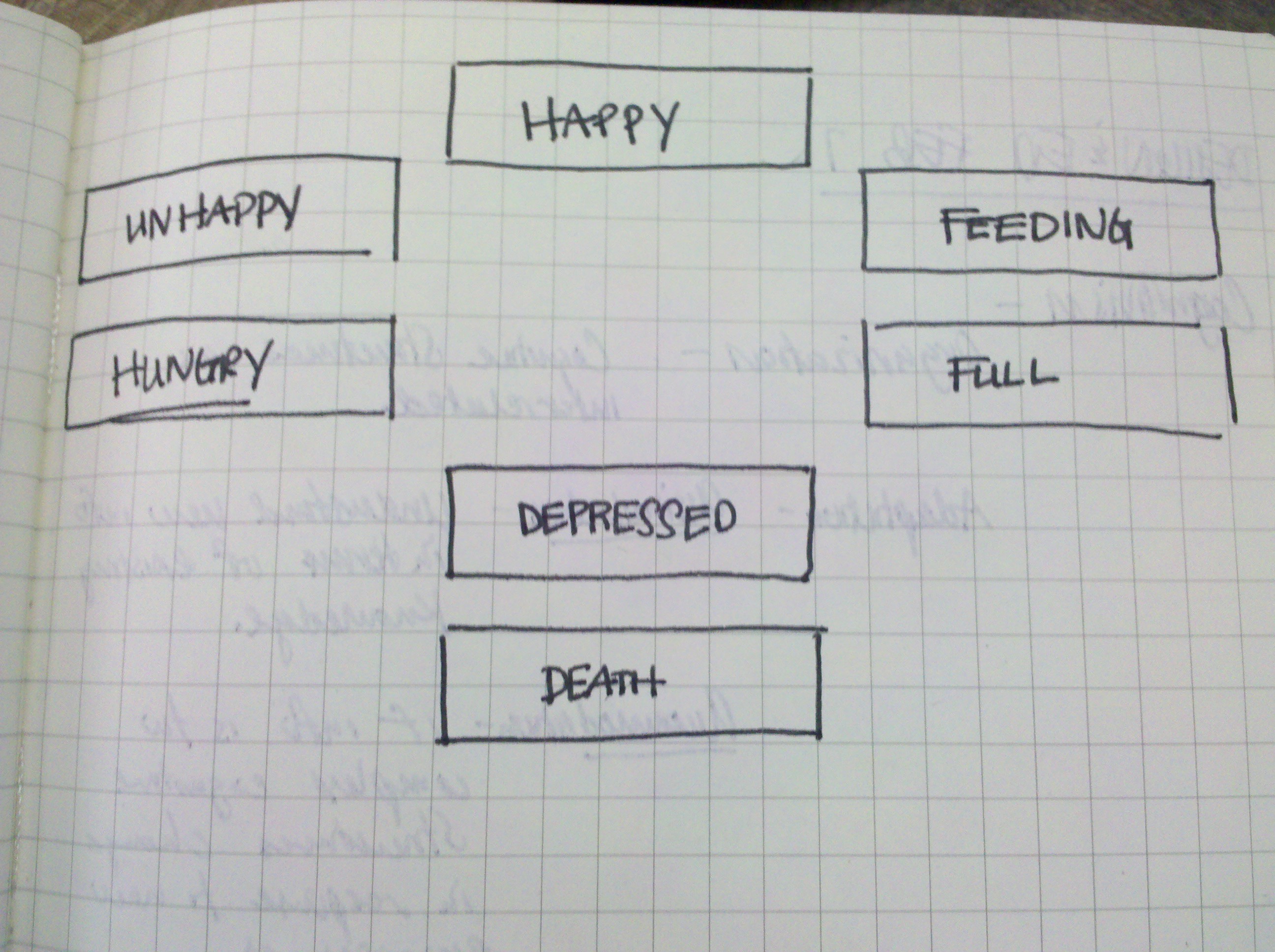
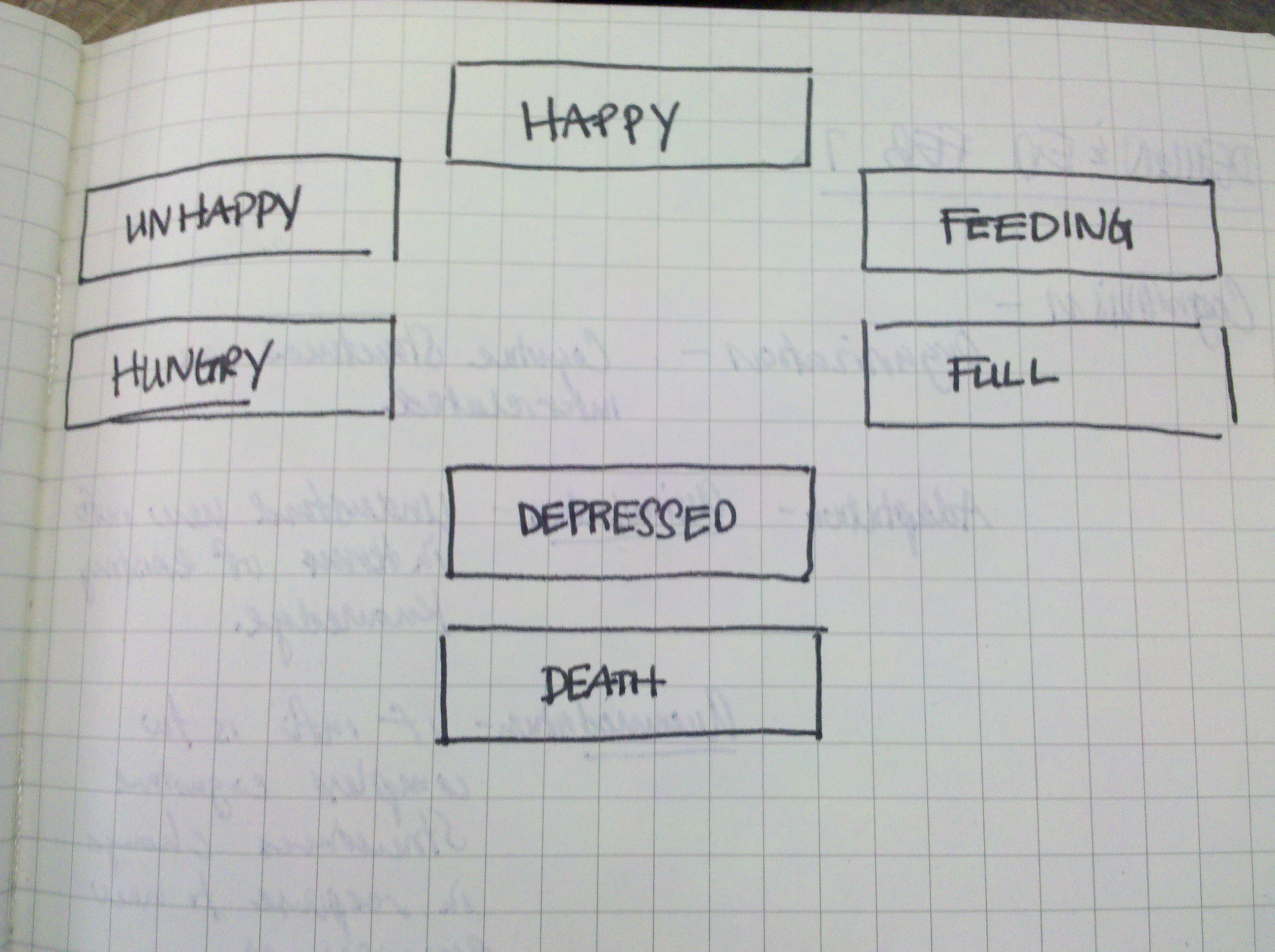
    The Bird has seven different emotions below is a chart of the emotions and how they work together.

    When the Bird is in ideal light he is happy, when he is in bright light he is feeding, and in dull light, he is unhappy. If you feed the bird too much light, he will become full, and if he says full for too long he will become depressed. Additionally, if the bird remains in dark light the bird gets hungry, and if it says hungry, the bird will become depressed. If depressed it is in danger of dying.

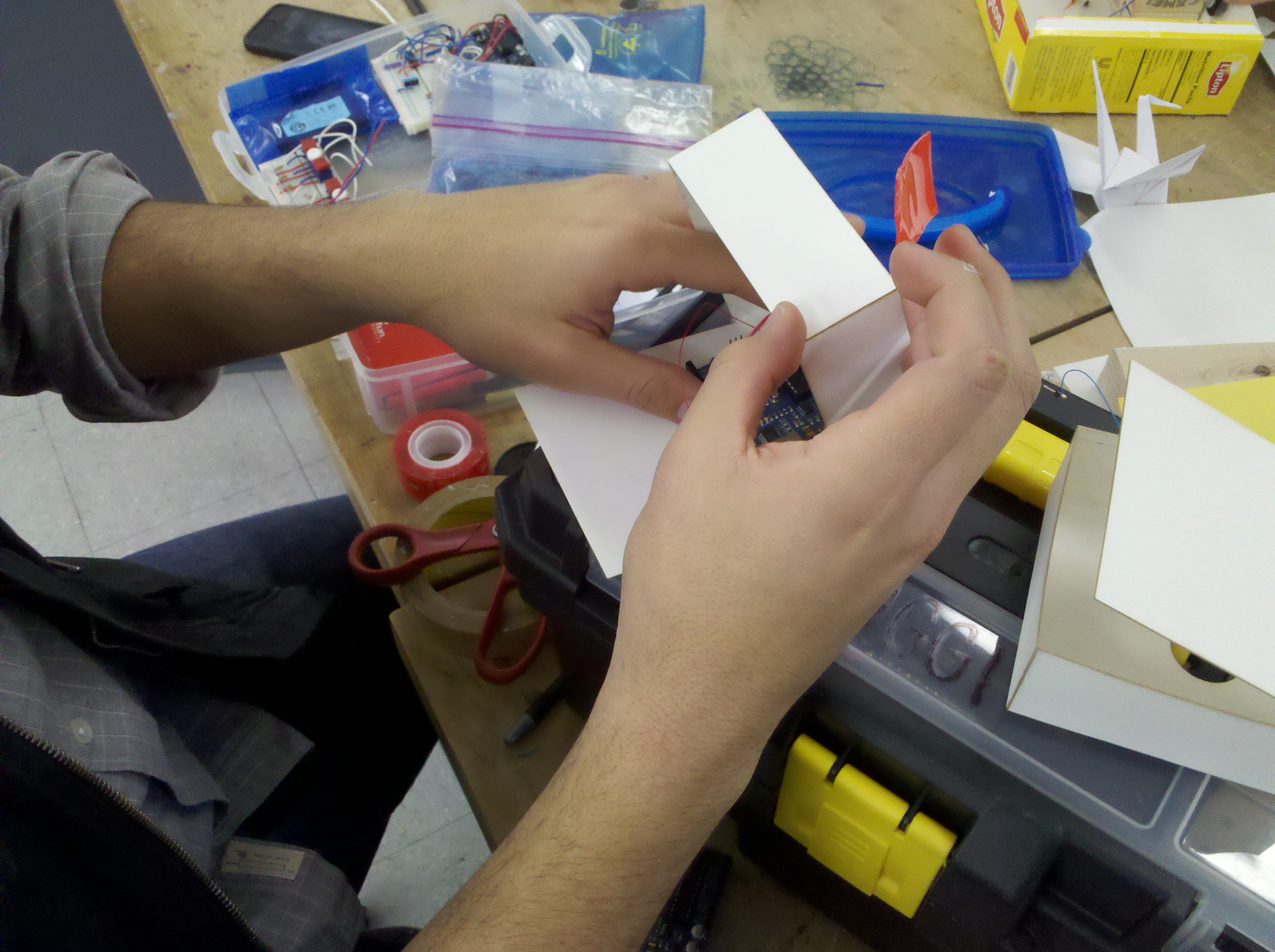
    Here are some shots of putting together our bird:

    download the code here »

     
  • Unknown's avatar

    scottpeterman 10:49 pm on February 7, 2011 Permalink | Reply  

    SHUT THOSE BABIES UP!!! 

    These are very noisy sonographs! These babies are yet unborn. But they are sooo whiny, crying so loud. One likes darkness. One likes light. If they get what they want they calm down and purr, like good babies do. If they don’t, they cry so loud!

    Arduino with photo resistor, 8 Ohm speakers, vibrating motor inside a plastic tub.

    (More …)

     
  • Unknown's avatar

    Oylum 10:38 pm on February 7, 2011 Permalink | Reply  

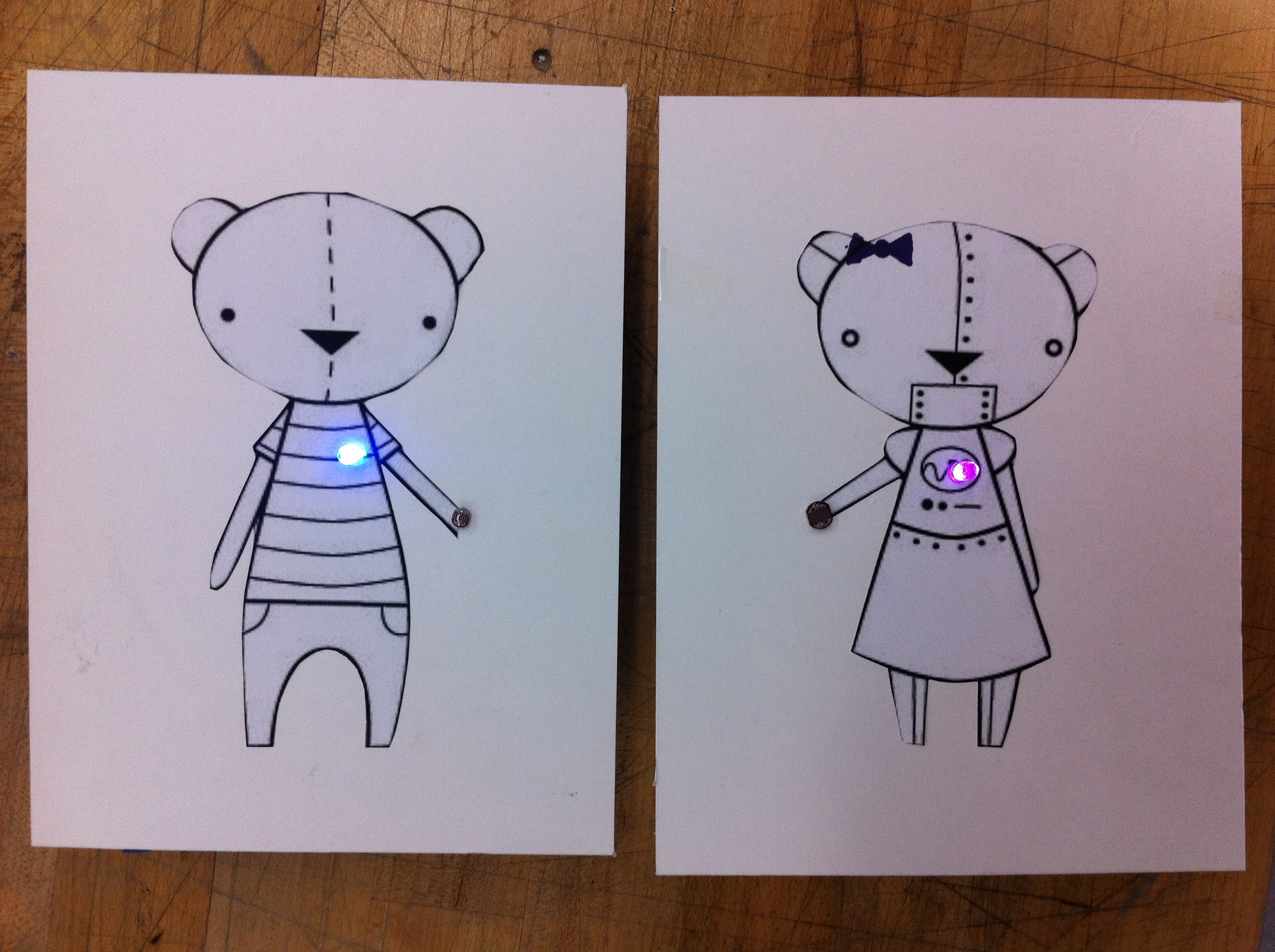
    Lucy&Sam are brothers and sisters… 

    Lucy loves being in light and she is so afraid of dark. On the other hand, Sam is a naughty boy that loves dark and gets crazy when it’s too light.

    Sam is my robot boy and Lucy is Kate’s robot girl.

    The sounds could have been much better I know, only if I could program sounds better in Arduino. Here is the code for it.

     
  • Unknown's avatar

    thisisvictorkim 10:36 pm on February 7, 2011 Permalink | Reply  

    Come On Baby Light My Fire 

    http://vimeo.com/19679426


    I composed a few of the sounds by just fiddling around with different types of chords using a MIDI keyboard and Garage band.


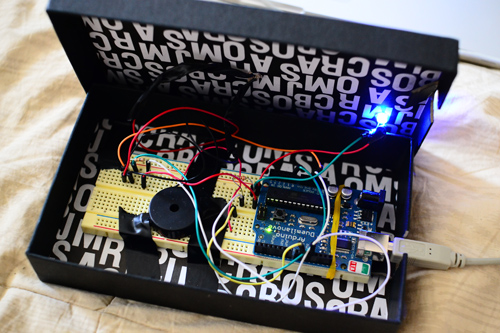
    After all the programming was done I laid the breadboard on top of two cigarette boxes in a Lipton tea box.  I also cut holes for the speaker and photocell.

    An illustration later and voila!  You got yourself a stoner!

    Here is the code

     
  • Unknown's avatar

    catherine 10:30 pm on February 7, 2011 Permalink | Reply  

    Lucy! 


    LUCY & SAM are noise making light sensitive bears! Lucy is my bear. Her sound is a little hard to detect because she’s just a young baby bear trying to find her voice.

    You can watch the video of Lucy & Sam here.

    You can view how Lucy works here.


  • Unknown's avatar

    Thom Hines 10:07 pm on February 7, 2011 Permalink | Reply  

    Light-Sensitive Noise Monster 

    http://vimeo.com/upload/video

    Working with the code we made last week to create different emotional gestures through sound, this week our task was to make creatures that responded to light using a photoresistor, either by loving light and hating dark, or hating light and loving dark. I partnered up with Bree Rubin to make two characters that were somewhat diametrically opposed. My creature is a predator of sorts that gets excited when darkness comes, as if that were the time it hunts. Bree’s creature is meant to be my creature’s natural prey, and so it fears the dark and loves the light.

    sound creature's lowly beginnings

    a monster in progress

    Another part of the assignment was that the light sensor wasn’t supposed to act as if it were a switch, but that changing light should affect it over time, in some sort of life-like way. Both of our creatures get happier or sadder based on their preferences, and these shifts happen over time. If it is light for a long time, my creature continues to get sadder and sadder. However, if there is an abrupt change in light levels, our creatures react in much stronger ways. For instance, if it is dark in the room but suddenly the lights come on bright, my creature will scream and very quickly be depressed. If, on the other hand, there is a lot of light and it suddenly gets dark, the creature will have a sudden burst of happiness and his mood will be shifted much quicker.

    Additionally, if either of our creatures are in their negative state for too long, they die, and can only be revived by making the room completely dark (in the predator’s case) or completely light (in the case of the prey).

    Here’s the code that runs the predator. The loop() handles all the logic and tracking of light levels and happiness and it runs various functions to indicate what emotion the speaker is supposed to convey.

    Also, here are my thoughtful written at the beginning of last class.

     
  • Unknown's avatar

    Yury Gitman 9:59 pm on February 7, 2011 Permalink | Reply  

    Toy Fair 2011 Feb: 13-16th 

    Image

     
  • Unknown's avatar

    minho 6:55 pm on February 7, 2011 Permalink | Reply  

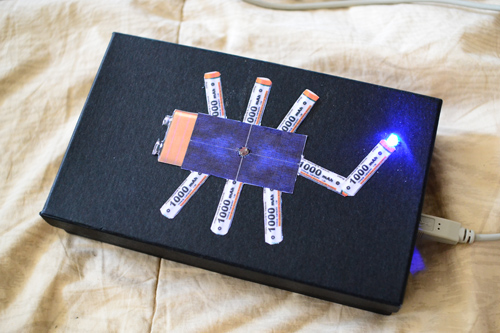
    Charger scorpion 

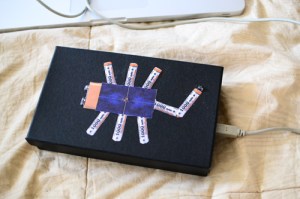
    He has solar panel body and battery organs, charging by light. When he gets full charged, his poisonous tail emits light.

    Charging speed depends on power of light, brighter light charges it faster with reaction. He dies in dark.

    #define  v     18000
    #define  x     10000
    #define  z     8000
    #define  c     3830    // 261 Hz
    #define  d     3400    // 294 Hz
    #define  e     3038    // 329 Hz
    #define  f     2864    // 349 Hz
    #define  g     2550    // 392 Hz
    #define  a     2272    // 440 Hz
    #define  b     2028    // 493 Hz
    #define  C     1912    // 523 Hz
    #define  D     1680
    #define  E     1500
    #define  F     1350
    #define  G     1200
    #define  A     1050
    #define  B     912
    // Define a special note, ‘R’, to represent a rest
    #define  R     0

    // SETUP ============================================
    // Set up speaker on a PWM pin (digital 9, 10 or 11)
    int speakerOut = 9;
    // Do we want debugging on serial out? 1 for yes, 0 for no
    int DEBUG = 1;

    int photocellPin = 0;     // the cell and 10K pulldown are connected to a0
    int photocellReading;     // the analog reading from the sensor divider
    int LEDpin = 11;          // connect Red LED to pin 11 (PWM pin)
    int LEDbrightness;
    int growspeed;
    int bN = 0;
    int bNcount = 0;
    int bNcount2 = 0;

    void setup() {
    pinMode(speakerOut, OUTPUT);
    if (DEBUG) {
    Serial.begin(9600); // Set serial out if we want debugging
    }
    }

    // MELODY and TIMING  =======================================
    //  melody[] is an array of notes, accompanied by beats[],
    //  which sets each note’s relative length (higher #, longer note)
    int hellom[] = {c,  c};
    int beats[]  = {16, 64};
    int dyingm[] = {  v,  R, z, v };
    int beats2[] = { 200, 8, 8, 32 };
    int happym[] = {  c,  C,  g,  e,  C,  g,  z,  e,  z,    c,  C,  g,  f,  C,  g,  z,  f,  z,     c,  C,  g,  e,  C,  g,  z,  e,  z,     d,  e,  f,  z,  f,  g,  g,  z,  g,  a,  a,  z,  C,  R};
    int beats3[] = { 16, 16, 16,  16, 8,  8, 16, 16, 16,   16, 16, 16, 16,  8,  8, 16, 16, 16,    16, 16, 16,  16, 8,  8, 16, 16, 16,     8,  8,  8,  8,  8,  8,  8,  8,  8,  8,  8,  8, 16, 16};
    int sadm[]   = {z,  x,  z,  z,  x,  x};
    int beats4[] = {36, 36, 36, 36, 36, 200};
    int yesm[]   = {d, b, E};
    int beats5[] = {8, 16, 32};
    int nom[]    = {B,  B,  B,  B,  B,  B};
    int beats6[] = {8,  8,  8,  8,  8,  8};

    int MAX_COUNT = sizeof(hellom) / 2;
    int MAX_COUNT2 = sizeof(dyingm) / 2;
    int MAX_COUNT3 = sizeof(happym) / 2;
    int MAX_COUNT4 = sizeof(sadm) / 2;
    int MAX_COUNT5 = sizeof(yesm) / 2;
    int MAX_COUNT6 = sizeof(nom) / 2;// Melody length, for looping.

    // Set overall tempo
    long tempo = 10000;
    // Set length of pause between notes
    int pause = 1000;
    // Loop variable to increase Rest length
    int rest_count = 100; //<-BLETCHEROUS HACK; See NOTES

    // Initialize core variables
    int tone1 = 0;
    int beat = 0;
    long duration  = 0;

    // PLAY tone1  ==============================================
    // Pulse the speaker to play a tone1 for a particular duration
    void playtone1() {
    long elapsed_time = 0;
    if (tone1 > 0) { // if this isn’t a Rest beat, while the tone1 has
    //  played less long than ‘duration’, pulse speaker HIGH and LOW
    while (elapsed_time < duration) {

    digitalWrite(speakerOut,HIGH);
    delayMicroseconds(tone1 / 2);

    // DOWN
    digitalWrite(speakerOut, LOW);
    delayMicroseconds(tone1 / 2);

    // Keep track of how long we pulsed
    elapsed_time += (tone1);
    }
    }
    else { // Rest beat; loop times delay
    for (int j = 0; j < rest_count; j++) { // See NOTE on rest_count
    delayMicroseconds(duration);
    }
    }
    }

    // LET THE WILD RUMPUS BEGIN =============================
    void loop() {
    // play each sound in order, with a pause between each one.
    photocellReading = analogRead(photocellPin);

    Serial.print(“Analog reading = “);
    Serial.println(photocellReading);
    Serial.println( growspeed);
    Serial.println(bNcount);
    Serial.println(bNcount2);

    LEDbrightness = 255;

    growspeed = map(photocellReading,0, 1023, 10000, 2000);

    if(photocellReading>300){
    bNcount2 = 0;
    bN = 0;
    bNcount = bNcount +1;
    if(bNcount == 4){
    bN= 2;
    }
    if(bNcount == 5){
    bN= 1 ;
    bNcount = 0;
    }

    }

    if(photocellReading<300){
    bNcount = 0;
    bN = 4;
    bNcount2 = bNcount2 +1;
    if(bNcount2 == 4){
    bN= 6;
    }
    if(bNcount2 == 5){
    bN= 5 ;
    bNcount2 = 0;
    }

    }

    switch (bN) {

    case 0:
    analogWrite(LEDpin, LOW);
    hello();
    break;

    case 1:

    analogWrite(LEDpin, LEDbrightness);
    happy();
    break;

    case 2:
    yes();
    break;

    case 3:
    // game4();
    break;

    case 4:
    analogWrite(LEDpin, LOW);
    no();
    break;

    case 5:
    analogWrite(LEDpin, LOW);
    dying();
    break;

    case 6:
    analogWrite(LEDpin, LOW);
    sad();

    break;

    }

    }

    void hello() {
    // Set up a counter to pull from melody[] and beats[]
    for (int i=0; i<MAX_COUNT; i++) {
    tone1 = hellom[i];
    beat = beats[i];

    duration = beat * tempo; // Set up timing

    playtone1();
    // A pause between notes…
    delayMicroseconds(pause);
    //noTone(speakerOut);

    }
    delay(growspeed);
    }

    void dying() {
    // Set up a counter to pull from melody[] and beats[]
    for (int i=0; i<MAX_COUNT2; i++) {
    tone1 = dyingm[i];
    beat = beats2[i];

    duration = beat * tempo; // Set up timing

    playtone1();
    // A pause between notes…
    delayMicroseconds(pause);
    //noTone(speakerOut);

    }
    delay(10000);
    }

    void happy() {
    // Set up a counter to pull from melody[] and beats[]
    for (int i=0; i<MAX_COUNT3; i++) {
    tone1 = happym[i];
    beat = beats3[i];

    duration = beat * tempo; // Set up timing

    playtone1();
    // A pause between notes…
    delayMicroseconds(pause);
    //noTone(speakerOut);

    }
    delay(8000);
    }

    void sad() {
    // Set up a counter to pull from melody[] and beats[]
    for (int i=0; i<MAX_COUNT4; i++) {
    tone1 = sadm[i];
    beat = beats4[i];

    duration = beat * tempo; // Set up timing

    playtone1();
    // A pause between notes…
    delayMicroseconds(pause);
    //noTone(speakerOut);

    }
    delay(2000);
    }

    void yes() {
    // Set up a counter to pull from melody[] and beats[]
    for (int i=0; i<MAX_COUNT5; i++) {
    tone1 = yesm[i];
    beat = beats5[i];

    duration = beat * tempo; // Set up timing

    playtone1();
    // A pause between notes…
    delayMicroseconds(pause);
    //noTone(speakerOut);

    }
    delay(growspeed);
    }

    void no() {
    // Set up a counter to pull from melody[] and beats[]
    for (int i=0; i<MAX_COUNT6; i++) {
    tone1 = nom[i];
    beat = beats6[i];

    duration = beat * tempo; // Set up timing

    playtone1();
    // A pause between notes…
    delayMicroseconds(pause);
    //noTone(speakerOut);

    }
    delay(2000);
    }

     
  • Unknown's avatar

    Lee 5:17 pm on February 7, 2011 Permalink | Reply  

    SPACE SQUID OF DOOOOOOM!!!! 

    So my Beep Boop creature is a squid. He loves the dark and hates the light. He’ll increasingly beep faster the longer he’s upset until he dies. He can be revived by being immersed in full darkness for a little while. He’ll get more excited the longer he’s in the dark.
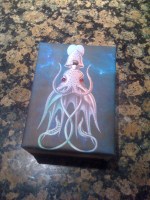
    ::BONUS::When he’s upset his eyes will blink red as well.

    #include "pitches.h"    //list of the frequencies of most notes
    int counter=0;
    
    int photoPin=0;
    int speaker=6;
    
    
    //the reading must be bellow each of these values to ellicit that emotion
    int excitedPoint=120;
    int neutralPoint=180;
    //higher than neutral results in dying
    
    int reading;  //holds the current photo reading
    String state="neutral";
    
    //using resistor: gold, red, green, brown
    
    boolean dead=false;
    int reviveCounter=0;  //counts how logn the dead creature has been in darkness
    
    // These are for the LED eyes
    const int ledPin =  13;
    int ledState = LOW;             // ledState used to set the LED
    long previousMillis = 0; 
    long interval = 1000;
    
    void setup(){
      Serial.begin(9600);
      pinMode(ledPin, OUTPUT);
    }
    
    void loop(){
      noTone(speaker);
      //checks to see what state the creature is in
      reading=analogRead(photoPin);
    
      if (readingexcitedPoint &amp;&amp; readingneutralPoint &amp;&amp; state!="screaming"){
        counter=0;
        state="screaming";
      }
    
      //Deal with the various states
      //is it dead?
      if (dead){
        Serial.println("DEAD");
        if (random(100)==0)
          PlayDeathGasp();
        interval = random(100,1300);
        RedEye(interval);
    
        //if it is in darkness logn enough, it should revive
        if (reading100){
            Serial.println("CHECK IT");
            //wait a few seconds between playing bliss sound
            if (counter%200==0) {
              PlayBliss();
            }
          }
          else if (counter%20==0){
            //if not, keep upping counter and play the exciting 
            PlayExcited();
          }
        }
    
        if (state=="neutral"){
          if (counter==1){
            PlayNeutral();  //play the sound
          }
          //if it's been neutral for a while, make sure some time passes between making sounds
          //then play it randomly
          if (counter&gt;200){
            if (random(0,100)==0)
              counter=0;  //reset counter
          }
        }
    
        if (state=="screaming"){
          if (counter%20==0)
            PlayScream(); 
          interval = 500;
          RedEye(interval);
          if (counter&gt;100){
            PlayDying();
            dead=true;
          }
        }
      }
    
      Serial.println(state);
      counter++;
      Serial.println(analogRead(photoPin));
      //Serial.println(counter);
    }
    
    void PlayNeutral(){
      //neutral tone sare played in a series of two.
      int notes[]={ 
        NOTE_D4, NOTE_B3, NOTE_A3, NOTE_F3, NOTE_DS3, NOTE_CS3                  };
      int start=random(0,2) *2;
      for (int i=start; i&lt;start+2; i++){
        tone(speaker, notes[i]);
        delay(500);
        noTone(speaker);
        delay(300);
      }
    }
    
    //&quot;I'm bursting with joy!&quot;
    void PlayBliss(){
      //oscilate between two ranges that keep moving up
      //originaly 512
      int startVal=512;
      int endVal=860;
      int range=100;
      int val=startVal;
      int incr=random(1,3);
    
      while(val&lt;endVal){
        //send it up
        int tempMax=val+range;  //how far up to go with this pass
        for (val; valtempMin; val-=incr){
          tone(speaker, val);
          delay(3);
        }
      }
    
      //hold the last value for a little while
      delay(500);
    }
    
    void PlayScream(){
      int scream[] = {
        NOTE_B4, 0, NOTE_G4, 0, NOTE_E4, 0, NOTE_D4                  };
      int screamDurations[] = {
        4,16,4,16,4,16,1                  };
    
      for (int thisNote = 0; thisNote endVal; i--){
        tone(speaker, i);
        delay(6);
      }
    
      //now create two beeps.
      noTone(speaker);
      delay(200);
      tone(speaker, 300);
      delay(500);
      noTone(speaker);
      delay(200);
      tone(speaker, 200);
      delay(500);
    }
    
    void PlayExcited(){
      int levelAdjust=map(reading,0,excitedPoint, 300,0);
      int toneA=NOTE_B4+levelAdjust;
      int toneB=NOTE_G5+levelAdjust;
    
      int counterAdjust=map(counter,0,100,0,40);
    
      for (int i=0; iendVal; i-=30){
        tone(speaker,i);
        delay(30000/i);
      }
      noTone(speaker);
      delay(500);
    
      //a few little burbles
      for (int i=0; i&lt;3; i++){
        PlayDeathGasp();
      }
    }
    
    //Burbles and gurgles
    void PlayDeathGasp(){
      tone(speaker, random(50,70));
      delay(random(500,1000));
      noTone(speaker);
      delay(random(500,1000));
    }
    
    //&quot;I'm coming back to life!&quot;
    void PlayRevive(){
      int startVal=50;
      int endVal=NOTE_D5;
    
      for (int i=startVal; i&lt;endVal; i+=30){
        tone(speaker,i);
        delay(30000/i);
      }
      noTone(speaker);
      delay(500);
    
      for (int i=0; i interval) {
        // save the last time you blinked the LED 
        previousMillis = currentMillis;   
    
        // if the LED is off turn it on and vice-versa:
        if (ledState == LOW)
          ledState = HIGH;
        else
          ledState = LOW;
    
        // set the LED with the ledState of the variable:
        digitalWrite(ledPin, ledState);
      }
    }
    
     
  • Unknown's avatar

    Bree 11:40 am on February 7, 2011 Permalink | Reply  

    I shall call him “Meat” 

    This is Meat. He is a bit of a nervous thing and really gets upset when the lights dim. Turn them off too quickly, and he screams. If he freaks out too much, he’s going to pass out and only a quick burst of light can wake him up.

    Why is he afraid of the dark? Because there are monsters out there…

    Meat gets ready for his housingThese are Meat's insides


    How does his little mind work?

    With very messy code.

    ————————————————————————————-

    ————————————————————————————-

    // Dayturnal “meat”

    // int vars
    int speaker = 9;

    int lastlight = 0;
    int light;
    int mood = 100;
    boolean happy = true;
    boolean scared = false;

    int deathCounter;
    boolean dead = false;

    void setup() {
    // set up pins and serial
    pinMode(0, INPUT);
    pinMode(9, OUTPUT);
    Serial.begin(9600);
    }

    void loop() {

    // check light sensor
    light = analogRead(0)*10;
    // make sure that value checking changes in light is same as light on first run
    // otherwise, it could falsely register a big change in light
    if(lastlight == 0) lastlight = light;

    // send values to serial
    Serial.println(“light: “);
    Serial.println(light);
    Serial.println(“mood: “);
    Serial.println(mood);
    Serial.println();

    mood = map(light, 0, 1000, 0, 1000);
    // run most of the code unless creature is dead

    // lazarus function
    if(dead){
    if(light – lastlight > 200) {
    dead = false;
    deathCounter = 0;
    // preyRelief();
    mood = 100;
    lastlight = 120;

    }
    }

    if(!dead) {

    // happiness follows light level
    if (mood >= 80){
    happy = true;
    }
    if (mood < 80){
    happy = false;
    scared = true;
    }

    if(light > lastlight) {
    mood+=5;
    }
    else if(light < lastlight) {
    mood-=5;
    }

    // sudden drop in light, OH NO!
    if(lastlight – light > 100) {
    preyScream();
    mood = 1;
    scared = true;
    }
    // sudden burst of light, OH JOY!
    if(light – lastlight > 100) {
    preyRelief();
    mood = 200;
    happy = true;
    }

    // if too little light, creature starts dying
    if(light < 50) deathCounter++;
    // otherwise, creature is recovering
    else deathCounter–;

    // if too little light for too long, DEATH!
    if(deathCounter > 20) {
    preyScream();
    death();
    dead = true;
    }

    // play normal noise on each loop
    preyNoise();
    // use line below instead if you don’t want the flat-line noise
    // when creature dies.
    if(!dead) preyNoise();
    }

    // remember last light value to see changes over time
    lastlight = light;
    }

    // standard creature noise, dependent on mood level
    void preyNoise() {

    if(happy){
    int basetone   = map(mood, 0, 800, 150, 1000);
    int basetempo  = map(mood, 0, 800, 20, 600);

    //3 notes
    tone(speaker, basetone);
    delay(basetempo);
    noTone(speaker);
    delay(basetempo);

    tone(speaker, basetone*1.26);
    delay(basetempo);
    noTone(speaker);
    delay(basetempo );

    tone(speaker, basetone*1.5);
    delay(basetempo);
    noTone(speaker);
    delay(basetempo);
    delay(basetempo*2);
    }
    else if (scared){
    int basetone   = map(mood, 0, 800, 150, 1000);
    int basetempo  = map(mood, 0, 800, 10, 600);
    basetempo      = basetempo – mood;

    //3 notes scared
    tone(speaker, basetone);
    delay(basetempo);
    noTone(speaker);
    delay(basetempo / 5);

    tone(speaker, basetone);
    delay(basetempo);
    noTone(speaker);
    delay(basetempo / 5);

    tone(speaker, basetone*1.6);
    delay(basetempo);
    noTone(speaker);
    delay(basetempo / 5);
    delay(basetempo*2);

    }

    }

    // noise when too much light comes abruptly
    void preyScream() {
    int freq = 2100;
    for(int x=0; x < 3000; x++) {
    tone(speaker, freq);
    delay(2);
    if (freq < 2800){
    freq++;
    }
    else {
    freq=3000;
    }
    }
    }

    // noise when light comes back abruptly.
    void preyRelief() {

    }

    // sound which occurs when creature dies
    void death() {
    tone(speaker, 200);
    delay(40);

    }


    ————————————————————————————–

    ————————————————————————————–

     
c
Compose new post
j
Next post/Next comment
k
Previous post/Previous comment
r
Reply
e
Edit
o
Show/Hide comments
t
Go to top
l
Go to login
h
Show/Hide help
shift + esc
Cancel