Updates from December, 2011 Toggle Comment Threads | Keyboard Shortcuts

  • Unknown's avatar

    Jun Sik (Jason) Kim 8:47 am on December 16, 2011 Permalink | Reply  

    Moduled the multipurpose lamp 

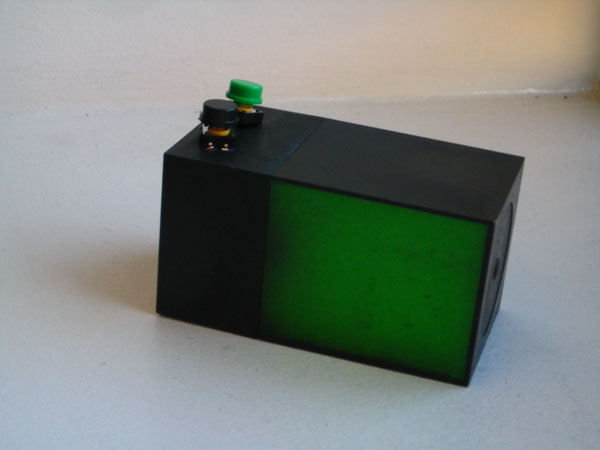
    Moduled is a multipurpose lamp for people who are in need of different functions, forms, and colors of lighting. It is composed of trapezoidal modules. The white module is where Luxeon high intensity LEDs, heat sinks, BlinkM RGB LEDs, on/off switch, battery pack, rare earth neodymium magnets, Arduino, 3 potentiometers (one to control white LED brightness, one to control hue of RGB LEDs, and one to control brightness of RGB LEDs) are. The white module is the main part that provides the light according to the user’s desires. The black trapezoidal modules also contain rare earth magnets to stick to the white module. The black modules are supplementary to the white module so that different forms of lamps (standing lamp, desk lamp, night lamp, etc.) can be created. Now, with moduled, people can take apart or build lamps out of simple trapezoidal figures and create whatever color and brightness of light they need.

    The code below uses blinkM’s .h file that can be downloaded here

    
    #include "Wire.h"
    #include "BlinkM_funcs.h"
    const int blinkm_addr = 0;
    const int hue_pot_pin = 0; //pin0
    const int bri_pot_pin = 1; //pin1
    int lightControl = 2; //pin2
    int lightVal = 0;
    int ledPin[] = {
     3,6,9,10,11};
    
    void setup()
    {
     Serial.begin(19200);
     BlinkM_beginWithPower();
     BlinkM_stopScript(blinkm_addr); // turn off startup script
     Serial.println("BlinkMKnobHue ready");
     for(int i = 0; i < 5; i++){
     pinMode(ledPin[i], OUTPUT);
     }
    }
    
    void loop()
    {
     int hue_val = analogRead(hue_pot_pin) / 4;
     int bri_val = analogRead(bri_pot_pin) / 4;
     Serial.println(hue_val);
     BlinkM_fadeToHSB( blinkm_addr, hue_val, 255, bri_val);
     delay(20);
     whiteLight();
    }
    
    void whiteLight(){
     lightVal = analogRead(lightControl);
     int ledVal = map(lightVal, 0, 1023, 0, 255);
     for(int i = 0; i < 5; i++){
     analogWrite(ledPin[i], ledVal);
     int hue_val = analogRead(hue_pot_pin) / 4;
     int bri_val = analogRead(bri_pot_pin) / 4;
     BlinkM_fadeToHSB( blinkm_addr, hue_val, 255, bri_val);
     delay(20);
     }
    }
    
     
  • Unknown's avatar

    Jun Sik (Jason) Kim 8:21 am on December 16, 2011 Permalink | Reply
    Tags: driving wheel ver 2, , , jun sik kim   

    Driving wheel version 2 


    This project uses arduino, LOL shield, and two inputs (tilt sensors). Using its shape, it can be tilted in different directions that triggers different animations. In this case, if the cover is upright, the animation seems as if you are driving a car straightforward. If you grab the steering wheel handle and turn it left, an arrow animation going left can be seen. If you turn the handle right, the arrow animation goes towards the right. If flipped upside down, the arrow is headed up which indicates the autodrive mode.

    In version 2, I inserted a potentiometer and 2 super bright white LEDs into the analog pins of the LoL Shield. The left LED is turned on if tilted left and the right LED is turned off if tilted right. When upside down, the LEDs blink to signal auto drive. The potentiometer controls the delay of the animation therefore can represent the acceleration of driving a car.

    (More …)

     
  • Unknown's avatar

    mayaweinstein 4:45 am on December 10, 2011 Permalink | Reply  

    Frankie Iteration 2 

    This is the second iteration of Frankie, the smushable Frankenstein pulse sensor for children. He’s soft and so much fun to hug and when you hold his hand his heartbeat shows your pulse.

    The code is the same as iteration 1

     
  • Unknown's avatar

    mayaweinstein 4:37 am on December 10, 2011 Permalink | Reply  

    Frankie iteration 1 

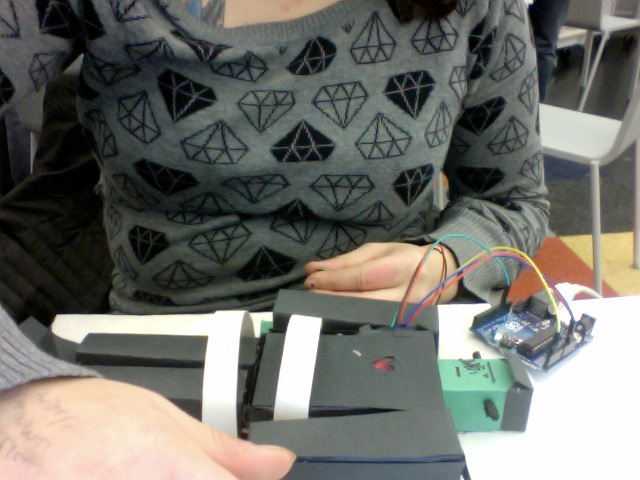
    For the pulse sensor I decided to make a toy for children to take their pulse with in a fun way. I constructed a toy Frankenstein out of construction paper with an led heart. As a person touches the pulse sensor they bring life to Frankenstein, creating a monster!
    Check it out!

    here’s the code
    (More …)

     
  • Unknown's avatar

    Catalina 4:14 am on December 9, 2011 Permalink | Reply  

    Final Project: From the Inside – Out & LOVE 

    2nd Iteration: From the Inside – Out

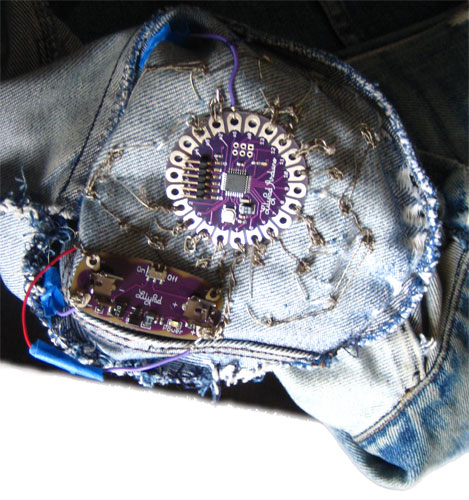
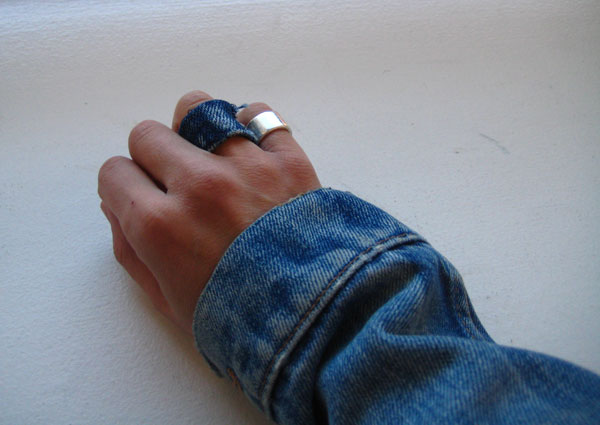
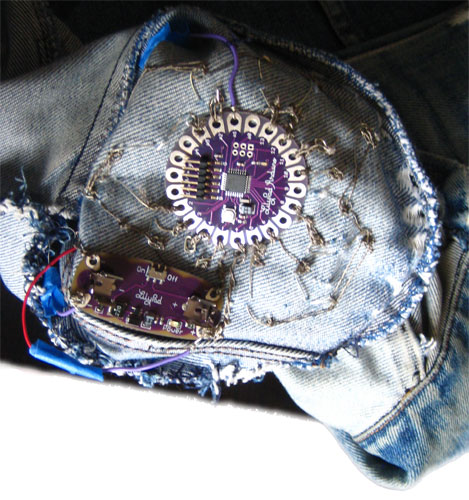
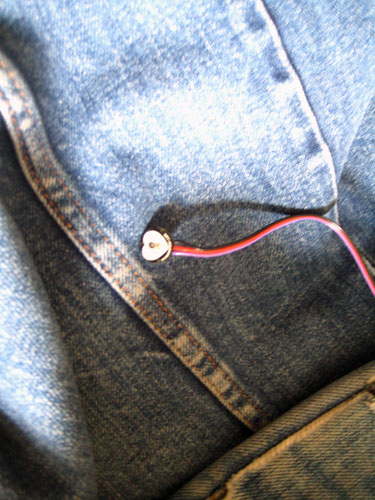
    This project is called From the Inside – Out. Using Arduino LilyPad, a pulse sensor and LED’s the heart bit of the user will be exposed to the exterior world. The LED’s will blink following the bit. The jackets has a jeans-ring that has the pulse sensor. The LED’s are Blue over the blue jeans jacket.

    Storyboard:

    Photographs:

    Video:

    2nd Iteration: LOVE

    This project is called Love. Using the LOL Shield and two push buttons. When one button is pressed there is one heart blinking. When the other button is pressed, the other heart is blinking. If both buttons are pressed at the same time, both hearts get together, become a big heart and the word LOVE appears.

    Photographs:

    Video:

    To see the codes: (More …)

     
  • Unknown's avatar

    josefayala 3:25 pm on December 7, 2011 Permalink | Reply
    Tags:   

    Josef Ayala-Tell Tale Heart Box (Pulse Sensor Project) 

    Description: The Tell Tale Heart Box was my small diorama rendition of an intense scene from Edgar Allen Poe’s short story. It essentially uses the pulse sensor to generate your heart beat and apply it to a solenoid that pushes the floor board up and down (simulating a live pulse and recreating the paranoia felt by the story’s protagonist that in turn causes him to turn himself in to the authorities stopping by his home).

    Heart Box uses:
    -Pulse Sensor (glued on the backside and ready for use on the back side of the box).
    -Solenoid (glued in the center of the box for vertical stance with a floor board glued to the pin).
    -3 9V batteries (2 for the solenoid/1 for the Arduino board)

    • Bread Board/Arduino Uno/Jumper Cables etc.

    more photos coming…

     
    NOTE: I lucked out with this project because the pulse sensor code runs off of one pin to begin with. I simply hooked the solenoid to that pin and had it working from the beginning. That said, the vast majority of this code is the work of Yury Gitman and Joel Murphy and has nothing to do with me.

    -Josef

    /*
    This program reads data from the Pulse Sensor.
    Serial output is designed to mate with Processing sketch “P_PulseSensor_xx” series
    Serial Protocol initiates datastring with coded ascii character, ends each message with carriage return
    We named the variable that holds the heart rate (BPM) after the group Quantified Self.
    They backed our Kickstarter campaing at the $600 level and having a variable named after them is one of their rewards.
    Go Count Yourself!!! http://quantifiedself.com/

    by Joel Murphy & Yury Gitman in Brooklyn, Summer 2011.
    */

    // VARIABLES
    unsigned long time; // Holds current time for pulse rate calculation
    unsigned long lastTime; // Used for calculating time between beats
    int Sensor; // Holds current analog Sensor Reading
    int lastSensor; // Used to find waveform direction
    int Peak; // Holds value of peak in waveform
    int Trough; // Holds value of trough in waveform
    int beats[10]; // Array to collect time between beats for calculating BPM
    int beatCounter = 0; // Used to hold position in beats array
    int QuantifiedSelf; // Used to hold the heart rate value (BPM)
    int drop; // Holds the amplitude of waveform

    int fadeRate = 10; // when arduino finds a heartbeat, it will fade an LED on pin 11 (PWM)
    int Fade = 0; // Fade variable will set PWM

    boolean falling = false; // used to keep track of waveform direction

    // PINS
    int LED = 13; // pin 13 – solenoid
    int dimLED = 11; // LED on pin 11 fades with each pulse
    int PulseSensor = 5; // Pulse Sensor purple wire connected to analog pin 5

    void setup()
    {
    pinMode(LED, OUTPUT); // set the LED pins as outputs
    pinMode(dimLED, OUTPUT);
    Serial.begin(115200); // start the hardware serial block and set the baud rate
    lastTime = millis(); // initialize lastTime variable
    }
    void loop()
    {
    Sensor = analogRead(PulseSensor); // take a reading
    Serial.print(“s”); // send raw analog data to Processing sketch (or other)
    Serial.println(Sensor); // ‘s’ = Raw Sensor Data
    // USE WITH LED ON PIN 11 FOR FADE EFFECT
    Fade -= fadeRate; // Fade variable set to 255 when heart beat is found
    Fade = constrain(Fade,0,255); // these lines fade the LED
    analogWrite(dimLED,Fade);

    // KEEP TRACK OF THE DIRECTION OF THE WAVEFORM
    if (falling == false){ // if the sensor values are rising
    if (Sensor lastSensor){ // otherwise, if current reading is bigger, values are still rising
    Peak = Sensor; // record the next potential peak
    lastSensor = Sensor; // keep track of rising signal
    }
    }
    if (falling == true){ // if the sensor values are falling
    if (Sensor > lastSensor){ // if current reading is bigger than last reading
    falling = false; // a trough has been reached
    Serial.print(“T”); // send trough value to Processing sketch (or other)
    Serial.println(Trough); // ‘T’ = Trough in waveform
    drop = Peak – Trough; // difference = signal amplitude
    Peak = 0; // setting Peak to 0 here helps get rid of noise
    // THIS IF STATEMENT IS HOW THE HEARTBEAT IS FOUND IN PULSE SENSOR WAVEFORM
    if (drop > 4 && drop <60){ // ignore noise in signal. adjust as needed
    timeBeat(); // go work out the BPM
    Serial.print("d"); // send the amplitude to Processing Sketch (or other)
    Serial.println(drop); // 'd' = amplitude of waveform
    digitalWrite(LED,HIGH); // start pin 13 LED blink
    Fade = 255; // set fading LED to high brightness

    }
    }else if (Sensor < lastSensor){ // otherwise, if current reading is smaller weʻre still falling
    Trough = Sensor; // record the next potential trough
    lastSensor = Sensor; // keep track of falling signal
    }
    }
    delay(20); // break for 20mS. Processing frame-rate = 100.

    }// END VOID LOOP

    void timeBeat(){
    time = millis(); // take note of the current time
    beats[beatCounter] = time – lastTime; // record miliseconds since the last pulse in beats array
    lastTime = time; // stay up to date!
    beatCounter ++; // move array pointer to next position in array
    if (beatCounter == 10){ // if we've taken 10 readings, it's time to derive heart rate
    QuantifiedSelf = getBPM(); // go derive the heart rate
    Serial.print("q"); // send the heart rate to Processing sketch (or other)
    Serial.println(QuantifiedSelf); // 'q' = heart rate
    beatCounter = 0;
    }
    }// END OF timeBeat FUNCTION

    // This function will return a value for heart rate (Beats Per Minute)
    int getBPM(){
    int dummy; // used in sorting
    int mean; // used in averaging
    boolean done = false; // clear sorting flag
    // this simple sorting routine will arrange values in the beat array from lowest to highest
    while(done != true){
    done = true;
    for (int j=0; j beats[j + 1]){ // sorting numbers here
    dummy = beats[j + 1];
    beats [j+1] = beats[j] ;
    beats[j] = dummy;
    done = false;
    }
    }
    }
    // this FOR loop selects the longer beat time values to avoid incorrect heart rate readings
    for(int k=1; k<9; k++){ // exclude lowest and highest values from averaging
    mean += beats[k]; // add beat times together
    }
    mean /=8; // averaging
    mean = 60000/mean; // devide 60 seconds by average pulse length
    return mean; // return beats per minute
    }// END OF getBPM function

     
  • Unknown's avatar

    Jun Sik (Jason) Kim 8:19 am on December 6, 2011 Permalink | Reply
    Tags:   

    Pulsey the Pulse Sensor Lamp Robot 

    Pulsey the Pulse Lamp Robot is a robot that detects a human’s pulse and reacts by producing light from RGB LEDs accordingly. It uses two blink M RGB leds as its eyes. It uses the servo motor to represent the robots heart-shaped hair. Both the servo motor and the RGB leds react to the human pulse detected from the pulse sensor. Once a pulse is detected, the RGB LEDs fade to a shade of green (much like the green of the pulse sensor). The servo turns once a pulse is detected.
    There are also two potentiometers. One is used to control the HSV of the eye LEDS when it does not detect a pulse. It can be rotated to make the eyes into diverse colors. The other potentiometer is used to adjust the brightness of the eyes therefore giving much more of the color palette. If the brightness is totally reduced, the robot will not light up its eye LEDs unless a pulse is detected.

    
    #include "Wire.h"
    #include "BlinkM_funcs.h"
    
    //Servo Motor
    #include <Servo.h>
    Servo myServo;
    int noTurn = 90;
    int rightTurn = 95;
    int leftTurn = 70;
    
    //Blink M
    int sensorPin = 0;
    int ledPin = 13;
    int sensorValue = 0;
    int blinkm_addr = 0;
    int redVal = 0;
    int grnVal = 0;
    int bluVal = 0;
    // VARIABLES
    unsigned long time;
    unsigned long lastTime;
    int Sensor;
    int lastSensor;
    int Peak;
    int Trough;
    int beats[10];
    int beatCounter = 0;
    int QuantifiedSelf;
    int drop;
    
    int fadeRate = 10;
    int Fade = 0;
    
    boolean falling = false;
    int PulseSensor = 0;
    
    void setup()
    {
     myServo.attach(2);
     myServo.write(noTurn);
     pinMode(ledPin, OUTPUT);
     BlinkM_beginWithPower();
     BlinkM_stopScript(blinkm_addr);
     Serial.println("BlinkMSensor0 ready");
     Serial.begin(115200);
     lastTime = millis();
    }
    void loop()
    {
     Sensor = analogRead(PulseSensor);
     Serial.print("s");
     Serial.println(Sensor);
    
    if (falling == false){
     if (Sensor < lastSensor-1){
     falling = true;
     Serial.print("P");
     Serial.println(Peak);
     myServo.write(rightTurn);
     normalPulse();
    
    }
     else if(Sensor > lastSensor){
     Peak = Sensor;
     lastSensor = Sensor;
     }
     }
     if (falling == true){
     if (Sensor > lastSensor){
     falling = false;
     Serial.print("T");
     Serial.println(Trough);
     drop = Peak - Trough;
     Peak = 0;
     if (drop > 4 && drop <60){
     timeBeat();
     Serial.print("d");
     Serial.println(drop);
     myServo.write(leftTurn);
     greenPulse();
     }
     }
     else if (Sensor < lastSensor){
     Trough = Sensor;
     lastSensor = Sensor;
     }
     }
     delay(100);
    }
    
    void timeBeat(){
     time = millis();
     beats[beatCounter] = time - lastTime;
     lastTime = time;
     beatCounter ++;
     if (beatCounter == 10){
     QuantifiedSelf = getBPM();
     Serial.print("q");
     Serial.println(QuantifiedSelf);
     beatCounter = 0;
     }
    }
    
    int getBPM(){
     int dummy;
     int mean;
     boolean done = false;
    
     while(done != true){
     done = true;
     for (int j=0; j<9; j++){
     if (beats[j] > beats[j + 1]){
     dummy = beats[j + 1];
     beats [j+1] = beats[j] ;
     beats[j] = dummy;
     done = false;
     }
     }
     }
     for(int k=1; k<9; k++){
     mean += beats[k];
     }
     mean /=8;
     mean = 60000/mean;
     return mean;
    }
    
    void normalPulse(){
     sensorValue = analogRead(sensorPin);
     Serial.println(sensorValue);
     grnVal = sensorValue/4;
     BlinkM_setFadeSpeed( blinkm_addr, 50);
     BlinkM_fadeToRGB( blinkm_addr, 255, 255, 255);
     delay(100);
    }
    void greenPulse(){
     sensorValue = analogRead(sensorPin);
     Serial.println(sensorValue);
     grnVal = sensorValue/4;
     BlinkM_setFadeSpeed( blinkm_addr, 50);
     BlinkM_fadeToRGB( blinkm_addr, 0, grnVal, 20);
     delay(100);
    }
    
    void redPulse(){
     sensorValue = analogRead(sensorPin);
     Serial.println(sensorValue);
     grnVal = sensorValue/4;
     BlinkM_setFadeSpeed( blinkm_addr, 50);
     BlinkM_fadeToRGB( blinkm_addr, grnVal, 0, 0);
     delay(100);
    }


    There is also the BlinkM_funcs.h file that needs to be in the same folder.
    This can be downloaded here

     
  • Unknown's avatar

    aisencc 10:18 am on December 5, 2011 Permalink | Reply  

    Grove Sound Recorder: PLAY/REC Switching from Manual to Digital 

    While trying to decipher how to bypass a manual switch with a digital gate, I found transistors to be helpful, but for the sound recorder itself.
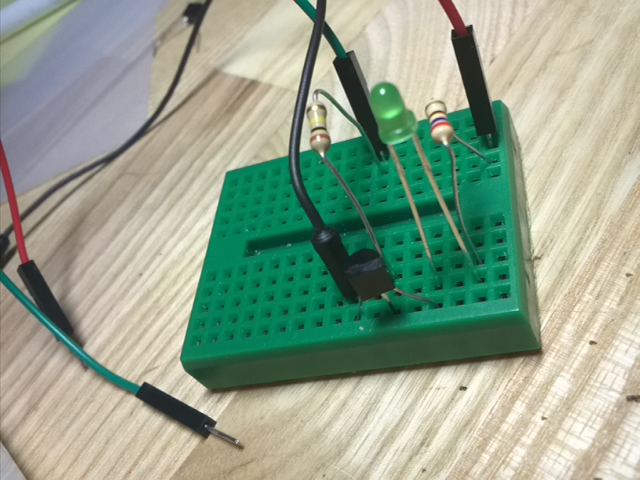
    First I tried to switch an LED on/off. Here is a photo of the LED circuit.
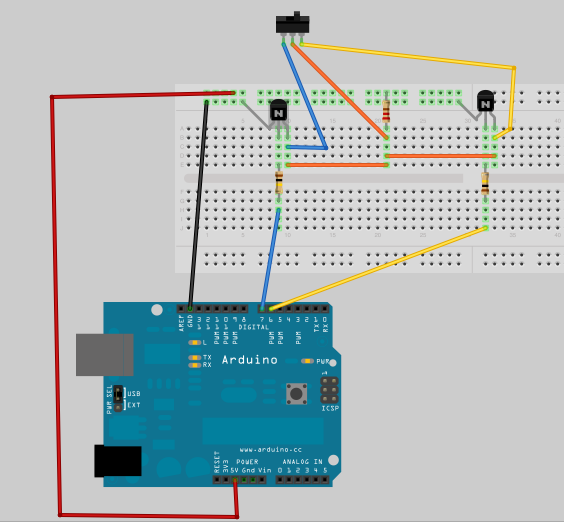
    Then I tried to replace the play/ record switch in the sound recorder with two transistors, with this schematic:
    But I had no luck!
    This was the code I used:
    You will need the library 
     
    • Catalina Cortazar's avatar

      Catalina Cortazar 9:10 pm on December 7, 2011 Permalink | Reply

      gracias Aisen!!!

  • Unknown's avatar

    noadol 6:39 am on December 4, 2011 Permalink | Reply  

    LOL Shield. Liquid Box 

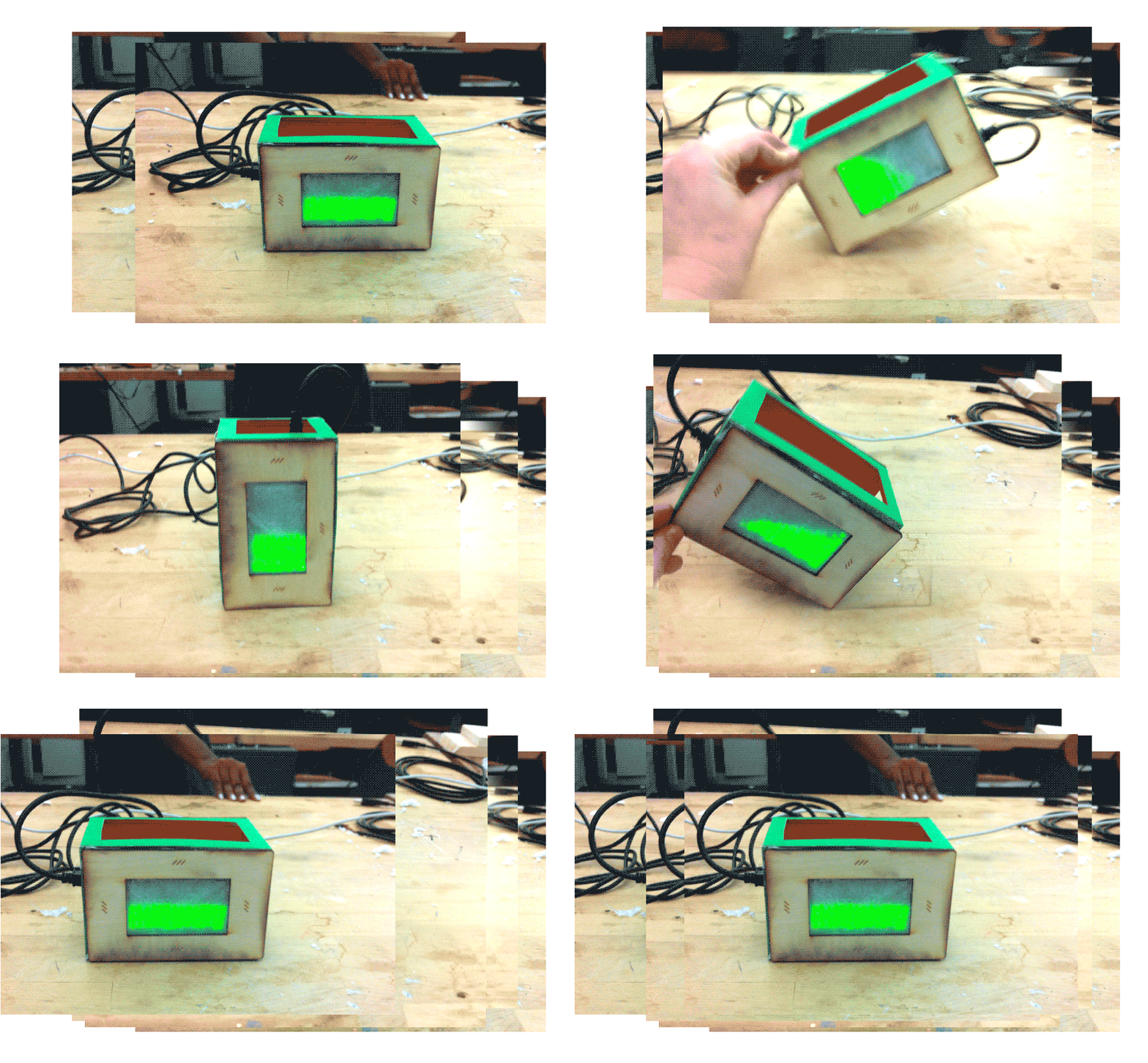
    I wanted to use the lol shield to create an illusion of liquid that obey the law of gravity. For each side of the box, I created three functions: sideA, Transition animation A->B, sideB and so on. For that I used 4 photoresistors, one for each side and played with the sensor’s ranges. Whenever one photoresistor is at the bottom, its value is low and the liquid shifts.


    code >>

    (More …)

     
  • Unknown's avatar

    firmread 5:53 am on December 3, 2011 Permalink | Reply  

    Arduino 1.0 

    Hi guys,

    Sorry for missing the class on this Friday, I worked overnight and my sickness just not allow me to push myself out of the bed as usual 😦

    However, I have a very big news that you guys should know about.
    Arduino has just release its 1.0 version!

    You can check out to the Appendix H “Migrating to Arduino 1.0” for Arduino Cookbook 2nd edition that would be release soon.
    Catch up with tech and design !

    ps. Can someone post anything about how exploration on making Twig Sound Recorder works went on this class, Thx.


    Best,
    Firm

     
  • Unknown's avatar

    aisencc 4:08 pm on December 2, 2011 Permalink | Reply  

    Searching for the Right Channel 

    This project was created using the LOL Shield by Jimmie Rodgers and the IR library by Ken Shirriff. The LOL library and the IR library do not work together because the ISR code in both is using the same timer. I tried combining both libraries and make one of the  ISR a separate function and injected into the other, however; it failed, so I had to alter the example code of the LOL Shield without the library and the help of my friend Shawn Lauriat. The idea the came to fruition, using the mac remote I was able to move a dot around the screen. Then if you found the right dot an animation would appear that I coded in with the help of Jimmie Rodgers’s excel sheet. Then the play button would flash all the LEDs at once and the menu button would reset your dot position. Its aesthetic is like a cute TV or a Bomb!

    Searching for the Right Channel

     
    • aisencc's avatar

      aisencc 5:54 am on December 6, 2011 Permalink | Reply

      // Searching for the Right Channel
      // By Aisen Caro Chacin
      // With the help of Shawn Lauriat, the LOL shield and IR library developers

      #include //This is in the Arduino library
      #include // IR remote control library

      const int irReceivePin = 14; // pin connected to IR detector output
      IRrecv irrecv(irReceivePin); // create the IR library
      decode_results results; // IR data goes here

      int blinkdelay = 75; //This basically controls brightness. Lower is dimmer
      int runspeed = 20; //smaller = faster

      int pin13 =13;
      int pin12 =12;
      int pin11 =11;
      int pin10 =10;
      int pin09 =9;
      int pin08 =8;
      int pin07 =7;
      int pin06 =6;
      int pin05 =5;
      int pin04 =4;
      int pin03 =3;
      int pin02 =2;

      int x=1;
      int y=0;

      const int pins[] = {
      pin13,pin12,pin11,pin10,pin09,pin08,pin07,pin06,pin05,pin04,pin03,pin02};

      const int ledMap[126][2] ={
      {pin13, pin05},{pin13, pin06},{pin13, pin07},{pin13, pin08},{pin13, pin09},{pin13, pin10},{pin13, pin11},{pin13, pin12},{pin13, pin04},{pin04, pin13},{pin13, pin03},{pin03, pin13},{pin13, pin02},{pin02, pin13},
      {pin12, pin05},{pin12, pin06},{pin12, pin07},{pin12, pin08},{pin12, pin09},{pin12, pin10},{pin12, pin11},{pin12, pin13},{pin12, pin04},{pin04, pin12},{pin12, pin03},{pin03, pin12},{pin12, pin02},{pin02, pin12},
      {pin11, pin05},{pin11, pin06},{pin11, pin07},{pin11, pin08},{pin11, pin09},{pin11, pin10},{pin11, pin12},{pin11, pin13},{pin11, pin04},{pin04, pin11},{pin11, pin03},{pin03, pin11},{pin11, pin02},{pin02, pin11},
      {pin10, pin05},{pin10, pin06},{pin10, pin07},{pin10, pin08},{pin10, pin09},{pin10, pin11},{pin10, pin12},{pin10, pin13},{pin10, pin04},{pin04, pin10},{pin10, pin03},{pin03, pin10},{pin10, pin02},{pin02, pin10},
      {pin09, pin05},{pin09, pin06},{pin09, pin07},{pin09, pin08},{pin09, pin10},{pin09, pin11},{pin09, pin12},{pin09, pin13},{pin09, pin04},{pin04, pin09},{pin09, pin03},{pin03, pin09},{pin09, pin02},{pin02, pin09},
      {pin08, pin05},{pin08, pin06},{pin08, pin07},{pin08, pin09},{pin08, pin10},{pin08, pin11},{pin08, pin12},{pin08, pin13},{pin08, pin04},{pin04, pin08},{pin08, pin03},{pin03, pin08},{pin08, pin02},{pin02, pin08},
      {pin07, pin05},{pin07, pin06},{pin07, pin08},{pin07, pin09},{pin07, pin10},{pin07, pin11},{pin07, pin12},{pin07, pin13},{pin07, pin04},{pin04, pin07},{pin07, pin03},{pin03, pin07},{pin07, pin02},{pin02, pin07},
      {pin06, pin05},{pin06, pin07},{pin06, pin08},{pin06, pin09},{pin06, pin10},{pin06, pin11},{pin06, pin12},{pin06, pin13},{pin06, pin04},{pin04, pin06},{pin06, pin03},{pin03, pin06},{pin06, pin02},{pin02, pin06},
      {pin05, pin06},{pin05, pin07},{pin05, pin08},{pin05, pin09},{pin05, pin10},{pin05, pin11},{pin05, pin12},{pin05, pin13},{pin05, pin04},{pin04, pin05},{pin05, pin03},{pin03, pin05},{pin05, pin02},{pin02, pin05}
      };

      uint16_t BitMap[][9] PROGMEM = {
      {0,0,0,0,2048,5120,2048,0,0},
      {0,0,0,10752,2048,13824,2048,10752,0},
      {0,13696,8320,2560,13696,2560,8320,13696,0},
      {4352,9344,2624,4352,9344,2560,9408,12672,6912},
      {4352,9344,2624,4352,8320,15232,8384,12672,6912 },
      {1024,1536,1280,1152,1088,16352,4224,3840,0},
      {1024,1536,17921920,1024,16320,4224,3860,16383},
      {1024,1536,1792,1920,1024,16320,4224,3882,16383},
      {512,768,896,960,512,8160,2112,6037,16383},
      {256,384,448,480,256,4080,1056,5098,16383},
      {128,192,224,240,128,2040,528,4586,16383},
      {64,96,112,120,64,1020,8456,13562,16383},
      {32,48,56,60,32,8702,12420,14457,16383},
      {32,48,56,60,8224,12798,14468,15482,16383},
      {16,24,8220,30,12304,14591,15426,15934,16383},
      {8,8204,12302,8207,8200,15487,15905,16286,16383},
      {4,1229,14343,8199,8196,12351,15888,16271,16383},
      {2,6147,15363,12291,12290,14367,16136,16327,16383},
      {1,7169,15873,14849,14337,15375,15876,16355,16383},
      {0,7680,16128,14592,14336,14343,15362,16129,16383},
      {16128,16256,16320,14528,12352,12291,12289,14336,16383},
      {7680,16256,16320,16352,15456,14369,14336,14336,16383},
      {1920,8128,16352,16352,15920,15520,15456,15872,16383},
      {0,1984,4064,7952,15952,16016,15968,16128,16383},
      {0,448,2016,4080,7952,16208,16160,16256,16383},
      {0,0,960,2016,3984,7984,16256,16376,16383},
      {0,0,0,960,1824,4000,8128,16380,16383},
      {0,0,0,384,960,2016,4088,16382,16383},
      {0,0,0,192,480,1008,2040,16383,16383},
      {0,0,0,0,192,480,1008,2040,16383},
      {0,0,0,192,0,192,480,1008,2040},
      {0,0,192,0,0,192,480,1008,2040},
      {0,288,0,192,0,192,480,1008,2040},
      {0,816,192,0,0,192,480,1008,2040},
      {0,816,1032,192,0,192,480,1008,2040},
      {0,816,1032,192,0,192,480,1008,2040},
      {0,528,1224,1032,0,192,480,1008,2040},
      {0,560,1032,1032,528,192,480,1008,2040},
      {0,560,1224,1032,528,480,480,1008,2040},
      {0,560,1224,1032,528,288,480,1008,2040},
      {0,560,1224,1032,528,288,192,1008,2040},
      {0,560,2040,1752,528,816,480,192,0},
      {0,560,1224,1032,0,528,288,192,0},
      {0,560,1224,1032,4092,528,288,192,0},
      {0,560,2040,1752,4092,816,0,0,0},
      {0,512,1920,1728,3968,768,0,0,0},
      {1792,3712,4032,7872,8064,3968,1792,0,8},
      {0,1536,1984,1664,3968,768,0,8,28},
      {0,1536,3968,3840,7424,1536,8,28,28},
      {0,1536,3968,3840,7424,1544,28,28,28},
      {0,1536,3968,3840,7448,1564,28,28,62},
      {0,1536,3968,3848,7452,1564,28,62,127},
      {0,1536,3976,3868,7452,1564,62,127,93},
      {0,1544,3996,3868,7452,1598,127,93,8},
      {0,1032,3612,3612,1052,62,127,93,8},
      {4096,14336,4192,192,2018,4095,2034,192,96},
      {4096,14336,4288,384,4066,8183,4066,384,192},
      {10240,4096,11264,6144,15873,16251,15889,6144,3072},
      {4096,14336,6144,12288,15364,16094,15364,12288,6144},
      {10240,4096,14336,8192,14340,16094,14340,8192,12288},
      {0,4096,8192,0,12292,15070,12292,0,8192},
      {4096,14336,4096,0,8196,14046,8196,0,0},
      {4096,14336,4096,0,66,11759,66,0,0},
      {0,0,0,0,0,11759,0,0,0},
      {18000}
      };

      // BitMap[9]
      uint16_t grid[] = {
      0, 0, 0, 0, 0, 0, 0, 0, 0
      };

      void up(){
      Serial.println(“moveUP();”);

      if(y > 0){
      y= y -1;
      }
      }

      void down(){
      Serial.println(“moveDOWN();”);
      if(y < 8){
      y= y +1;
      }
      }

      void right(){
      Serial.println("moveRIGHT();");
      if(x 1) {
      x /= 2;
      }
      }

      void menu(){
      Serial.println(“menu();”);
      x=1;
      y= 0;
      }

      void play(){
      Serial.println(“play();”);
      blinkall(33);
      }

      void setup() {
      blinkall(2); // useful for testing
      Serial.begin(9600);
      pinMode(irReceivePin, INPUT);
      irrecv.enableIRIn(); // Start the IR receiver
      Serial.println(“Press a remote key”);
      }

      void turnon(int led) {
      int pospin = ledMap[led][0];
      int negpin = ledMap[led][1];
      pinMode (pospin, OUTPUT);
      pinMode (negpin, OUTPUT);
      digitalWrite (pospin, HIGH);
      digitalWrite (negpin, LOW);
      }

      void alloff() {
      DDRD = B00000010;
      DDRB = B00000000;
      }

      void loop() {
      byte line = 0;
      unsigned long data;
      if (irrecv.decode(&results)) {
      // here if data is received
      irrecv.resume();
      if(results.value == 2011255018){
      up();
      }else if(results.value == 2011246826){
      down();
      }else if(results.value == 2011259114){
      right();
      }else if(results.value == 2011271402){
      left();
      }else if(results.value == 2011283690){
      menu();
      }else if(results.value == 2011275498){
      play();
      }
      }
      if (x == 2048 && y == 5) {
      DisplayBitMap();
      y = 0;
      }
      for(line = 0; line < 9; line++){
      if(line == y){
      grid[line]= x;
      }else{
      grid[line]= 0;
      }
      }
      for(int i = 0; i < runspeed; i++) {
      for(line = 0; line < 9; line++) {
      data= grid[line];
      for (byte led=0; led<14; ++led) {
      if (data & (1<<led)) {
      turnon((line*14)+led);
      delayMicroseconds(blinkdelay);
      alloff();
      }
      else {
      delayMicroseconds(blinkdelay);
      }
      }
      }
      }
      }

      void blinkall(int numblink) {
      alloff();
      for(int n = 0;n < numblink;n++) {
      if (irrecv.decode(&results)) { // need to call the IR read
      // here if data is received
      irrecv.resume();
      if(results.value == 2011283690){ // this makes the menu button reset if it is stuck on the play loop
      return;
      }
      }
      for(int i = 0; i < runspeed; i++) {
      for(int j = 0; j < 126; j++) {
      turnon(j);
      delayMicroseconds(blinkdelay);
      alloff();
      }
      }
      delay(500);
      }
      }

      void sequenceon() {
      for(int i = 0; i < 126; i++) {
      turnon(i);
      delay(800);
      alloff();
      delay(800);
      }
      }

      void DisplayBitMap()
      {
      boolean run=true;
      byte frame = 0;
      byte line = 0;
      unsigned long data;
      while(run == true) {
      for(int i = 0; i < runspeed; i++) {
      for(line = 0; line < 9; line++) {
      data = pgm_read_word_near (&BitMap[frame][line]); // fetch data from program memory
      if (data==18000){
      run=false;
      }
      else for (byte led=0; led<14; ++led) {
      if (data & (1<<led)) {
      turnon((line*14)+led);
      delayMicroseconds(blinkdelay);
      alloff();
      }
      else {
      delayMicroseconds(blinkdelay);
      }
      }

      }

      } frame++;
      }
      }

  • Unknown's avatar

    firmread 11:54 am on December 1, 2011 Permalink | Reply  

    The Forum 

    This is my experimentation on making water switches.

    However, I still have to figure out about the consistency problem of the piece. Breaking down aspect such as floor material or human conductivity. But for now it might be better to apply it for only just site-specific installation.

    #include <Charliplexing.h> //Imports the library, which needs to be
    
    byte line = 0; //Row counter
    char buffer[10];
    int value;
    
    int delaytime = 100;
    int slow = 2;
    
    int sen1Pin = A4;
    int sen2Pin = A5;
    
    int waterState1 = 0;
    int waterState2 = 0;
    
    int watercalibrate = 3;
    
    void setup()
    {
     LedSign::Init(); //Initializes the screen
     pinMode(sen1Pin, INPUT);
     pinMode(sen2Pin, INPUT);
     Serial.begin(9600);
    }
    
    void loop()
    {
     // serial tests
     Serial.print(analogRead(sen1Pin),DEC);
     Serial.print(" , ");
     Serial.println(analogRead(sen2Pin),DEC);
     //delay(delaytime);
    
     waterState1 = analogRead(sen1Pin);
     waterState2 = analogRead(sen2Pin);
    
    // if(waterState1 < watercalibrate && waterState2 < watercalibrate) {
    // steadywave();
    // }
     if (waterState1 > watercalibrate){
     // && waterState2 < watercalibrate
     fragmentleft();
     }
     else if ( waterState2 > watercalibrate){
     // waterState1 < watercalibrate &&
     fragmentright();
     }
     else {
     steadywave();
     }
    }
    
    void DisplayBitMap(int lineint)
    {
     //int data[9] = {95, 247, 123, 511, 255, 1, 5, 31, 15};
    
     //for(line = 0; line < 9; line++) {
     for (byte led=0; led<14; ++led) {
     if (lineint & (1<<led)) {
     LedSign::Set(led, line, 1);
     } else {
     LedSign::Set(led, line, 0);
     }
     }
    
     line++;
     if(line >= 9) line = 0;
    }
    
    void steadywave(){
     delay(delaytime);
     DisplayBitMap(4369);
     DisplayBitMap(15291);
     DisplayBitMap(12014);
     DisplayBitMap(1092);
     DisplayBitMap(0);
     DisplayBitMap(4369);
     DisplayBitMap(15291);
     DisplayBitMap(12014);
     DisplayBitMap(1092);
     delay(delaytime);
     DisplayBitMap(0);
     DisplayBitMap(4369);
     DisplayBitMap(15291);
     DisplayBitMap(12014);
     DisplayBitMap(1092);
     DisplayBitMap(0);
     DisplayBitMap(4369);
     DisplayBitMap(15291);
     DisplayBitMap(12014);
     delay(delaytime);
     DisplayBitMap(1092);
     DisplayBitMap(0);
     DisplayBitMap(4369);
     DisplayBitMap(15291);
     DisplayBitMap(3822);
     DisplayBitMap(1092);
     DisplayBitMap(0);
     DisplayBitMap(4369);
     DisplayBitMap(15291);
     delay(delaytime);
     DisplayBitMap(3822);
     DisplayBitMap(1092);
     DisplayBitMap(0);
     DisplayBitMap(4369);
     DisplayBitMap(15291);
     DisplayBitMap(12014);
     DisplayBitMap(1092);
     DisplayBitMap(0);
     DisplayBitMap(4369);
     delay(delaytime);
     DisplayBitMap(15291);
     DisplayBitMap(3822);
     DisplayBitMap(1092);
     DisplayBitMap(0);
     DisplayBitMap(4369);
     DisplayBitMap(15291);
     DisplayBitMap(12014);
     DisplayBitMap(1092);
     DisplayBitMap(0);
    
    }
    
    void fragmentleft(){
    
    delay(delaytime*slow);
     DisplayBitMap(0);
     DisplayBitMap(0);
     DisplayBitMap(0);
     DisplayBitMap(0);
     DisplayBitMap(0);
     DisplayBitMap(0);
     DisplayBitMap(0);
     DisplayBitMap(3);
     DisplayBitMap(2);
     delay(delaytime*slow);
     DisplayBitMap(0);
     DisplayBitMap(0);
     DisplayBitMap(0);
     DisplayBitMap(0);
     DisplayBitMap(0);
     DisplayBitMap(0);
     DisplayBitMap(7);
     DisplayBitMap(12);
     DisplayBitMap(8);
     delay(delaytime*slow);
     DisplayBitMap(0);
     DisplayBitMap(0);
     DisplayBitMap(0);
     DisplayBitMap(0);
     DisplayBitMap(0);
     DisplayBitMap(7);
     DisplayBitMap(8);
     DisplayBitMap(16);
     DisplayBitMap(16);
     delay(delaytime*slow);
     DisplayBitMap(0);
     DisplayBitMap(0);
     DisplayBitMap(0);
     DisplayBitMap(7);
     DisplayBitMap(8);
     DisplayBitMap(16);
     DisplayBitMap(32);
     DisplayBitMap(64);
     DisplayBitMap(64);
     delay(delaytime*slow);
     DisplayBitMap(255);
     DisplayBitMap(384);
     DisplayBitMap(768);
     DisplayBitMap(1536);
     DisplayBitMap(3072);
     DisplayBitMap(3072);
     DisplayBitMap(3072);
     DisplayBitMap(3072);
     DisplayBitMap(3072);
     delay(delaytime*slow);
     DisplayBitMap(3840);
     DisplayBitMap(7168);
     DisplayBitMap(6144);
     DisplayBitMap(6144);
     DisplayBitMap(6144);
     DisplayBitMap(6144);
     DisplayBitMap(12288);
     DisplayBitMap(12288);
     DisplayBitMap(12288);
    
    }
    void fragmentright(){
     delay(delaytime*slow);
     DisplayBitMap(0);
     DisplayBitMap(0);
     DisplayBitMap(0);
     DisplayBitMap(0);
     DisplayBitMap(0);
     DisplayBitMap(0);
     DisplayBitMap(0);
     DisplayBitMap(8192);
     DisplayBitMap(4096);
     delay(delaytime*slow);
     DisplayBitMap(0);
     DisplayBitMap(0);
     DisplayBitMap(0);
     DisplayBitMap(0);
     DisplayBitMap(0);
     DisplayBitMap(0);
     DisplayBitMap(12288);
     DisplayBitMap(2048);
     DisplayBitMap(2048);
     delay(delaytime*slow);
     DisplayBitMap(0);
     DisplayBitMap(0);
     DisplayBitMap(0);
     DisplayBitMap(0);
     DisplayBitMap(0);
     DisplayBitMap(12288);
     DisplayBitMap(2048);
     DisplayBitMap(1024);
     DisplayBitMap(1024);
     delay(delaytime*slow);
     DisplayBitMap(0);
     DisplayBitMap(0);
     DisplayBitMap(0);
     DisplayBitMap(14336);
     DisplayBitMap(1024);
     DisplayBitMap(512);
     DisplayBitMap(256);
     DisplayBitMap(256);
     DisplayBitMap(256);
     delay(delaytime*slow);
     DisplayBitMap(12288);
     DisplayBitMap(3072);
     DisplayBitMap(1536);
     DisplayBitMap(768);
     DisplayBitMap(384);
     DisplayBitMap(128);
     DisplayBitMap(128);
     DisplayBitMap(128);
     DisplayBitMap(128);
     delay(delaytime*slow);
     DisplayBitMap(384);
     DisplayBitMap(64);
     DisplayBitMap(96);
     DisplayBitMap(32);
     DisplayBitMap(48);
     DisplayBitMap(48);
     DisplayBitMap(48);
     DisplayBitMap(48);
     DisplayBitMap(96);
     delay(delaytime*slow);
     DisplayBitMap(14);
     DisplayBitMap(7);
     DisplayBitMap(3);
     DisplayBitMap(3);
     DisplayBitMap(3);
     DisplayBitMap(3);
     DisplayBitMap(3);
     DisplayBitMap(7);
     DisplayBitMap(6);
    }
    
     
  • Unknown's avatar

    Catalina 3:41 am on December 1, 2011 Permalink | Reply  

    From the Inside – Out 

    This project is called From the Inside – Out. Using Arduino LilyPad, a pulse sensor and LED’s the heart bit of the user will be exposed to the exterior world. The LED’s will blink following the bit.


c
Compose new post
j
Next post/Next comment
k
Previous post/Previous comment
r
Reply
e
Edit
o
Show/Hide comments
t
Go to top
l
Go to login
h
Show/Hide help
shift + esc
Cancel