Hi my name is Hilal. I have studied cell bio and molecular genetics and worked as a researched assistant in a vascular biology research lab for two years.
I am interested in this class because, I love physical computing and I want to learn more. I also love toys!
My background is primarily visual; Back in school after a few year stint creating interactive advertisements. I’m a tinkerer and love making, creating and fabricating my ideas.
I am interested in off screen interactions and how we can change and shape the way people and technology live together. I throughly enjoy the prototyping process and hope to refine my concepts into tangible, concrete objects.
One day I will finally build myself the website I always dreamed of, until then you can see some of my work here »
5)
Jumper Wires:
Jumper Wires Premium 12″ M/F Pack of 100
sku: PRT-09386 http://www.sparkfun.com/products/9386
Share among 3-4 Students
About $34 per pack
Computation Major Studio 2011
Parsons The New School for Design
Design and Technology Department
Major Studio: Computation
PGTE 5201-E ; 1915
Spring 2011
Monday & Thursday 6:00-8:40
Room 1013
Instructor: Yury Gitman
Course Sub-Title: Lifestyle Hardware and Software R & D, Product Design, Entrepreneurship, Fine Art, & Mini-Thesis
Description:
This class functions and the second semester Major Studio requirement for the Parsons MFA in Design and Technology. Students will be lead to design and develop projects that explore new forms of interactive with emerging technology. In particular, the first half of class focuses on physical and electronics interfaces for play. In particular we zero-in on Toys and Lifestyle Products. Students will use rapid prototyping techniques, user-testing, iterative design, as well as, document their work by University standards. The second half of class [after midterm] focuses exclusivity on a student-led mini-thesis project. This in latter half students envision, prototypes, user-test, and document a project of their choosing. The mini-thesis allows students to begin conceiving and exploring thesis direction and the thesis process.
Key Topics Include:
Play and Interaction Research [Rapid Prototyping and Iterative Design based on User-Interaction and User Testing]
Open Source Hardware Development [ Arduino, Processing Third-party Shields, Zigbee, Sound, and LED’s]
“Social Hardware” Research [Networked and Web’ed Prototypes]
Data Visualization [via Processing, LED’s, Web-page & Cellphone Interfaces].
Toy Design [ Designing Play Experiences with Emerging Technology]
Product Design [ Techniques, Tips, and “Rules” for Mass-produced]
General Entrepreneurship [Production, Distribution, Cash Flow Basics, Overhead, Legal Stuff]
Intellectual Property [Types and Uses discussing Patents, Copyright, Trademark, Creative Commons Licences. The Licencing of IP.]
Marketing, [Online Video, Link Sharing, Documentation, ]
and
Fine Art [ When Entertainment Value > Tangible Value > “Sum of It’s Parts” Value ]
Final Grade Calculation
Participation /Attendance 25%
Project 1 25%
Project 2 25%
Free Writing. 25%
TOTAL 100%
1. BPA – Baby Products Association, London, Aries the night clock 2. 3rd Form Wave Vis. – Ars 2010 - Hybrid Media 3. IDEA/IDSA – 2010 - Aries the night clock
It is available to have the story connected with custom essay or about this topic in our world. But before people order the custom papers, they must determine the trustworthy essay writing service.
This light fixture introduces an element of the fantastical and narrative to the traditional form of the hanging lamp.
Provides the user with a sense of an open narrative and a feeling of discovery when the light is turned on to reveal the different characters in the inside of the lamp. Hanging legs provide a clue that there may be more to the lamp than what meets the eye and they also serve as an invitation to interact with the object. This interaction results in the turning on of the light.
The LED’s inside the light fixture get activated by touching the dangling legs. Conductive thread and the capacitance pins in the Arduino allow for a playful interaction with the light fixture.
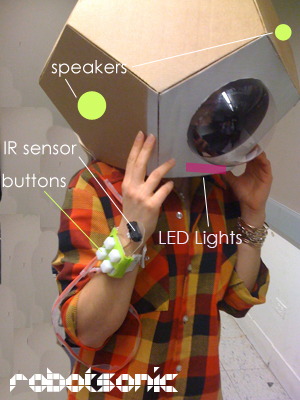
It seeks to create a play space, where through the presence of light and the ability to manipulate sound, a child can react to his/her imagined play landscape.
The interface consist of: 1. A wrist band with four buttons that trigger different preprogramed sound sequences and an IR sensor that allows the user to control the tempo of two of the pre-programed sequences in real time. 2. A head gear that houses two speakers.
Robotsonic is inspired by interfaces related to the experience of adventure and discovery such as an astronaut helmet, a diving bell, or robot head. This cultural reference are meant to enriched and enhanced the play experience by suggesting a narrative.
Future iterations envision a second interface and the ability to communicate from one interface to the other.
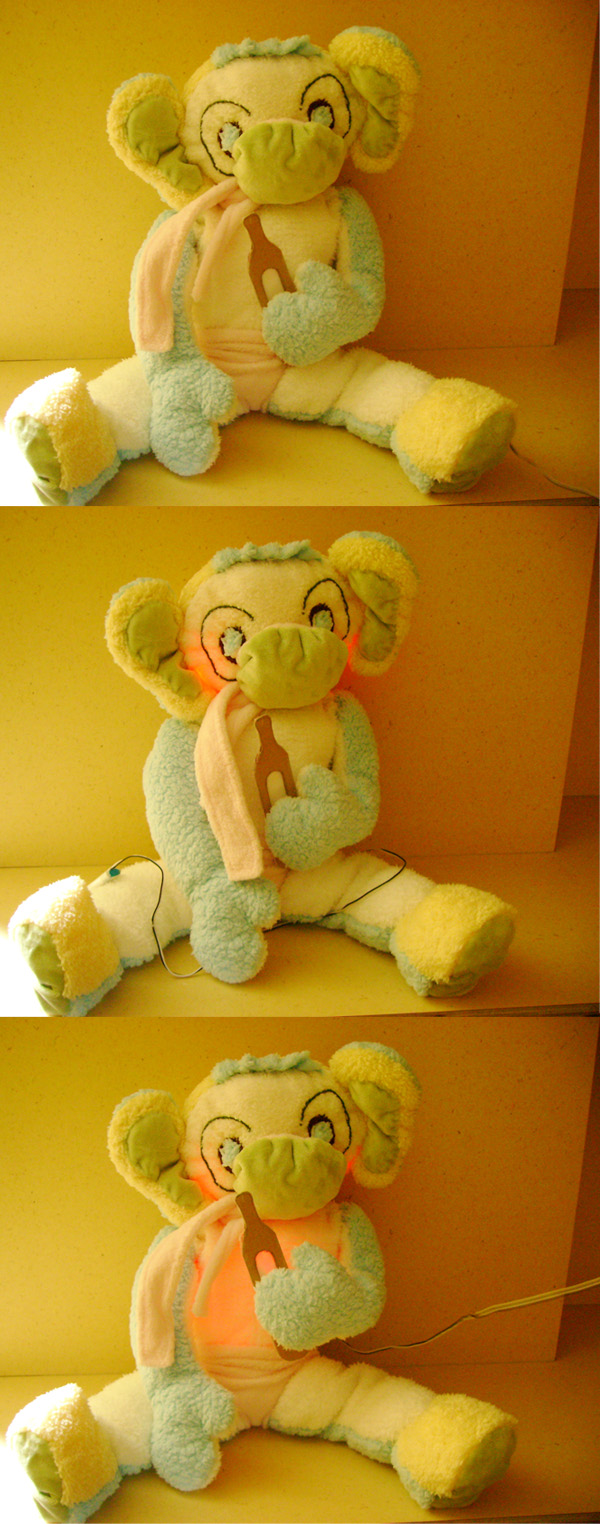
Colony is made out of plushes called Nicos. In their natural environment, Nicos glow softly and make little sound to communicate with each other. When a user removes a Nico from its natural environments, they get scare and make high pitch sounds and their red light flickers. If the user is friendly and gentle with Nico, a Nico will become his/her friend and return to its peaceful state. Nicos can also be fed their favorite snack, cupcakes, and if you tickled them in their belly they will laugh. Future iterations of Colony, include the ability of Nicos to communicate with one another wirelessly.
And that is a BIG WOW !!! I really really enjoy while watching the video of the hanging lamp, and the cute stuff toys!! It really amazing!! I like it so very much!! and I like this blog to.
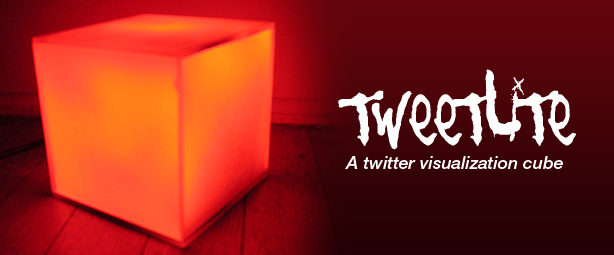
Tweetlite is a 4" white, plexiglass, visualization cube that reads messages from a Twitter feed and displays them in Morse code.
Each message is displayed in a different color and makes for a great mood light. It has USB and power connectivity and comes with a program that is used to enter Twitter credentials to enable the data feed visualization. It needs to be connected to a computer with an Internet connection, via USB. The patterns and colors can be customized. Needless to say, it can be of great use to someone who can read, interpret or even want to learn Morse code.
Diver is an instrument inspired by Analog Sequencers and Theremins. This project was conceived in the computation studio class at Parsons The New School for Design.
It allows the creation of a four-note looped melody which can be manipulated in real-time with knobs that can assign upto 5 octaves for each note. Each knob lights up to indicate it’s position in the loop. The top of Diver houses a sensor which can be used to control the tempo of the loop in real-time. Use Diver in live performances or at home to produce awesome loops, melodies and special effects.
Jnx is an augmented, tactile interface for stress relief, in the form of a plush doll. The core idea of Jnx is based around the concept of squeezing something, much like stress busters, which is emulated by squeezing the dolls throat.
The look and feel of Jnx is inspired by sack puppets and voodoo dolls to add a mystical aura to the interaction. The interface emulates a voodoo doll like behavior by allowing the user to strangle it or twist it arms and legs. The doll responds to the users actions in the form of audio playback.
Speak to Me//Breathe Speak to Me//Breathe is a physical metaphor for my personal views on the security of our information today.
This project retrieves my live email data in real time and both translates and displays this digital information using a visual form of the Braille alphabet. The use of an available binary language which is rarely used in visual form is intended to be a direct metaphor for the encryption processes that everyone's data goes through on a daily basis. The piece is also intended to live in a gallery space where photography or video recording is strictly prohibited. By displaying my data publicly using both encryption and a human form of security, Speak to Me//Breathe challenges viewers to put in the time to both learn and translate an otherwise useless form of encryption, as well as get around human forms of security in order to access my private data. This real life interaction is intended to reflect the process of a hacker who must both learn arcane data systems and get around real life system operators in order to obtain the information that they covet. Overall the main goal of the project is to transform the viewer into a participant as well as stress the fact that in the new digital age, no information is secure, it is just very hard to get at. http://vimeo.com/moogaloop.swf?clip_id=4673457&server=vimeo.com&show_title=1&show_byline=1&show_portrait=0&color=&fullscreen=1
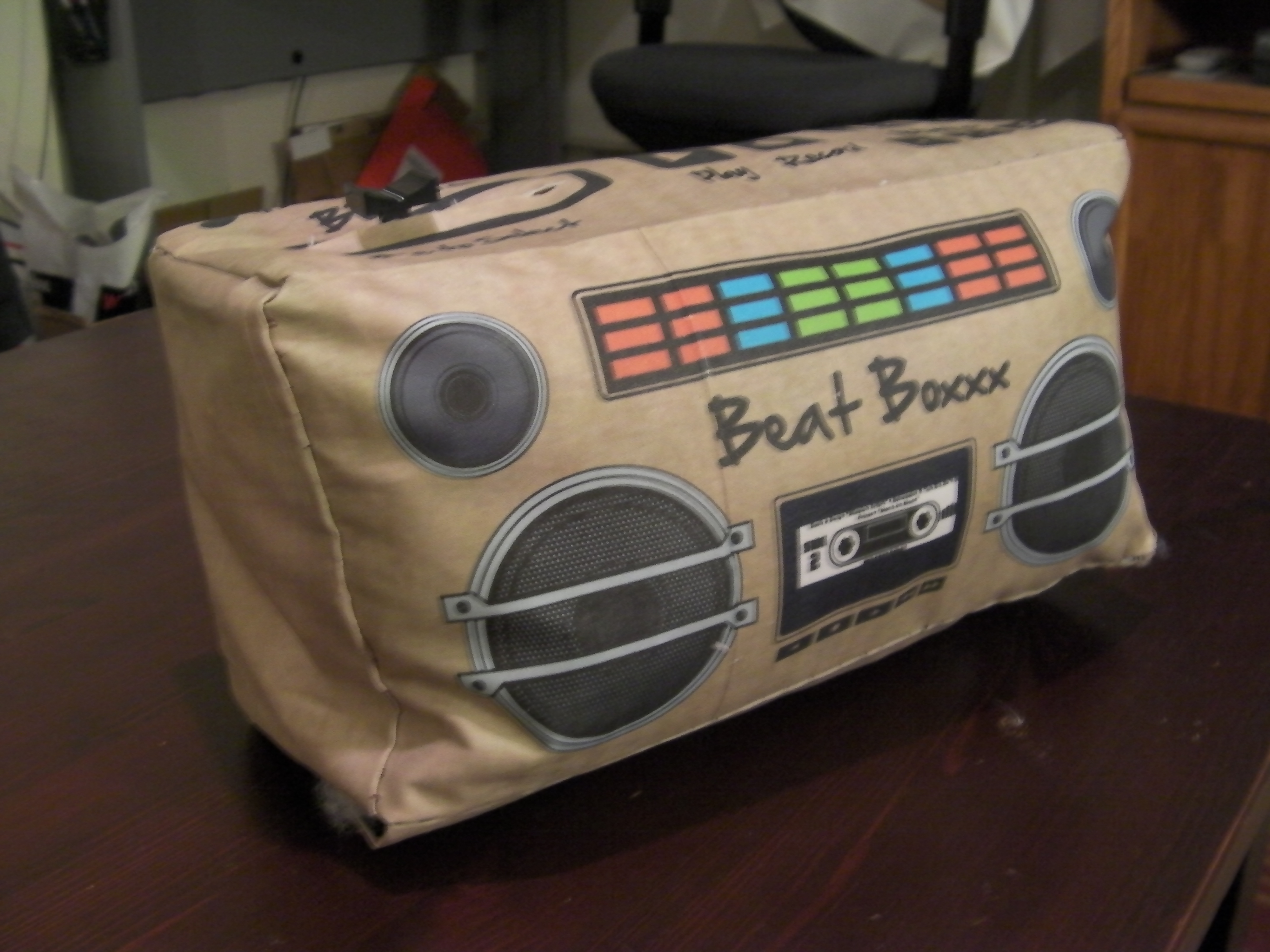
BeatBoxxx 1.0 BeatBoxx is an open-source, Arduino based electronic beat sequencer.
Beat Boxx is an interactive beat creator and recorder that allows users to lay down digital loops of blips and beeps or perform them live. Through the use of gesture based beat selection, users can choose to either perform live or record a sample and endlessly loop it. Through encouraging users to create their own enclosure from readily available items such as shoeboxes, BeatBoxxx aims to be a simple, affordable, and extremely customizable kit that will hopefully inspire a large amount of creative and practical implementations.
BeatBoxxx 2.0 BeatBoxxx 2.0 is an exploration into how far my open source BeatBoxxx concept can be taken using a basic understanding of electronics and open source arduino hardware.
BeatBoxx 2.0 is a plush toy with digital controls that allows users to select beats, record them to one of three loop memory spots, as well as vary the tempo and switch the type of beats they are using by swiping RFID tags disguised as cassette tapes.
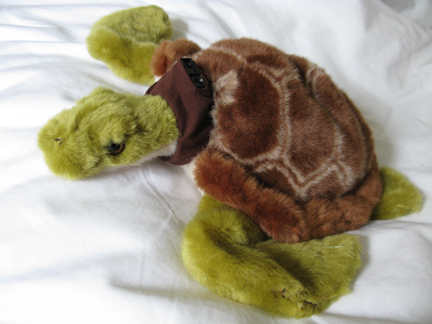
The Shy Turtle is intended to be used by a young toddler – ages 1-3. It
is an interactive plush toy that uses the Arduino to output movement.
The Shy Turtle is an educational tool intended to teach children how to
be kind to animals and respectful of emotions. The turtle acts as an
impetus for parents to talk to their children about emotions – both the
turtle’s emotions (in this case “fear”), the child’s emotions, and the
emotions of the people around them.
My First Robot is a “book” for young children (ages 1 – 3), intended as
an introduction to sensory input and output. Designer, Kirsten
Halterman created this book to excite children about small electronics
and robots. This book gives parents a platform to discuss depth, sound,
and touch.
The Sea Light is an artistic light source meant to inspire creativity
and imagination. Designer, Kirsten Halterman, employed the arduino,
several green and blue LEDs, and cover velum paper to achieve the soft
diffusion of light. When turned on, the Sea Light is blue. As time passes, the green and
blue lights fade in and out simulating tidal changes. The soft fading
of green and blue lights emulate low tide while the fast paced blinking
lights are meant to emulate high tide.
The spine of scapula is a LED decorative lamp is a handcrafted, unique product that combines electronic technology with old style and simple paper cuts. Relaxing colorful combination of LED lights scrolls up towards its elongated shape, and creates a dreamy relaxing atmosphere. The lamp might be used vertically on the wall or be displayed horizontally on the desk.
Nove Bit is an interactive 3 x 3 matrix that allows users to record
sequences of light and save them as 9 bit memories. Nove Bit addresses
human to computer interaction by allowing the user to physically input
the memory as 9 bits, as opposed to the traditional 8 bit computer
memory. Nove Bit also touches on the notion of a personal memory by
recording a users’ thoughts in time and replaying them as a pattern of
lights. The visual memories are stored as 9 bits, represented by a
corresponding button. Compared to 8 bits, 9 bits also allows for a
visually even distribution of the memory as a square. The “Nove”, which
means nine in Italian, also references the Arduino Duemilnove, one of
the two micro-controllers that control the unit.
“Squaremin ” name thanks to Collin Cunningham from his post at blog.makezine.com, this project is also featured on engadget.com.
This battery powered electronic musical instrument is a descendant of
the theremin and can be played without contact from the musician. This
small instrument contains two infared (IR) sensors that measure
proximity. One sensor controls the note, while the other controls the
octave that is played through the speaker in the front. The tone is
reflected by one of seven colors that illuminates the center area and
highlights a small indicator located on the top panel.
The Morning Monster is a plush electronic alarm clock. He has all of the normal alarm functions, set time, set alarm, snooze, etc. However, what makes him a monster is his ability to shine the sun on your face when the alarm goes off by opening the blinds. The blinds are also manually controlled my moving his left arm up and down and he will never over-crank them!
Featured on: I wrote to Rob Faludi because I used his open source code as a starting point and he wrote a post on his blog! This was also on make and arduinoshow.
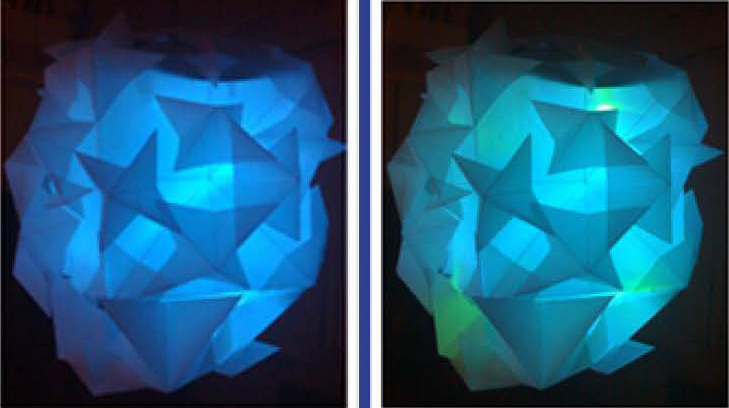
A mood-enhancing, tri-color, glowing light projection for dark spaces that exposes the beauty of additive color synthesis. Luminosphere provides ever-changing blends of red, green, and blue light that is projected vertically out of a translucent white dome. For anyone who is afraid of the dark, or perhaps simply in need of a mood enhancement for any room, Luminosphere provides an extremely unique lighting alternative. Great in a bedroom, living room, hallway, or festive environment, Luminosphere creates ambiences that appeal to all ages and situations. Simply toggle the switch to the ‘on’ position, sitback and enjoy the atmosphere and ceiling projections created by Luminosphere.
• The ‘raindrop’ samples play in a loop, each speaker playing their own
unique raindrop. The LEDs light up the speaker playing at that moment.
The tempo of the loop is controlled by a long-range Sharp Infrared range finder.
The closer an object is to you, the faster the loop plays. If an object
is close enough and a threshold is reached, a lightning sequence is
triggered.
• Spatialized Umbrella was featured on the Hack-a-Day and Arduino Show blogs, as well as a few others.
• SOBEaR is a robot friend for anyone who does not know their own limits, or has problems controlling themselves. SOBEaR has a breathalyzer which the user must blow into. Blood Acohol Content is displayed on a scale of 1 – 6 ( via green, yellow, red LEDs in his chest). Depending on how drunk you are (or aren’t) SOBEaR will pour you a drink appropriate for your current state. If you are sober, a shot of alcohol is poured, if you are very drunk, more mixer (cranberry juice) is served. Too drunk, and only mixer will be poured.
Salutations! My name is Joe Saavedra, and I’m totally happy with the outcome of this class. Everyone made great projects, lots of creativity, and tons of learning happened for everyone. Phenomenal experience. I also applaud everyone for getting posted on big blogs, we should be proud of ourselves, and we are only increasing MFA DT’s profile as this happens more and more. I’m super proud of everyone in this class, we have all come a long way! Special thanks and CONGRATULATIONS to Mr. Yury Gitman — and to the administration for providing lots of material and technology for us to play with.
 Evander Batson
 xinhe feng
 FluffyLeecy
 frankiezek
 gaboratparsons
 giang063
 gracegotlost
 lauriewaxman
 Siwen Li
 Xiaofeng Lin
 Yury Gitman
 mar28th
 Max(TONG WEN)
 Soohyun
 sabotai
 Susan Lin









 Making Toys
Reply